



Last Updated
Key Takeaways
Generated from the text of customer reviews
Our Verdict
CyberFOX Password Manager Specifications
- Data Encryption
- Multi-Factor Authentication
- Security Audits And Reporting
- Cloud Security
CyberFOX Password Manager Features
Role-Based Access
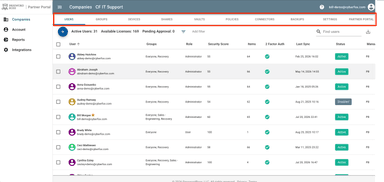
Using this functionality, administrators are able to assign permissions to users based on their roles. These permissions determine whether users can view, edit, or share stored passwords and vault information. This helps organizations apply different access levels across teams, such as limiting client account visibility to specific users or groups.
Auto-Logins
The feature automatically fills saved usernames and passwords when users access stored websites through the browser extension. It removes the need to manually enter login details for saved accounts, making it easier for authorized users to access frequently used applications.
Built-In Dark Web Features
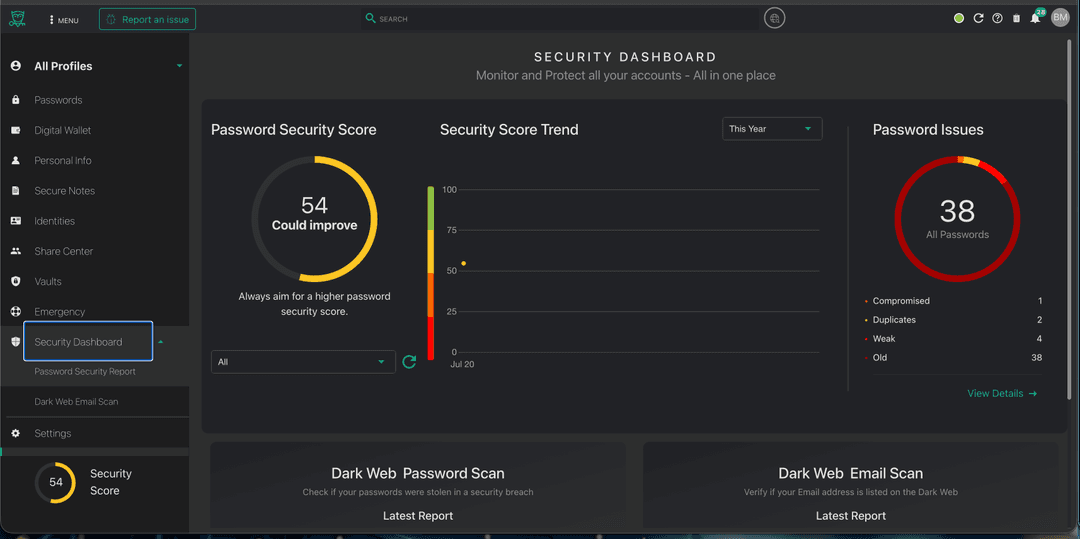
CyberFOX Password Manager’s Dark Web features monitor stored passwords and email addresses against known data leaks and breaches. They identify accounts that may have been exposed, helping IT staff review affected credentials and take action when potential risks are detected.
End-To-End Encryption
The platform encrypts stored passwords and sensitive information throughout storage and access. It uses encryption methods designed to prevent unauthorized users from reading protected account information, helping organizations safeguard stored credentials.
Two-Factor Authentication
It adds an additional verification step when users access their password vault. In addition, the built-in authenticator generates verification codes for supported accounts, allowing users to verify their identity beyond entering a master password.
Pros And Cons of CyberFOX Password Manager
Pros
Helps teams store and share passwords without relying on email or spreadsheets
Users find the interface easy to navigate
Separation of business and personal passwords supports better organization
Reduces repeated login entry through password autofill
Security insights enable teams to identify weak or reused passwords
Cons
Some users report occasional performance issues or application freezes
Shared item synchronization may occasionally require troubleshooting
Some users experience slow application response times during peak usage
CyberFOX Password Manager Reviews
Total 3 reviews
3.7
All reviews are from verified customers
Rating Distribution
5
Stars67%
4
Stars0%
3
Stars0%
2
Stars0%
1
Stars33%
Share your experience
Jacquelyn L.
Small Business, 11-50 employees
“Shares files safely across devices”
Pros
Password Boss really delivers on what it promises. It keeps my information secure, sharing passwords is very easy and the fact that it works well across all my other devices is a fantastic bonus. Thank you!
Cons
The one thing that can be a little frustrating is when the program logs me out in the middle of the workday or right when I am doing something important. Sometimes I have to fully quit the app and sign in again before it starts working properly. It's not a major problem but it is still a small annoyance.
Rating Distribution
Ease of use
10
Value for money
9
Customer Support
9
Functionality
10
Jon K B.
Small Business, 11-50 employees
“crashes often and erases data”
Pros
its unfortunate that the execution completely falls apart.
Cons
From the start the software simply did not work. The core functions it is supposed to handle all fail. It crashes constantly across every computer, operating system, mobile device and browser plugin and this is not an antivirus conflict no matter how often that gets blamed. When it comes to storing credentials, there are serious bugs that repeatedly roll back or erase data. This didn't happen once or twice but dozens of times over roughly 18 months and each time there was yet another excuse. That is the central purpose of the product so this is unacceptable. Sharing credentials is just as bad. Syncing is terrible, with fields not transferring correctly. Since shares are tied to an individual instead of the company, the person who created the share effectively controls the data. The fact that an employee can end up holding company owned credentials hostage is absurd. On top of that if someone else needs to add items to a shared folder, it takes far too many steps. Logs and backups are also very weak and often fail to work properly. If your data disappears, the team seems to do everything possible to blame anyone else first. Only after exhausting troubleshooting do they finally admit it was yet another bug that wiped everything out.
Rating Distribution
Ease of use
2
Value for money
1
Customer Support
1
Functionality
1
Lloyd W.
Mid Market, 101-500 employees
“Remembers passwords for me”
Pros
Whenever I need to create or enter a password, it suggests one and keeps track of the ones I use. Also it saves the website URLs which makes it convenient to jump straight to the sites I visit.
Cons
One annoyance is that it can be intrusive and keeps reappearing on a webpage even after I have already closed it there.
Rating Distribution
Ease of use
10
Value for money
10
Customer Support
10
Functionality
10
Frequently Asked Questions
What other apps does CyberFOX Password Manager integrate with?
It integrates with ConnectWise Manage, Kaseya BMS, Autotask PSA, Microsoft Entra ID, and Active Directory, among others.
What types of pricing plans does CyberFOX Password Manager offer?
The platform offers custom pricing tailored to each organization’s requirements. Request a custom CyberFOX Password Manager price quotation.
Does CyberFOX Password Manager offer an API?
Yes. It supports API-based integrations with third-party platforms.
What language does CyberFOX Password Manager support?
It supports the English language.
Does CyberFOX Password Manager have a mobile app?
Yes, the Password Boss Password Manager mobile app is available for Android and iOS.
Who are the typical users of CyberFOX Password Manager?
The software is designed for MSPs and IT professionals in higher education, K-12 education, local government, and manufacturing.
What level of support does CyberFOX Password Manager offer?
The company provides customer support through its support team and a knowledge base.