


HP Wolf Security
Last Updated
Overview
HP Wolf Security is an endpoint protection software for IT and security teams managing distributed Windows device fleets (particularly in healthcare). Reviewers value its monthly forensic reports — although resource demands might affect performance. The platform suits organizations that seek centralized oversight and aim to investigate threats transparently.
Be the first one to leave a review!
No review found

Starting Price
$3
per month


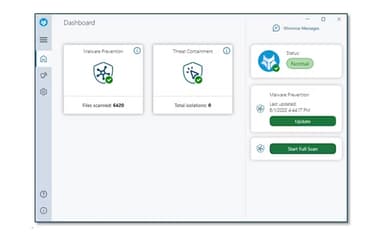
HP Wolf Security Specifications
- Anti-Virus And Anti-Malware
- Threat Intelligence
- Phishing Prevention
- Security Audits And Reporting
What Is HP Wolf Security?
HP Wolf Security — a layered cybersecurity portfolio — is built for organizations protecting endpoints across supported HP business PCs. It isolates risky browser activity and files, detects malware with deep-learning AI, blocks credential theft, and monitors device health. Using the platform, Administrators can apply policies and review security events. The portfolio also monitors device health, helping security teams maintain visibility across their fleets.
What Is HP Wolf Security Best For?
The most valuable feature of HP Wolf Security is HP Sure Click Enterprise — it isolates risky websites, downloads, and email attachments inside hardware-enforced micro-virtual machines. It also protects credentials and lets administrators apply enterprise policies through role-based, cloud-based, or on-premises management. This gives security teams consistent control over endpoint exposure while preventing malware from reaching the operating system.
How Much Does HP Wolf Security Cost?
The HP Wolf Security price is $3/month with an initial charge of $36. A free 60-day trial option is also available.
Additional costs might include:
- Implementation And Deployment Planning: Typically $5,000–$25,000 one-time, depending on device volume and deployment complexity
- Onboarding And Environment Setup: Approximately $2,000–$10,000 one-time, based on configuration and administrative requirements
- Policy Migration: Generally $3,000–$15,000 one-time or $10–$25/device when transferring policies from an incumbent antivirus or EDR platform
- System Integration: Usually $5,000–$30,000 one-time for connecting SIEM, MDM, identity management, or ticketing systems, depending on complexity
- Administrator Training: Around $1,500–$5,000/session or $150–$300/administrator, depending on cohort size and delivery format
- Managed Security Or MDR Services: Approximately $3–$8/device/month when optional monitoring and response services are purchased separately
Disclaimer: The pricing is subject to change.
HP Wolf Security Integrations
HP Wolf Security supports integrations with:
- STIX/TAXII-compatible threat intelligence platforms
- Privileged access management solutions
- Azure KMS
How Does HP Wolf Security Work?
To configure and use HP Wolf Security, follow these steps:
- Log in to the HP Wolf Security Controller and review the available security and administration settings
- Enroll supported business PCs and arrange endpoints according to the organization’s device structure
- Assign administrative roles and permissions when using an edition that supports role-based access controls
- Configure threat containment, credential protection, and malware detection policies for different endpoint requirements
- Deploy the selected policies and protection components across enrolled business devices
- Enable HP Sure Click Enterprise to isolate risky websites, downloads, and email attachments during user activity
- Monitor malware and credential-threat detections reported by protected endpoints
- Check device health, policy status, and security events through the centralized controller
- Investigate recorded threats using event details, behavioral analysis, and available threat intelligence
- Refine protection policies and generate reports as endpoint activity or organizational requirements change
Who Is HP Wolf Security For?
The software supports organizations across:
- Government and public sector
- Healthcare
- Education
- Retail
- Financial services
HP Wolf Security Use Cases
After thoroughly evaluating HP Wolf Security features, we have identified the following scenarios in which it would perform particularly well:
Healthcare Security Officer Containing Attachment-Borne Ransomware
Healthcare security officers face ransomware when employees open convincing email attachments. HP Wolf Security runs the same content in an isolated micro-virtual machine and, as a result, keeps it away from clinical systems.
School District IT Administrator Protecting Shared Windows PCs
Students and staff expand the attack surface across classrooms, offices, and remote-learning environments. By deploying HP Wolf Security policies across Windows PCs, school IT administrators can easily and accurately review detections. Users note that the software potentially stops attacks from compromising their systems.
Retail Technology Manager Securing Point-Of-Sale Devices
Checkout terminals and back-office computers often handle both operational software and internet activity. A retail technology manager could use HP Wolf Security's isolation approach to separate risky browsing and files from point-of-sale operations. This setup can maintain consistent security controls across customer-facing and administrative endpoints.
Privileged Access Administrator Isolating Server Sessions
Elevated access sessions expose high-value systems when attackers compromise an administrator’s workstation. Privileged access administrators might use HP Wolf Security to isolate RDP, Citrix ICA, SSH, and HTML5 sessions from routine desktop activity. This separation lets them conduct elevated and everyday work on one PC while maintaining distinct security boundaries.
Is HP Wolf Security Right For You?
HP Wolf Security may suit businesses that need endpoint protection spanning smaller fleets and complex enterprise environments. For IT managers overseeing at least 25 devices, Wolf Pro Security offers cloud-based management and simplified policies. Organizations with advanced requirements can access enterprise policies, role-based controls, integrations, and cloud or on-premises management.
The platform combines CPU-enforced isolation with hardware and firmware protections across supported HP business PCs. Buyers reviewing governance requirements can examine ISO/IEC 27001 certification for the HP Security Controller Cloud Platform. The platform is also SOC 2 Type I certified. Clients include SML-IT, Masonicare, Dataport, and DLG. Recently, HP has added a controller event for automatic Signing Key rotation during Endorsement Key-only device migration workflows.
Still have concerns about the HP Wolf Security platform? Connect with us at (661) 384-7070 and we will help you make the right decision.
HP Wolf Security Features
Credential Protection
The feature analyzes website reputation in real time before accepting password input. When users follow suspected phishing links, it blocks credential entry on known malicious or low-reputation websites.
Threat Containment
It creates CPU-enforced micro-virtual machines around risky tasks, including opening email attachments and visiting suspicious links. When a task ends, the system deletes its Micro-VM and destroys any malware inside it.
Micro-Virtual Machines
Another capability automatically runs browser activity inside a secure, CPU-enforced Micro-VM. The container separates uncategorized or untrusted websites from the host operating system and other endpoint resources.
Antivirus
The functionality applies multiple detection techniques to identify evasive and polymorphic threats. It generates high-fidelity alerts and stops identified malware before it performs further activity.
Pros And Cons of HP Wolf Security
Pros
Threat Containment isolates risky email attachments
Micro-VM deletion removes contained malware automatically
Antivirus produces high-fidelity threat alerts
Antivirus identifies evasive polymorphic malware
Browser Isolation separates untrusted web sessions
Cons
Credential Protection might block legitimate low-reputation sites
Controller interface may feel visually dense
Alert filtering could take additional tuning
HP Wolf Security Reviews

No reviews yet!
Be the first to review this product
Frequently Asked Questions
Does HP Wolf Security offer an API?
Yes, it offers an API.
Does HP Wolf Security have a mobile app?
Yes, the software offers a mobile app available on iOS and Android devices.
What level of support does HP Wolf Security offer?
It offers support via phone and support center.
What other apps does HP Wolf Security integrate with?
It integrates with STIX/TAXII-compatible threat intelligence platforms, privileged access management solutions, and Azure KMS.
Who are the typical users of HP Wolf Security?
Typical users include professionals working in the government and public sector, healthcare, education, retail, and financial services.
What language does HP Wolf Security support?
It supports multiple languages, including English, Dutch, Italian, Portuguese, Turkish, Arabic, Spanish, and more.
What types of pricing plans does HP Wolf Security offer?
$3/month is the starting price with an initial charge of $36. A free 60-day trial option is also available. Get a custom flexible HP Wolf Security pricing plan today.