


Last Updated
Overview
Virtual Desktops secures remote workforces by providing centralized, cloud-based access to data and applications. While managing user-specific setups can be difficult, this platform offers robust security protocols and simplified IT management. This makes it ideal for businesses in regulated industries seeking to prevent data loss and enhance productivity.
Be the first one to leave a review!
No review found

Starting Price
Custom
Virtual Desktops Specifications
- Security Measure
- Firewall Protection
- Anti-Virus <a id="_Int_2BMozXRx"></a>And Anti-Malware
- Data Encryption
Virtual Desktops Features
Optimized Performance
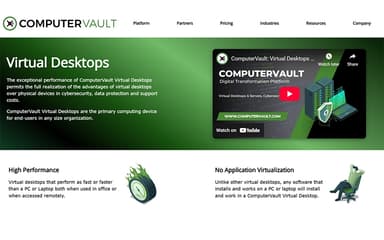
Virtual Desktops provide exceptional speed, performing equal to or better than traditional PCs and laptops. Users experience seamless operation both on-site and remotely, ensuring smooth workflows, fast task execution, and efficient handling of demanding applications without compromising productivity or responsiveness.
Full Software Compatibility
This feature allows users to install and run any software that works on a standard PC or laptop directly on the virtual desktop. It eliminates compatibility issues, enabling employees to access familiar tools without restrictions, enhancing workflow continuity, and reducing IT complexity.
Universal Device Access
Users can access their virtual desktops from any Windows, Linux, iOS, or Android device. This includes PCs, laptops, Mini-PCs, Raspberry Pis, tablets, netbooks, and phones, ensuring flexibility, mobility, and consistent access to applications across a wide range of hardware and platforms.
Dedicated Virtual Workspaces
The software provides dedicated personal virtual desktops that remain consistent for each user. This persistence encourages adoption, reduces confusion, and prevents abandonment by maintaining user settings, installed applications, and files, ensuring a reliable and continuous work environment at all times.
Pros And Cons of Virtual Desktops
Pros
Easy remote access from any location
Reduces hardware and maintenance overhead
Enables collaboration through easy screen sharing
Cons
Scammers can misuse remote access tools
No offline access without an internet connection
Virtual Desktops Reviews

No reviews yet!
Be the first to review this product
Frequently Asked Questions
What types of pricing plans does Virtual Desktops offer?
Virtual Desktops offers two main pricing options. For Persistent and Domain Integrated desktops, pricing is $199/year per managed desktop or $299/year for vGPU-enabled desktops, with a one-time setup fee of $75 per desktop. For Non-Domain Instances, pricing is $99/year per instance, plus a $75 setup fee per instance template. A Standby option is also available at $75 per template. Request a tailored Virtual Desktops price plan for your organization.
Does Virtual Desktops have a mobile app?
No, Virtual Desktops does not have a mobile app.
What language does Virtual Desktops support?
Virtual Desktops supports only the English language.
Does Virtual Desktops offer an API?
No, Virtual Desktops does not offer an API.
What other apps does Virtual Desktops integrate with?
Virtual Desktops integration details have not been specified by its vendor.
What level of support does Virtual Desktops offer?
Virtual Desktops offers support through an online form and partner portal.
Who are the typical users of Virtual Desktops?
Typical users of Virtual Desktops include organizations in industries and sectors such as healthcare, manufacturing, government, education, financial, retail, and energy.