


FormFire
Last Updated

Overview
FormFire helps insurance brokers and agencies manage health insurance quoting, enrollment, and benefits administration. Its centralized workflows reduce manual data entry and simplify benefits management, though integration with some legacy HR systems can be challenging. Overall, FormFire is a practical solution for brokers managing small-group health insurance and employee benefits.

FormFire Specifications
- Employee Information Management
- Benefits Administration
- Employee Self-Service Portal
- Alerts/Notifications
What Is FormFire?
FormFire is Health Insurance Quoting, Sales, and Enrollment software designed to simplify small-group benefits processes. It offers a centralized platform for collecting and managing employee information. The software helps brokers gather health plan quotes, create proposals, collect employee information, and manage enrollment in one place. Employers can compare plans side by side, calculate contributions, and select benefits online.
It also provides medical health questionnaires, e-signatures, form mapping, automated error checks, and reporting to help reduce manual work and improve data accuracy. Quote+ allows brokers to compare community-rated, medically underwritten, and ancillary health insurance options in one place, making it easier to prepare quotes and proposals.
What Is FormFire Best For?
FormFire is best known for its “Intelligent Employee Interview,” which adjusts questions based on each employee’s responses. Its Medical Health Questionnaire (MHQ) collects only relevant health details and fills in related information automatically. It helps check for missing or inconsistent data and provides carriers with more complete information for accurate quotes.
How Much Does FormFire Cost?
FormFire pricing approximately starts at $399/user/month. However, the actual cost varies based on a plan selected out of its three customized plans:
- Agency Advantage
- Agency Professional
- Enterprise
Besides the base subscription, users should consider the following estimated expenses:
- Implementation and Setup: $500–$2,000 one-time, depending on setup requirements
- Standard Integrations: $1,000–$3,000 for connecting standard business systems
- Custom or Carrier Integrations: $2,500–$5,000+ for more complex carrier connections
- Data Migration and Customization: $500–$2,500+ based on data volume and configuration needs
- Other Carrier IMQ Forms: $9/employee submitted for applicable carrier forms
Disclaimer: Pricing references are based on publicly available third-party information and industry benchmarks. Actual costs may vary.
FormFire Integrations
The vendor has not provided details about third-party integrations for this software.
How Does FormFire Work?
Here’s how brokers can use FormFire to manage small-group health insurance:
- Log in to the broker portal or sign up for a FormFire account
- Create a new employer group or add a prospect
- Upload a census or enter employee and coverage information
- Generate health insurance quotes using basic group details
- Compare available plans and rates from participating carriers
- Create proposals and select suitable products for employer groups
- Set employer contributions and available benefit options
- Invite employees to access the private benefits marketplace
- Collect required health information through the Medical Health Questionnaire (MHQ)
- Let employees compare plans and select their benefits online
- Track enrollment progress and follow up on incomplete information
- Populate carrier applications and census files using collected data
- Submit enrollment information electronically when carrier connections are available
- Manage group renewals and benefit changes throughout the year
Who Is FormFire For?
FormFire software is designed primarily for the health insurance and employee benefits sector and is used by:
- Health insurance brokers
- Insurance agencies
- General agencies
- Employers
- Insurance carriers
FormFire Use Cases
We have compiled a list of scenarios, based on FormFire features, where the platform can support specific insurance and benefits requirements:
Brokers Struggling To Collect Employee Census Information
Collecting employee details manually can take time and lead to missing or incorrect information when preparing health insurance quotes. FormFire allows brokers to upload a group census or enter each employee’s date of birth, marital status, and coverage level directly into the portal. This keeps essential group information in one place and helps brokers prepare the data needed for quoting.
Insurance Agencies Managing High Volumes Of Group Data
Insurance agencies rely on FormFire to process large volumes of group data within a limited time while meeting each carrier’s application requirements. It captures prescreening information required for different carrier applications and processes it for benefits of pricing, plan selection, and enrollment. So, agencies can prepare carrier submissions and process reliable sold cases.
Small Companies Facing Rising Employee Benefit Costs
Rising healthcare costs can make it difficult for small companies to offer attractive employee benefits without increasing expenses. The platform helps employers compare health plan options and manage benefit enrollment in one place. Employers can also include voluntary benefits that are mostly or fully paid by employees. This helps companies expand benefit choices while keeping employer costs under control.
Associations Struggling To Manage MEWA Benefit Plans
Administering a MEWA can be difficult when associations need to securely collect, store, and manage medical information and employee data across large groups. FormFire provides online management tools that digitize information for quoting and sale installation processing. It also helps organize employee and group data throughout the benefits process. It allows MEWAs to manage plans from enrollment to enrollment while supporting ongoing compliance requirements.
Is FormFire Right For You?
If your agency relies on paper applications, spreadsheets, and multiple carrier portals to manage small-group health insurance, FormFire can make the process easier. It brings quoting, medical questionnaires, plan selection, form mapping, and carrier submissions into one place. It is particularly useful for agencies working with ACA, level-funded, self-funded, medically underwritten, and ancillary benefits.
As the employee benefits industry shifts toward centralized digital platforms and simpler benefits selection, FormFire supports this approach. This reduces repetitive data entry and helps brokers manage the journey from quoting to enrollment more smoothly.
Additionally, FormFire helps keep sensitive data secure through AES-256 encryption. Moreover, it is hosted on secure data centers that meet compliance standards, such as ISO 27001, FedRAMP, HIPAA, SOC 1, and SOC 2. In this regard, organizations like Expresslink General Agency, Aetna, and Paychex trust FormFire.
Still unsure whether FormFire software is a good fit? Call our expert staff at (661) 384-7070 for guidance.
FormFire Features
E-Signature And Error Checking
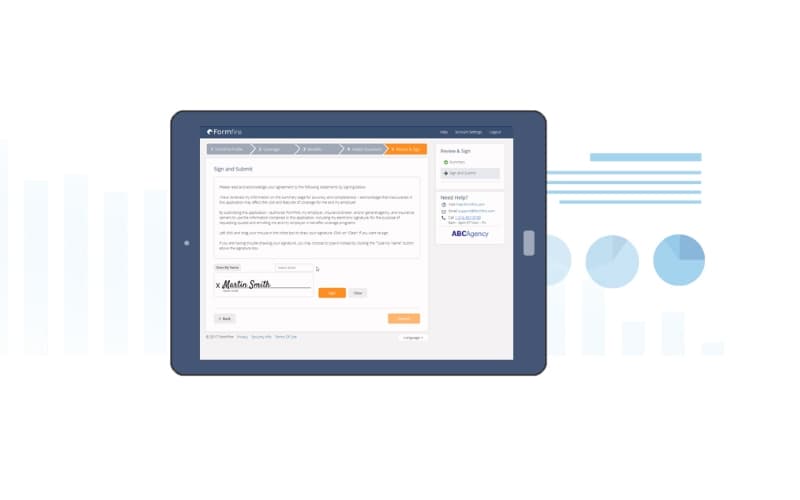
FormFire lets employees electronically sign their insurance information. Before signing, the system checks the employee’s data for missing information. Employees can correct any issues before submitting, which helps reduce follow-up calls between brokers and employees.
Form Mapping
The platform collects employee information and maps it to carrier-specific applications. This helps brokers prepare the information required by different insurance carriers without manually entering the same employee data into each carrier form.
Intelligent Business Reports
FormFire provides reports that help brokers see which groups are renewing or should be renewed. Carriers can also view group medical summaries and review important health information more quickly.
Information Preloader
With this software, brokers can preload group information into FormFire before employees enter their details. This reduces the amount of information employees need to enter themselves. Medical information is excluded from the preloaded data.
Quote Engine
Brokers can use basic demographic information to gather quotes from participating insurance carriers. Depending on the carrier connection, FormFire can send data to carrier quoting systems through spreadsheets or return real-time formatted quotes.
Pros And Cons of FormFire
Pros
Centralizes quoting, enrollment, and employee information in one platform
Preloads group information to reduced manual data entry
Built-in error checking helps identify missing information before applications are signed
Comparing available plans and manage employee benefit selections through one system
Offers security measures and its HIPAA, HITECH, and HITRUST compliance
Cons
Integration options have a room for improvement
Limitations for extensive customization
Complex workflows may require external carrier systems for certain processes
FormFire Pricing
Agency Advantage | Agency Professional | Enterprise |
|---|---|---|
Custom Pricing | Custom Pricing | Custom Pricing |
|
|
|
Disclaimer: The pricing details were last updated on Sep 25, 2026 from the vendor's website. Please contact us for a tailored pricing list.
FormFire Reviews
Total 1 reviews
3
All reviews are from verified customers
Rating Distribution
5
Stars0%
4
Stars0%
3
Stars100%
2
Stars0%
1
Stars0%
Share your experience
Insurance, N/A employees
“simple to use but pricing issues”
Pros
The software is very simple to use in my experience and I find it easy to navigate.
Cons
The rates are often different from what the quote shows and that can cause major problems. On top of that, customer service for insurance-related needs is basically nonexistent.
Rating Distribution
Ease of use
7
Value for money
6
Customer Support
6
Functionality
6
Frequently Asked Questions
What level of support does FormFire offer?
FormFire offers support via phone, email, ticket submission, and a help center.
What language does FormFire support?
FormFire primarily supports English.
What other apps does FormFire integrate with?
Information about third-party integrations has not been specified by the vendor.
What types of pricing plans does FormFire offer?
FormFire pricing is estimated at $399/user/month. However, it offers three customized plans: Agency Advantage (up to 50 small groups), Agency Professional (up to 100 small groups), and Enterprise (100+ small groups). Get in touch for a personalized FormFire price estimate.
Does FormFire offer an API?
Yes, FormFire offers an API.
Does FormFire have a mobile app?
No, FormFire does not offer a mobile app.
Who are the typical users of FormFire?
FormFire is built for the insurance industry, helping brokers and HR teams efficiently manage multiple employee groups.