


WKS
Last Updated
Overview
WKS provides flexible ERP management, aiding in process optimization and data centralization. It connects CRM, accounting, and ticketing for better control. Although occasional custom tweaks are needed, its browser access and updates outweigh that. Overall, WKS aids efficiency for diverse operations.
Be the first one to leave a review!
No review found

Starting Price
Custom
WKS Specifications
- Financial Management
- Inventory Management
- Human Resources Management
- Customer Relationship Management
WKS Features
Ticket System
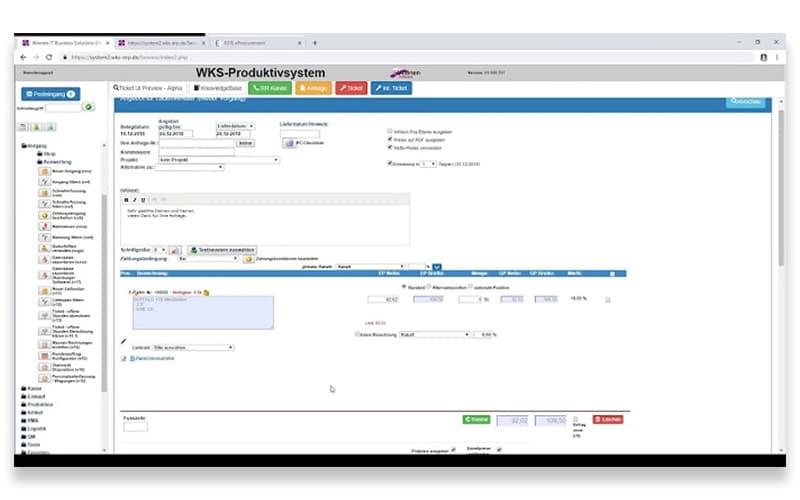
WKS software captures requests via email links and assigns them to teams with timelines. It tracks progress and links to guides for faster fixes. Automated flows route urgent items first, cutting response times. This setup aids quick resolutions and clear oversight, improving team coordination on support tasks.
Time Tracking
The platform tracks hours through apps or terminals and exports data for payroll. It handles leave requests through approval chains and produces productivity reports. Users check calendars for shifts, quickly identifying gaps. This visibility supports accurate planning and fair billing, improving workforce management.
Interfaces
WKS features connect to tools like calendars and finance exports for data sync. It pulls in orders and alerts without manual input, keeping records up to date with bidirectional links that update changes instantly across apps. This flow reduces errors and speeds processes, fostering reliable cross-system work.
Customer Portal
Users access tickets and bills directly, accepting quotes with one click. The tool shares documents per site, providing real-time views of services. Self-service options handle routine checks, reducing inquiry volumes and building trust. This facilitates smoother client interactions and feedback loops.
Pros And Cons of WKS
Pros
Accurately tracks employee hours
Smoothly syncs system data
Provides transparent client portals
Cons
Requires occasional fine adjustments
Links require initial testing
WKS Reviews

No reviews yet!
Be the first to review this product
Frequently Asked Questions
Does WKS have a mobile app?
Yes, WKS offers a mobile app.
What language does WKS support?
WKS supports German language for accessibility.
What types of pricing plans does WKS offer?
WKS price is customized based on required features and business size. Get a tailored WKS cost estimate.
Does WKS offer an API?
The vendor has not shared information about its API.
Who are the typical users of WKS?
WKS is commonly used by businesses across various industries, including manufacturing, e-commerce, logistics, and retail.
What other apps does WKS integrate with?
The vendor has shared information about its third-party integrations.
What level of support does WKS offer?
WKS provides support through email and phone.