


Last Updated
Overview
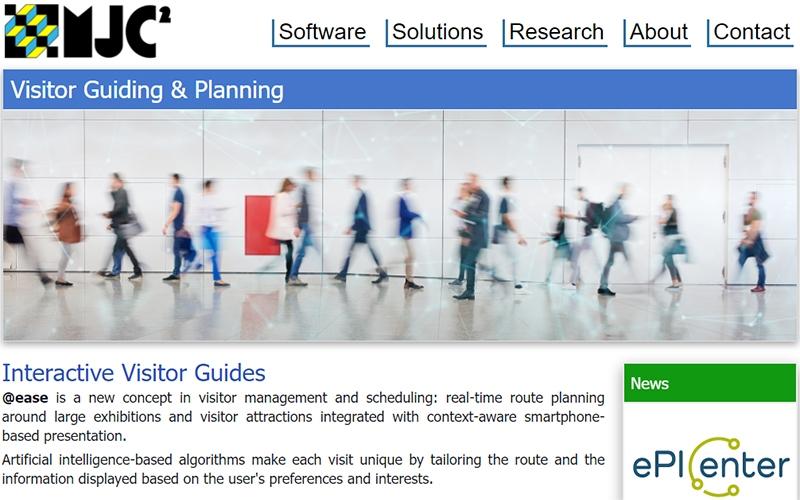
@ease software is a comprehensive visitor management solution that delivers intelligent visitor routing, AI-based personalization, and real-time crowd avoidance to optimize visitor flows at museums, exhibitions, and attractions. While the platform’s performance can be slow under extensive load, it enables personalized tours and virtual guidance that enhance engagement.
Be the first one to leave a review!
No review found

Starting Price
Custom
@ease Specifications
- Space Management And Planning
- Visitor And Resource Booking
- Reporting And Analytics Dashboards
- Asset Lifecycle Management
What Is @ease?
@ease software is a facilities and energy management platform that creates personalized visitor routes and optimizes flow through large exhibitions and attractions. It provides interactive multimedia guides, context-aware information delivery, and real-time monitoring of visitor movements. The platform enables tailored tour scheduling, crowd avoidance, and virtual guidance, adapting dynamically to visitor progress and preferences. It also allows users to analyze visitor paths for future exhibit planning, safety, and operational efficiency.
@ease Pricing
@ease pricing is estimated to range between $30-$350/location/month. This pricing is intended for general budgeting purposes, as actual costs can vary based on number of users, selected feature tiers, and required integrations.
In addition to the base subscription costs, organizations should account for the following estimated expenses that are sourced from third-party websites:
- Hardware costs: $500 to $3,000
- Hidden costs: setup fees of $0-$5,000; integration charges of $500-$2,000, and annual training refreshers charges of $500-$2,000
Disclaimer: Pricing references are based on publicly available third-party information and industry benchmarks. Actual costs may vary.
@ease Integrations
Who Is @ease For?
@ease software is suitable for the following businesses:
- Museums and galleries
- Archaeology agencies
- Tourist authorities
Is @ease Right For You?
@ease software is suitable for businesses aiming to personalize visitor experiences, manage crowd flow, and deliver interactive tours efficiently. It enables AI-driven routing, virtual guidance, and dynamic schedule adjustments based on visitor preferences and timing. The platform also supports strategic analysis of visitor paths to improve safety, future exhibit planning, and operational efficiency.
Still not sure if @ease software is right for you? Contact our customer helpline at (661) 384-7070 for further guidance.
@ease Features
Tailored Visitor Routes
@ease automatically creates visitor-specific routes based on preferences, time constraints, and expertise. It provides dynamic updates during visits to optimize time and engagement. The system also tracks visitor movements to refine future routing algorithms.
Crowd Avoidance Algorithms
The software monitors real-time visitor positions to reduce congestion and queues. It enables predictive scheduling of groups and individuals, supporting safer and smoother flows throughout exhibits.
Virtual Tour Guide
The platform provides context-aware virtual guidance using AI-driven updates based on visitor location. It delivers interactive information about exhibits and nearby attractions. The software also allows visitors to modify their tour length or schedule dynamically, enhancing the overall experience.
Pros And Cons of @ease
Pros
Enables personalized visitor route planning
Delivers AI-based crowd avoidance solutions
Provides virtual tour guidance and real-time updates
Supports integration with multimedia presentation systems
Cons
Updates may increase set up time
Extensive features may be slightly overwhelming for new users
@ease Reviews

No reviews yet!
Be the first to review this product
Frequently Asked Questions
Does @ease offer an API?
No, @ease does not offer an API.
What types of pricing plans does @ease offer?
The vendor offers customized pricing plans according to different business needs. Its pricing is estimated to range between $30-$350/location/month. This pricing is intended for general budgeting purposes, as actual costs can vary. In addition to the base subscription costs, organizations should account for the Hardware costs of $500 to $3,000 and Hidden costs including setup fees of $0-$5,000; integration charges of $500-$2,000, and annual training refreshers charges of $500-$2,000. These estimated expenses are sourced from third-party websites. Get a customized @ease cost breakdown for your business today.
What other apps does @ease integrate with?
The vendor has not provided details about third-party integrations for this software.
What language does @ease support?
@ease software supports English language only.
Does @ease have a mobile app?
No, @ease does not offer a mobile app.
Who are the typical users of @ease?
The typical users of @ease include businesses like museums and galleries, archaeology agencies, and tourist authorities.
What level of support does @ease offer?
@ease offers support through phone number and form submission.