


iLab
Last Updated
Overview
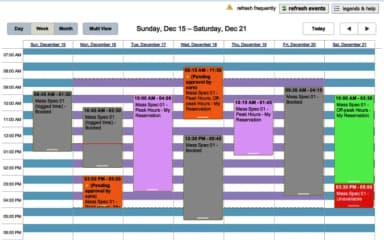
iLab helps core facilities manage scheduling, service requests, and shared equipment usage with centralized bookings, access controls, and billing workflows. While the initial configuration can be a bit complex, it supports consistent usage tracking and operational oversight. Overall, it suits research institutions and core facility teams coordinating multi-user lab resources.
iLab Specifications
- Space Management And Planning
- Asset Lifecycle Management
- Maintenance Management
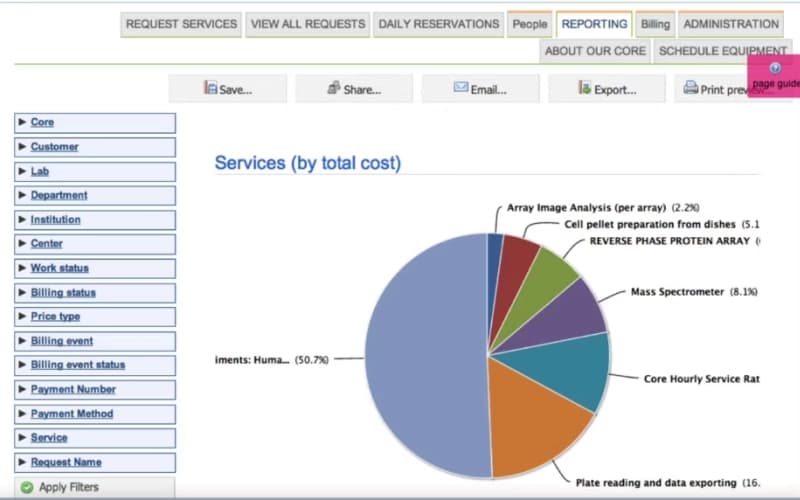
- Reporting And Analytics Dashboards
What Is iLab?
iLab is a web-based, modular core facilities management software designed for centralized laboratories and shared resource facilities. The software provides tools for scheduling resources, controlling access to sensitive equipment, tracking time and costs for projects, and managing inventory in labs and central stockrooms. iLab can integrate with institutional financial and identity management systems. It helps lab administrators streamline operations, monitor resource usage, and maintain organized inventory and project records across multiple facilities.
iLab Pricing
The pricing of iLab is estimated to fall between $50 and $150/user/month, according to industry benchmarks for similar core facilities management platforms used for scheduling, access control, billing, and inventory tracking. This iLab price range is intended for general budgeting purposes, as actual costs can differ based on the number of cores, enabled modules, and institution-wide configuration.
In addition to the base subscription costs, organizations should account for the following expenses:
- Implementation: $10,000–$50,000 for SMBs; $50,000–$250,000 for complex deployments
- Data migration: $5,000–$40,000, based on customer records, historical usage, and billing data
- Admin and team training: $2,000–$20,000
- SSO and API/integration work: $10,000–$100,000+, depending on integration scope
Disclaimer: Pricing references are based on publicly available third-party information and industry benchmarks. Actual costs may vary.
iLab Integrations
The software supports integration with multiple systems and platforms, such as:
- PayPal software
- NelNet
- CashNET
Who Is iLab For?
iLab is ideal for a wide range of industries and sectors, including:
- Academic research
- Healthcare
- Biopharma
- Pharmaceutical research
- Biotechnology
- Government
- Environmental health
Is iLab Right For You?
If you’re part of a centralized laboratory or shared resource facility looking to manage operations more efficiently, iLab may be a suitable solution. It is designed for core facilities and shared labs that need structured management of resources and projects.
iLab also integrates with institutional financial and identity management systems to support coordinated workflows. Organizations seeking to streamline lab operations and maintain organized resources may find iLab fits their operational needs.
Still doubtful if iLab software is the right fit for you? Connect with our customer support staff at (661) 384-7070 for further guidance.
iLab Features
Automated Studies Management
iLab provides tools for managing large scientific experiments, allowing core facilities to coordinate complex studies efficiently. The software supports tracking multiple submissions, managing project timelines, and ensuring proper documentation. It helps laboratory staff maintain organized workflows while overseeing experimental progress across different research projects.
Core Facilities Management
The platform assists core facilities in handling business operations for shared labs. It enables administrators to organize resources, monitor usage, and manage projects systematically. By integrating with other lab systems, the software supports smooth coordination and oversight, helping facilities maintain operational efficiency and structured workflows.
Instrument Access Control And Usage Tracking
The software allows facilities to define when and by whom instruments can be used. It helps lock out unauthorized users and track equipment utilization. By monitoring access and usage, iLab supports regulatory compliance, maintains equipment integrity, and ensures that instruments are available and properly managed for scheduled projects.
Materials Management
iLab simplifies procurement and inventory management for laboratories. The platform tracks stock levels, manages supply orders, and maintains central storerooms efficiently. It enables staff to oversee on-hand materials, ensuring resources are available when needed and supporting smooth operational management within both labs and shared core facilities.
Publication Tracking
The software provides tools for tracking publications linked to core facilities. Users can search, filter, and save publications associated with projects or equipment usage. iLab helps maintain accurate records of research outputs, supporting reporting, collaboration, and institutional documentation for projects conducted within the facility.
Pros And Cons of iLab
Pros
Strong reporting and exports to Excel
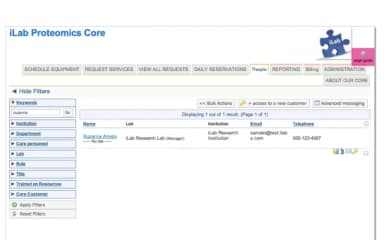
Useful grid layout for managing groups
Changes are clearly highlighted in-app
Cons
The interface may feel less intuitive
Processes may feel time-consuming
iLab Reviews
Total 3 reviews
4.3
All reviews are from verified customers
Rating Distribution
5
Stars33%
4
Stars67%
3
Stars0%
2
Stars0%
1
Stars0%
Share your experience
Research, 500+ employees
More than a year
“scheduling works very well”
Pros
Reservations and scheduling have been working exactly as expected, with no problems at all. Overall, it's a user-friendly software that handles the job well and feels dependable to use.
Cons
The only thing I'd like to see improved is the UI since a few design choices feel a bit awkward. For example, the equipment list is smaller than it needs to be and the drag-to-select option can get frustrating when you need to adjust the times.
Rating Distribution
Ease of use
9
Value for money
10
Customer Support
10
Functionality
10
Research, 500+ employees
More than a year
“Great booking help”
Pros
Using the site has been a really positive experience overall. The full web platform works very well, you can quickly reserve microscopes or submit a request form as a user without any hassle. On the admin side, it covers a lot like scheduling microscopes for maintenance, taking an instrument offline for major repairs, reviewing request forms and adding notes, generating PDF invoices and adjusting charges when extra fees need to be applied. The support team deserves a lot of credit too. They reply fast and if a ticket doesn't include enough detail, they'll usually set up a call for the next day so you can walk them through the issue and show exactly what's going on.
Cons
Every now and then, like with any website or software, there are random issues where a page doesn't respond or a function isn't recognized correctly. That said, the process for getting help is very simple you submit a ticket and iLAB support typically gets back to you within 24 hours to collect more details and look into it. The longest I've personally had a ticket stay open was about a week so they move quickly and stay very responsive.
Rating Distribution
Ease of use
9
Value for money
9
Customer Support
10
Functionality
8
Biotechnology, 500+ employees
More than a year
“Interface is easy to navigate”
Pros
Handling around 40 research faculty groups, I really appreciate the grid-style layout for updating members and managing the accounts they can access. The green highlight that appears after a change is especially useful because it makes updates clear right away. It's also very helpful that the reporting can be exported to Excel, either as graphs or as raw data for further analysis.
Cons
At the same time, the system feels sluggish and pretty outdated. The faculty I work with constantly complain about iLab, saying it feels like it was built in a different language and doesn't make much sense to them. Creative and scientific users already tend to struggle with administrative tools but they seem to find iLab especially frustrating.
Rating Distribution
Ease of use
7
Value for money
8
Customer Support
9
Functionality
8
Frequently Asked Questions
What other apps does iLab integrate with?
iLab integrates with multiple systems and platforms, such as CashNET, PayPal software, and NelNet.
Who are the typical users of iLab?
iLab features are used by organizations across a wide range of industries and sectors, including biopharma, academic research, and healthcare.
What types of pricing plans does iLab offer?
The iLab price is estimated at $50 to $150/user/month, based on industry benchmarks for comparable core facilities management platforms. Get a detailed iLab cost breakdown tailored to your specific requirements.
What level of support does iLab offer?
iLab offers support through phone.
Does iLab offer an API?
Yes, iLab offers an API.
Does iLab have a mobile app?
No, iLab does not offer a dedicated mobile app.
What language does iLab support?
iLab primarily supports the English language.