


Mapbox
Last Updated
Overview
Mapbox provides a flexible location platform for maps, navigation, and AI-powered spatial insights. It helps teams deliver interactive, real-time mapping experiences. Satellite imagery is outdated in some regions; however, its comprehensive geospatial tools and scalable APIs ensure reliable performance for web, mobile, and embedded applications.
Overall Rating
Based on 11 users reviews
4.5
Rating Distribution
Positive
91%
Neutral
9%
Negative
0%
Starting Price
$0.30
per user
Mapbox Specifications
- Asset Lifecycle Management
- Reporting And Analytics Dashboards
- Mobile Accessibility
- IoT Integration
What Is Mapbox?
Mapbox is a location technology platform for developers, automakers, and innovators alike. Through APIs and SDKs, it delivers maps, navigation, search, and geospatial data. It gives businesses room to build location experiences that actually fit their needs, not just generic defaults. Its infrastructure handles enterprise-level demands, and the software has extended that reach to AI. With these integrated AI tools, developers can build location-aware agents facilitated by rich geospatial context.
What Is Mapbox Best For?
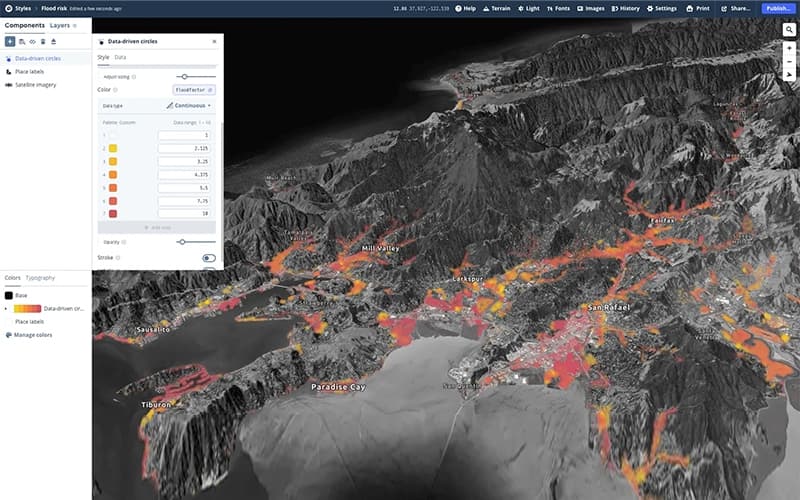
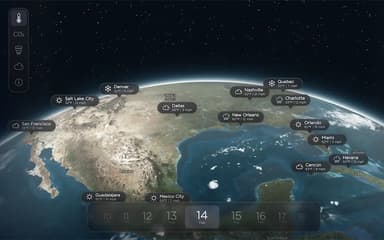
Mapbox is best known for its “Maps,” built around real-time rendering engines. This handles large volumes of location data and facilitates animations in 2D or 3D. Users also get runtime administration over visual elements, from live styling to custom interactivity, which sets embedded maps apart on the web and mobile. Every account includes access to Mapbox's core location datasets, which merge data from various sources and update continuously. The software is a good fit for developers looking for highly customizable, real-time maps.
How Much Does Mapbox Cost?
Mapbox's Navigation SDK (metered trips) tool pricing starts at $0.30/user for 101+ monthly active users. It is free for up to 100 monthly active users and 1,000 monthly trips.
The vendor uses a pay-as-you-go pricing model with no fixed subscription plans. Rates are calculated per product, meaning a team could use several Mapbox tools together and be billed separately for each based on its own usage volume. Other product tools include:
- Maps: Starts at $4.00 for 25,001 (125,000 active users)
- Search: Starts at $3.00 for 501 (100,000 monthly sessions)
- Data: Starts at $0.007/MB (10,000+ monthly MB)
In addition to the base subscription cost, organizations should account for additional expenses:
Support: Starts at $50/month and goes up to $6,000/year, as well as a custom quote for the Premium option
Reviewers tend to call Mapbox's pricing fair when starting out, though costs rise fast at scale. Many like the generous free tier and its affordability compared to alternatives. Others, however, cite concerns about renewal pricing transparency.
Disclaimer: The pricing is subject to change.
Mapbox Integrations
The software connects with Cerence.
How Does Mapbox Work?
Follow the steps below to understand how the software typically works:
- Set up your account to start pulling maps, navigation, search, and location data through APIs and SDKs
- Head over to Mapbox Studio to build custom styles, starting with standard basemaps or designing your own
- Upload your custom geographic datasets and turn them into hosted tilesets ready for your apps
- Embed interactive maps right into web or mobile projects using Mapbox GL JS or the native mobile SDKs
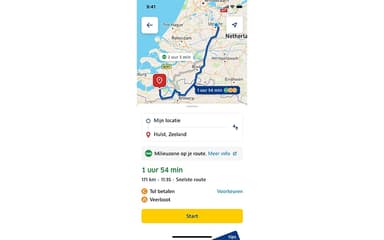
- Enable turn-by-turn routing and live directions for apps or vehicles using the dedicated Navigation SDK
- Add address search and geocoding features using the Search Box API to convert real-world locations into coordinates
- Monitor system health and overall uptime using the live Mapbox status dashboard
Who Is Mapbox For?
Mapbox is ideal for a wide range of industries and sectors, including:
- On-demand logistics
- Weather
- Real estate
- Automotive
- Telecommunications
- Drones and robots
- Travel
Mapbox Use Cases
Based on our analysis of Mapbox's current tools and offerings, we have identified the following key business scenarios where it is well suited:
Travel Platforms Simplifying Cluttered, Driving-Focused Maps
Most mapping tools are built with drivers in mind, so travelers end up wading through road details they don't need. Mapbox flips that script, letting travel platforms strip away the clutter and put landmarks, tourist spots, and restaurants front and center. With the Mapbox Streets basemap and custom map pins, companies can shape a map around travelers, not drivers. Reviewers back this up too, praising how easily it fits a project's specific needs.
Utility Providers Optimizing Field Engineer Routing
Mapbox is well-suited for utility companies covering large service areas. The software uses routing and geocoding tools to calculate travel times, build optimal routes, and adjust on the go as traffic or jobs shift. With the Matrix API and Directions API, field service providers can assign jobs smartly and keep engineers on the move. User feedback has highlighted Mapbox's mapping and routing tools as fast and reliable for demanding, high-volume operations.
Mapbox Is Used by Automakers Building Branded In-Vehicle Navigation
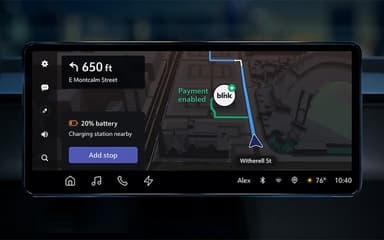
Automakers face a tricky balance where navigation systems need to feel on-brand while dealing with real-time data and multiple in-car screens. That's where Mapbox can help, offering 3D building data, advanced styling, and rendering fast enough to keep up. Manufacturers can lean on these tools for seamless navigation experiences. Reviewers also note this, pointing to Mapbox's flexibility as what lets them push past typical design limits.
Delivery Fleets Managing Precision Logistics Within Tight Time Windows
Mapbox is used by grocery and delivery companies running custom vehicle fleets, especially where generic navigation apps hit a wall on narrow streets or tight delivery windows. Its Navigation SDK and Directions API let teams build turn-by-turn routing suited to their exact vehicles and constraints. Pairing that with the Geocoding API sharpens location accuracy, cutting down on missed or delayed stops. In this regard, reviewers describe Mapbox as fast, precise, and built for teams dealing with custom data at scale.
Is Mapbox Right For You?
If you're looking for a platform to build maps, navigation, search, and location AI services, Mapbox offers access to all of them in one platform. Its geospatial infrastructure is relied upon by leading enterprises across industries and is used by big names including BMW, CNN, and Tripadvisor.
The software has strict compliance standards, which include GDPR, CCPA, SOC 2 Type II, and SOC 3 certifications. If you need a scalable, developer-friendly location platform trusted by major brands, Mapbox is worth considering.
Still unsure whether Mapbox software is the right fit for you? Contact us at (661) 384-7070 for further guidance regarding its functionality.
Mapbox Features
Mapbox Navigation
Mapbox Navigation builds better experiences for both vehicles and mobile apps. Teams can go with ready-made components or custom features when specific needs call for it. The AI-powered Navigation SDK takes things to the next level, adding enhanced navigation, EV route planning, 3D live navigation, and third-party integrations.
Mapbox Search
The search feature sits at the core of Mapbox, powering maps, navigation, and AR alike. It draws on over 160 data sources to cover addresses, places, and points of interest across 39 languages. Developers can layer in offline search, ready-to-use UI components, favorites, and customization for iOS and Android.
Mapbox Atlas
Atlas gives developers room to build custom mapping and location apps entirely within their own private cloud or on-premises setup. It runs in firewalled, air-gapped, or offline environments to keep data protected. From there, teams can self-host maps, style basemaps offline in Studio, and deploy wherever they need, laptops, servers, virtual machines, or private clouds.
Mapbox Location AI
Its artificial intelligence helps make sense of geospatial data, location context, and the whole Mapbox platform. At its center is the MCP Server, which equips AI agents and LLM-powered apps with maps, geospatial data, and skills. It includes everything from geocoding locations to calculating routes and analyzing travel times, all through one interface.
Pros And Cons of Mapbox
Pros
Easy to get the software up and running
Provides deep customization for building tailored map experiences
Gives access to precise and high-quality geographic data
Data visualization enables improved airspace operations
Robust GL JS SDK performance and excellent Mapbox Studio capabilities
Cons
Initial training may be required
Navigation may seem clunky at times
Documentation may be hard to understand
Mapbox Reviews
Total 11 reviews
4.5
All reviews are from verified customers
Rating Distribution
5
Stars64%
4
Stars27%
3
Stars0%
2
Stars9%
1
Stars0%
Share your experience
Computer Software, N/A employees
“Charges for no reason”
Pros
The map quality is excellent and there's a lot you can do with the extra functionality you can add to it.
Cons
On the downside, support is basically nonexistent. I got hit with unexpected charges out of nowhere and the second I tried to ask about them, there was no one available to help. The only replies came from sales and all they did was point me to the forum. I even joined the Discord hoping to reach someone faster but plenty of questions there just get ignored, like they simply don't care. At this point, I'm perfectly happy taking my business and my clients' business somewhere else. Easily one of the worst experiences I've had.
Rating Distribution
Ease of use
5
Value for money
2
Customer Support
1
Functionality
6
Architecture & Planning, 101-500 employees
More than a year
“packed with features”
Pros
Powerful APIs and SDKs were the biggest advantage for me right away. They made it possible to integrate interactive maps into web applications and also use them for university road design projects involving autonomous tasks. Geographic data quality and accuracy were another thing I really appreciated since that was essential for running analysis and making well-informed decisions during map development especially when working on roads.
Cons
The only real downside I noticed was the price. In my case, it was not an issue because my university gave me access to the paid version but for people who cannot afford it some important features of the tool can end up being restricted.
Rating Distribution
Ease of use
8
Value for money
5
Customer Support
7
Functionality
10
Airlines/ Aviation, 1-10 employees
Less than a year
“Top performance”
Pros
The level of customization is outstanding and the performance has been excellent.
Cons
Working offline with GL-JS can be tricky but it's still manageable.
Rating Distribution
Ease of use
8
Value for money
9
Customer Support
9
Functionality
9
Frequently Asked Questions
What other apps does Mapbox integrate with?
Mapbox integrates with Cerence.
What languages does Mapbox support?
The platform supports many languages, including English and Japanese.
Does Mapbox have a mobile app?
The vendor does not indicate whether a mobile app is offered.
Does Mapbox offer an API?
Yes, it offers an API.
What level of support does Mapbox offer?
Mapbox offers customer support through three bundles, which includes a help center, chat, phone, video calls, and contact forms.
Who are the typical users of Mapbox?
Businesses use Mapbox features across multiple sectors and industries, including automotive, travel, and telecommunications.
What types of pricing plans does Mapbox offer?
The Mapbox price for Navigation SDK (metered trips) starts at $0.30/user for 101+ monthly active users. It is free for up to 100 monthly active users and 1,000 monthly trips. Other products include Maps, starting at $4.00 for 25,001–125,000 active users; Search, starting at $3.00 for 501–100,000 monthly sessions; and Data, starting at $0.007/MB for 10,000+ monthly MB. Get a detailed Mapbox pricing breakdown tailored to your specific requirements.