


QGIS
Last Updated
Key Takeaways
Generated from the text of customer reviews
QGIS is a free, open-source desktop GIS platform built for spatial visualization, mapping, and geospatial analysis. It's strongest when you need enterprise-grade cartography and analysis tools without licensing costs, backed by an active plugin ecosystem and community. Common drawbacks reported are performance slowdowns with very large datasets and dated toolbar graphics. Recent updates include QGIS 4.2, which introduced performance optimizations enhancements to 3D capabilities and processing tools.
Our Verdict
QGIS is an open-source GIS platform with professional-grade cartography, analysis, and interoperability tools. It suits planners, researchers, environmental analysts, and public-sector teams needing advanced spatial capabilities without licensing costs. Core software is free, with optional spending on support, training, or plugin development. We recommend QGIS for teams prioritizing flexibility and vendor independence.
QGIS Specifications
- Space Management And Planning
- Asset Lifecycle Management
- Reporting And Analytics Dashboards
- Mobile Accessibility
What Is QGIS?
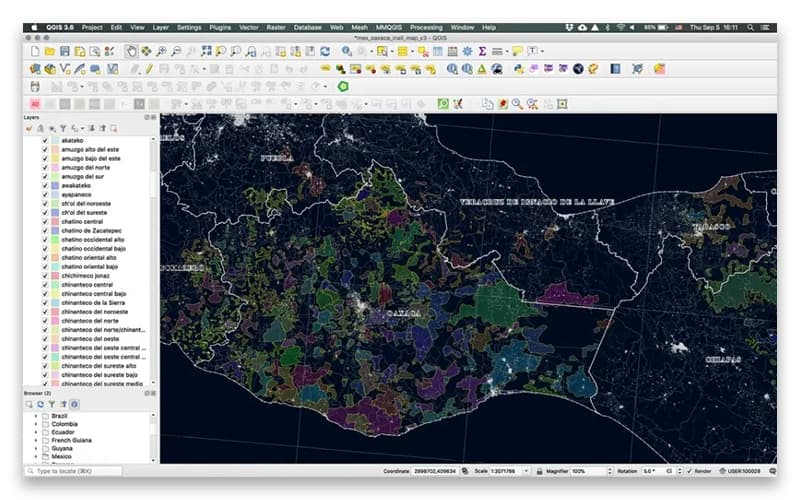
QGIS is a free and open-source Geographic Information System (GIS) platform offering spatial visualization and decision-making tools. It supports map creation with class-leading cartography, a layout designer, and reporting tools for atlases and tabular content. Users can edit layers with precise digitizing and CAD-like construction tools, plus build custom forms. The platform also includes a comprehensive analysis toolset with automated, reproducible workflows. QGIS runs on Windows, Mac, and Linux, and is licensed under GNU GPLv2+.
What Is QGIS Best For?
The platform stands out for its “Cartographic Design” feature, including a layout designer for producing high-quality, large-format print maps, atlases, and reports. This feature set allows users to combine map canvases, tabular content, and graticule layers into publication-ready outputs. It results in professional map production without needing separate design software.
How Much Does QGIS Cost?
There is no QGIS price as it is completely free to download, install, and use, with no licensing fees, subscription costs, or per-user charges at any tier.
However, organizations should factor in the following potential expenses:
- Commercial Support Contracts: $500-$5,000/yr for small and mid-size organizations; $10,000+/yr for enterprise SLAs
- Professional Training: $600-$1,200 per person for public 2-3 day courses; $2,000-$10,000 for custom group training
- Custom Plugin Or Feature Development: $1,000-$30,000+/project; $25-$200/hour from freelancers to specialist firms
- QGIS Server Hosting: $600-$6,000/year managed; $2,000-$15,000 one-time for self-hosted setup, plus ongoing maintenance
- Data Migration And Conversion: $1,000-$10,000 typical; large enterprise geodatabase migrations can exceed this
Reviewers consistently describe QGIS's pricing as a major advantage, with several noting it's accessible across all budget ranges since the software carries no cost. Users, including those from non-profit and small-business backgrounds, frequently cite the zero-cost, open-source model as valuable compared to paid alternatives.
Disclaimer: The pricing is subject to change.
QGIS Integrations
QGIS features seamless integration with third-party applications, including:
- MapProxy
- QWC2
How Does QGIS Work?
Here's how you can access the platform and its features:
- Download and install QGIS from the official website, selecting the version suited to your operating system
- Create or open a project by adding vector, raster, or database layers from local files or web services
- Style and symbolize layers using the data-defined symbology tools to control how features are displayed
- Digitize and edit features using vector digitizing and construction tools to create or update geometries
- Run analysis using the Processing toolbox to perform geoprocessing, sampling, and geometry operations
- Compose maps using the print layout designer to build atlases, reports, and print-ready outputs
- Extend functionality by installing plugins from the official Plugins Repository for specialized workflows
- Publish and export results as web services through QGIS Server or export finalized files for external use
Who Is QGIS For?
The platform caters to a variety of industries, including:
- Aerospace and aviation
- Civil engineering
- Infrastructure and urban planning
- Geospatial and GIS consulting
- Environmental data and risk intelligence
- Energy and utility data services
- Public sector and government administration
QGIS Use Cases
Based on our analysis of user feedback and QGIS features, we have identified the following key business scenarios where it is well suited:
Urban And Regional Planners Managing Land Use Data
Planning teams use QGIS to visualize zoning boundaries, land parcels, and infrastructure layers alongside demographic and environmental datasets. The platform's cartographic tools let planners produce clear, presentation-ready maps for public hearings and policy proposals. This is especially useful for municipalities that need professional mapping output without proprietary software costs.
GIS And Engineering Teams Consolidating Multi-Source Spatial Data
Civil engineers and GIS specialists use QGIS to bring CAD, GPS, satellite imagery, and raster data into a single workspace instead of switching between separate tools. The platform's geoprocessing and thematic mapping tools handle format conversion and spatial modeling directly. This reduces the manual rework that typically happens when fieldwork spans multiple hardware and data sources.
Developers Scripting Custom Workflows With PyQGIS And GDAL
Developers use QGIS's built-in Python console and native GDAL library to automate repetitive spatial tasks and extend functionality past the default toolset. Reviewers suggest that this scripting layer is what lets them shape the platform around their own workflows rather than working strictly within the standard interface. In this regard, it brings together everything the developers might need to group multiple layers and organize the layouts.
Analysts Turning Layered Formats Into Client-Ready Maps
Data analysts use QGIS to move from raw spatial inputs, shapefiles, PostGIS tables, and live web map services, straight through to finished, presentation-quality maps in one platform. Its format flexibility removes the need to pre-process data in a separate tool before visualization. This keeps the full pipeline from ingestion to deliverable inside a single application.
Energy And Environmental Teams Running Layered Resource Analysis
Energy and environmental sectors use QGIS to stack multiple resource-tracking layers. On top of that, it helps them run Python-driven analysis, work that typically requires a dedicated proprietary license elsewhere. User reviews describe its feature depth as matching platforms like ArcGIS Pro, with community-built plugins adding further reach for specialized environmental and resource modeling.
Is QGIS Right For You?
QGIS is a practical choice if your organization needs professional GIS capabilities without ongoing licensing costs. It tends to work particularly well for teams that want full control over their spatial data workflows and the flexibility to extend functionality through plugins or custom development. The platform also benefits users already working with open data standards or PostGIS-based infrastructure.
QGIS is backed by a global network of sustaining members and institutions. These include ETH Zurich, E-TIB GmbH, and the Giswater Association. Moreover, the Digital Public Goods Alliance (DPGA) recognizes QGIS as a Digital Public Good.
Still doubtful if QGIS software is the right fit for you? Connect with us at (661) 384-7070 for further guidance.
QGIS Features
Create Maps
The platform offers cartography with extensive design options for desktop, mobile, cloud, and print media. Its intuitive layout designer supports professional, large-format print map production. Built-in reporting tools also let users generate atlases and reports that combine maps with tabular content.
Edit Layers
QGIS delivers digitizing and construction capabilities for precise spatial editing. Users can craft and edit points, lines, polygons, and meshes with ease. They can also build complex geometries using curves, CAD-like tools, and a wide range of transformations. A built-in form designer enables customizable data entry forms.
Process And Analyze
The software provides a comprehensive analysis toolset integrated directly into its processing framework. Users can visually combine individual tools into automated, reproducible workflows. The platform also extends further through a diverse ecosystem of third-party analysis tools, expanding its processing capabilities beyond the core toolset.
Share Maps
QGIS functions as an equal-access platform for sharing geospatial results. It offers format support that resolves common data integration challenges. The platform also supports open standards, letting users explore, utilize, and create web services. It extends this reach to cloud and mobile devices for wider accessibility.
Pros And Cons of QGIS
Pros
Seamless plug-ins for CAD and GPS tools
Built-in GDAL library included natively
Cross-platform compatibility across Windows, Linux, macOS
Advanced geoprocessing and thematic mapping capabilities
Reads and exports numerous file formats
Cons
Lacks built-in cloud deployment support
Limited 3D visualization and analysis capabilities
Map layout and labelling tools could be optimized more
QGIS Reviews
Total 35 reviews
4.4
All reviews are from verified customers
Rating Distribution
5
Stars57%
4
Stars34%
3
Stars3%
2
Stars0%
1
Stars6%
Share your experience
Market Research, 1-10 employees
More than a year
“Excellent interface”
Pros
The interface is excellent. I can find the commands quickly and it feels very visual pleasing and easy to use compared with other geoprocessing software. It also lets me attach several different file types. Right after startup, the most recent projects are displayed clearly which makes it easier to remember what I was working on recently.
Cons
I still think the "generate report" section and the "Print Layout" need improvement. The panel with the added "composition" and "item properties" is confusing and visually overlaps with other functions. Even for simple changes like adjusting font size, I have to hunt through arrows and tiny lowercase labels in the options menu which is difficult to figure out.
Rating Distribution
Ease of use
8
Value for money
9
Customer Support
10
Functionality
10
E-Learning, 1-10 employees
Free Trial
“horrible implementation experience”
Pros
there are no positives for me here. I will not be using this product again under any circumstances.
Cons
Getting it installed was incredibly difficult. As someone completely new to GIS, I ended up with a bunch of files that would not even open on my computer and just took up space for no reason. I cannot afford to waste my time dealing with something like this.
Rating Distribution
Ease of use
1
Value for money
3
Customer Support
1
Functionality
1
Civil Engineering, 1-10 employees
Less than a year
“useful point mapping”
Pros
It's helpful for identifying and locating the points where we carried out testing.
Cons
Performance is just too slow and that makes working with it frustrating.
Rating Distribution
Ease of use
7
Value for money
5
Customer Support
5
Functionality
5
Frequently Asked Questions
What language does QGIS support?
Besides English, QGIS supports multiple languages for its interface.
What other tools does QGIS integrate with?
QGIS integrates with third-party applications like QWC2 and MapProxy.
Does QGIS offer an API?
Yes, QGIS offers an API.
What types of pricing plans does QGIS offer?
QGIS is completely free to download and use, with no licensing fees or subscription costs. Get in touch for a tailored QGIS cost estimate.
What level of support does QGIS offer?
QGIS offers community support through resources, documentation, support groups, and email.
Who are the typical users of QGIS?
QGIS is used by professionals across multiple sectors, including aerospace and aviation, civil engineering, infrastructure and urban planning, geospatial and GIS consulting, environmental data and risk intelligence, energy and utility data services, and public sector and government administration.
Does QGIS have a mobile app?
No, QGIS does not offer a dedicated mobile app.