

Last Updated
Overview
System Surveyor provides a digital platform for site surveys and system design. Although larger teams might need an adjustment period to transition from paper-based methods, its automated reporting tools save hours of manual data entry. Overall, its professional output enhances the credibility of system integrators and facility managers alike.
Be the first one to leave a review!
No review found

Starting Price
Custom
System Surveyor Specifications
- Mobile Accessibility
- Reporting And Analytics Dashboards
- Incident/Event Tracking
- Vendor Contract Management
What Is System Surveyor?
System Surveyor software is a Visual Collaboration platform designed to streamline the entire lifecycle of facility and security system management. This software supports technology professionals by replacing manual paper-based processes with a digital as-built environment. Key features such as the interactive floor plan editor and automated bill of materials help businesses accelerate project timelines and improve accuracy. System Surveyor is particularly effective for medium to large enterprises managing complex physical infrastructure.
System Surveyor Pricing
The System Surveyor cost begins with a free Starter plan. The software also offers the following three paid plans:
- Essentials: $55/user/month
- Scale: $85/user/month
- Enterprise: Custom quote
Disclaimer: The pricing is subject to change.
System Surveyor Integrations
Who Is System Surveyor For?
System Surveyor is ideal for a range of professionals, including:
- Sales teams
- Engineers and estimators
- Project managers
- Technicians
- Facility operators and managers
Is System Surveyor Right For You?
System Surveyor is the best fit for organizations needing to bridge the gap between field surveys and office design. Its standout visualization tools ensure total site transparency for security devices. Recently awarded the "Security Today New Product of the Year 2025," it provides industry-leading scalability and SOC 2 Type 2 compliance. These technical standards make System Surveyor a secure and enticing choice for high-stakes facility management environments.
Still not sure about System Surveyor? Contact our support team at (661) 384-7070 for further guidance.
System Surveyor Features
Floor Plans
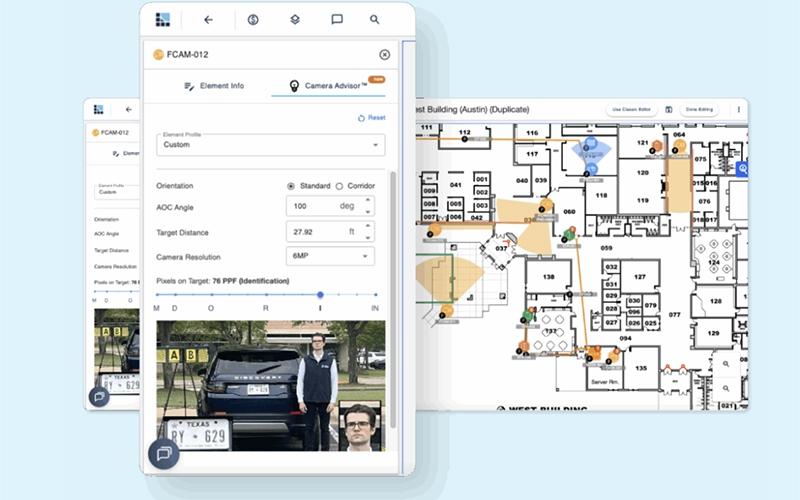
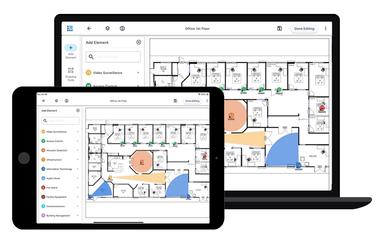
This feature streamlines the digital scaling of blueprints to create an interactive workspace. It supports rapid design by allowing professionals to drag and drop system elements directly onto the layout for immediate visualization.
Reporting
The solution enables the automated generation of professional PDF and Excel reports, including a complete bill of materials. It ensures that all project data is captured accurately for seamless handovers between the design and installation teams.
Budget Estimator
The platform supports financial planning by automatically calculating estimated project costs based on the equipment placed on the layout. It enables teams to provide instant budget insights to stakeholders, facilitating faster approval and procurement.
Boundaries
System Surveyor facilitates the creation of custom zones to define specific monitoring or maintenance areas within a site. It helps facility managers organize complex systems by grouping devices according to their physical location or functional purpose.
Area Of Coverage
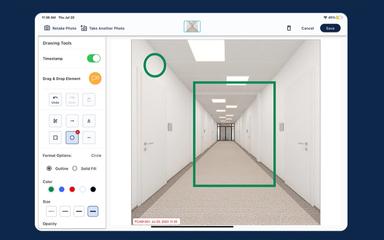
The software supports precise planning by providing visual representations of device ranges, such as camera viewing angles. This tool ensures that every corner of a facility is accounted for, eliminating blind spots during the initial design phase.
Pros And Cons of System Surveyor
Pros
Intuitive drag-and-drop digital interface for surveys
Real-time collaboration between field and office
Offers an offline mode for remote site access
Cons
Mandatory manual entry for some assets
Occasional slow synchronization on mobile devices
System Surveyor Reviews

No reviews yet!
Be the first to review this product
Frequently Asked Questions
Does System Surveyor have a mobile app?
Yes, System Surveyor offers a mobile app for both Android and iOS devices.
What level of support does System Surveyor offer?
System Surveyor provides support through email, phone, form submission, help center, and general resources, such as FAQs, video tutorials, and blogs.
What language does System Surveyor support?
System Surveyor is primarily available in English.
What types of pricing plans does System Surveyor offer?
In addition to its free Starter plan, the System Surveyor price ranges across the following plans: Essentials ($55/user/month), Scale ($85/user/month), and custom-based Enterprise. It also includes custom plans for corporate and campus security. Request a personalized System Surveyor pricing quote for your business.
Who are the typical users of System Surveyor?
The typical users of System Surveyor features are various professionals, including sales teams, engineers and estimators, project managers, technicians, and facility operators and managers.
What other apps does System Surveyor integrate with?
System Surveyor software integrates with HubSpot and NetSuite.
Does System Surveyor offer an API?
Yes, System Surveyor offers an API.