


Dataforma
Last Updated
Key Takeaways
Generated from the text of customer reviews
Our Verdict
Overall Rating
Based on 105 users reviews
4.3
Rating Distribution
Positive
82%
Neutral
17%
Negative
1%
Starting Price
$69.99
per feature per month

Dataforma Specifications
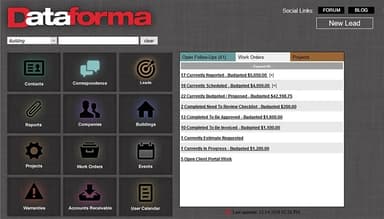
- Work Order Management
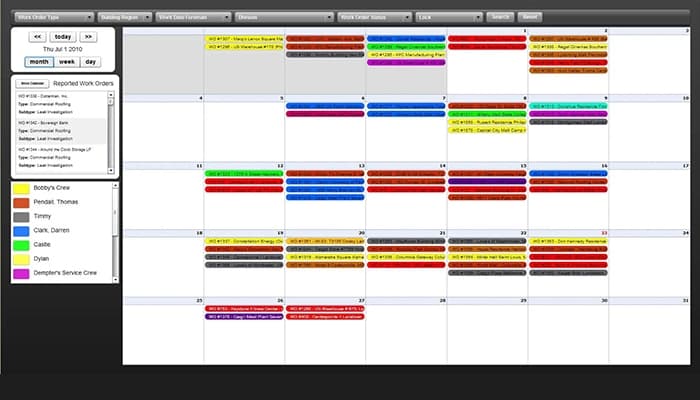
- Scheduling & Dispatching
- Mobile Access
- Customer Relationship Management (CRM)
Dataforma Features
Building Work History
The building record in Dataforma can contain details about previous service activity, installed products, and related warranty information. Staff can refer to this history when reviewing earlier work or preparing for a new quote or service visit.
Correspondence Management
Communication with prospects and customers can be recorded against the relevant account or job. Follow-up dates can also be added, allowing staff to keep track of previous conversations and scheduled client contact.
Warranty Management
Warranty records can be linked to specific projects, buildings, and work orders. Contractors can manage these records through the web or mobile application and refer to coverage details when handling later service requests.
Lead Tracking
Potential sales opportunities can be recorded and followed through customizable sales stages. Businesses can structure these stages around their own sales process and track a lead from its initial contact through the potential project.
Quick Searching And Sorting
Search and sorting functions cover records such as work orders, projects, contacts, companies, buildings, and warranties. Users can filter and locate existing records when they need to review customer or job information.
Pros And Cons of Dataforma
Pros
Detailed project records make historical job information easy to retrieve
Custom templates can be adapted to a contractor’s specific requirements
Customer photos help explain completed work without requiring site visits
Users can redirect field crews when job priorities change
Searchable records reduce the need to rely on paper files
Cons
Users report occasional difficulty loading photos through the mobile app
Some users find report creation confusing before they receive proper training
Moving a work order to the correct building can require recreating it
Dataforma Reviews
Total 105 reviews
4.3
All reviews are from verified customers
Rating Distribution
5
Stars49%
4
Stars33%
3
Stars14%
2
Stars3%
1
Stars1%
Share your experience
Construction, 51-100 employees
More than a year
“Don't choose Dataforma”
Pros
It collects a lot of data but after using it for over two years, I struggled to find anything I actually liked about the app or desktop version. It was not easy to use.
Cons
I have struggled with customer support and the system is not the easiest to use. For the price, I expected a smoother experience.
Rating Distribution
Ease of use
4
Value for money
4
Customer Support
2
Functionality
2
Construction, 11-50 employees
Less than a year
“Essential for our service team”
Pros
I find it easy to schedule tickets for employees working in the field and generate invoices immediately after completing a job. This makes it simple to keep track of clients and monitor the work completed at each business location.
Cons
Setting up relationships between buildings, customers and companies is not as smooth as I would like. But once the initial setup is done, creating work orders becomes a lot easier.
Rating Distribution
Ease of use
8
Value for money
10
Customer Support
10
Functionality
8
Mid Market, 51-100 employees
“Too complex”
Pros
I can create contracts using their templates which is really convenient since they download right into Word where I can customize everything to fit my specific needs.
Cons
It takes about 6 clicks just to find basic information. The mobile app can't upload PDFs so I need a separate app to annotate pictures before uploading them to the main platform. Made an error? Too bad, only administrators can delete entries. Viewing photos is a nightmare, you either download them all or view one at a time. There's a slideshow feature but it only opens to a quarter of your screen and you can't zoom in or out. Photo organization is frustrating since everything has to be in numerical order. The phone app doesn't sync with projects so when I call, text or email clients, I have to manually log everything twice in the system. No integration with Google Mail, Contacts or Calendar means constant double entry if you use Google services. Quickbooks integration is non-existent too. Creating a purchase order means doing it in Quickbooks, emailing it out, downloading it, uploading to the docs section, then writing notes in a completely separate window. Project managers don't get notified when notes are updated, you have to open another window and manually send emails. Overall, it doesn't help with efficiency at all.
Rating Distribution
Ease of use
5
Value for money
6
Customer Support
6
Functionality
4
Frequently Asked Questions
Does Dataforma offer an API?
Yes, Dataforma provides API access.
What language does Dataforma support?
Dataforma supports the English language.
Does Dataforma offer a mobile app?
Yes, Dataforma offers a mobile app for iOS and Android devices.
What other apps does Dataforma integrate with?
The software includes integrations with platforms such as Microsoft Outlook, Gmail, FollowUp CRM, QuickBooks Online, Stripe, and Pegnato.
What types of pricing plans does Dataforma offer?
Dataforma pricing is estimated to start at $69.99/feature/month and depends on the size and scope of the business. To make an informed choice, request a detailed Dataforma cost estimate tailored to your needs.
Who are the typical users of Dataforma?
Dataforma features are used by commercial contractors managing field service, maintenance, or repair operations, including those in roofing, HVAC, electrical, plumbing, and restoration & construction.
What level of support does Dataforma offer?
Dataforma offers support through various channels, including 24/7 (live rep), phone support, email/help desk, a knowledge base, and FAQs/forums.