


Magnetize
Last Updated
Overview
Magnetize helps trade and construction businesses manage people and equipment in one system. While some users find its digital forms harder to complete on smaller phone screens, its mobile logging and equipment tracking simplify daily job management. Overall, Magnetize's centralized approach makes it a practical pick for field-heavy businesses.
Overall Rating
Based on 2 users reviews
5
Rating Distribution
Positive
100%
Neutral
0%
Negative
0%
Starting Price
NZD $12
per user per month
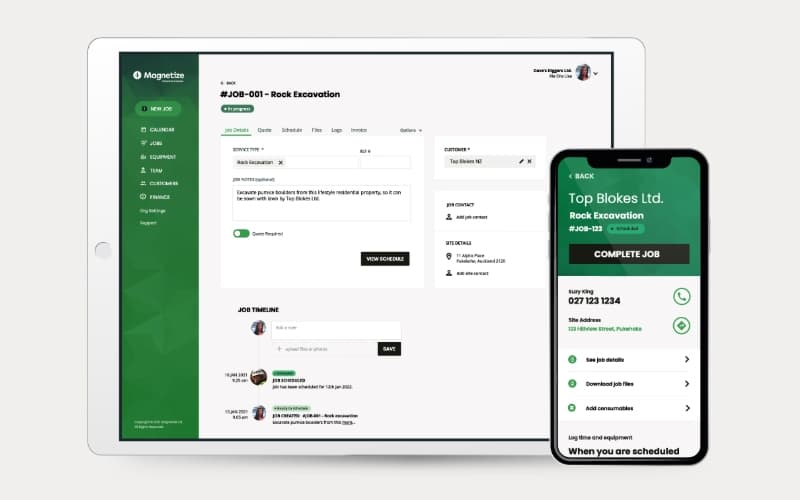
Magnetize Specifications
- Work Order Management
- Scheduling & Dispatching
- Mobile Access
- Invoicing & Billing
What Is Magnetize?
Magnetize is a job management platform built around coordinating work, people, and equipment within the same operational workflow. Rather than treating scheduling as a standalone calendar, it provides resource views that let managers see which employees and assets are assigned across upcoming jobs. Teams can also filter schedules by status or assigned groups, which can help businesses manage multiple crews, locations, or operating units from one planning environment.
The platform also accounts for resources that are temporarily unavailable. Managers can record staff leave or take equipment out of service for maintenance, inspections, or other non-job activities directly within the scheduling calendar. Magnetize then reflects reduced availability when teams review upcoming resource commitments. This gives operations teams a clearer view of usable capacity before assigning resources to new work. It began inside a New Zealand drilling company, PRO DRILL, before growing into standalone software now used by contractors across the country.
What Is Magnetize Best For?
The software is best known for its drag-and-drop 'Job Scheduling', which sets it apart within the job management software industry. Managers can schedule and reschedule recruitment tasks, staff, and equipment from a single calendar. They can also extend a job across additional days simply by dragging it further along the timeline. This gives the whole team visibility into what is booked and for how long, without needing to check multiple systems. The feature is especially useful for businesses scheduling machinery alongside people, such as drilling, civil, and construction contractors managing several jobs and crews at once.
How Much Does Magnetize Cost?
Magnetize cost starts at NZD $12/user/month for the 'Staff Users'. Additional details are as follows:
- Full Users (Admins) – NZD $60/user/month
A 30-day free trial is also provided.
In addition to the base subscription costs, organizations should account for the following potential expenses:
- Implementation: NZ$500–NZ$3,000 for SMB deployments; larger implementations may cost more depending on requirements (approx. US$280–US$1,680)
- Accounting Integrations: NZ$500–NZ$2,500 for setup and configuration of Xero or MYOB integrations (approx. US$280–US$1,400)
- Data Migration: NZ$500–NZ$3,000, depending on the volume and complexity of existing customer, job, and equipment data (approx. US$280–US$1,680)
- Custom Enterprise Requirements: NZ$2,000–NZ$10,000+ for larger teams requiring additional configuration, workflows, or enterprise-level support (approx. US$1,120–US$5,600+)
Disclaimer: The pricing is subject to change.
Magnetize Integrations
The software supports integration with multiple systems and platforms, such as Xero Accounting Solution.
How Does Magnetize Work?
Here's how you can get started with the software:
- Set up your account and add job rates, equipment, and staff details
- Create a quote from the rate book and send it to the client for approval
- Schedule the job, along with the staff and equipment needed, on the calendar
- Give staff access to the mobile app so they can view their assigned jobs
- Log time, equipment use, consumables, and photos as the job progresses
- Track job status and documentation through the job timeline as work is completed
- Reconcile quoted amounts against logged data and generate the invoice
Explore the demo jobs on the calendar to get familiar with scheduling before adding live data
Who Is Magnetize For?
Magnetize serves a wide range of businesses across the construction industry, including:
- Drilling
- Civil and earthmoving
- Construction
- General trades contracting
- Roofing
Magnetize Use Cases
Based on our analysis of user feedback and Magnetize features and current capabilities, we have identified key scenarios where this software is a good fit for drilling, civil, and construction businesses:
1. Equipment Rental Companies Coordinating National Fleets And Changing Delivery Schedules
Equipment rental businesses managing large fleets can struggle to coordinate pickups, deliveries, service jobs, and equipment availability across a wide geographic area. Kiwi Hire & Sales, for example, needed to manage hundreds of clients and a national fleet while handling thousands of changing jobs each year. Magnetize helped them bring quotes, cash sales, deliveries, pickups, equipment tracking, and invoicing into the same workflow.
2. Traffic Management Firms Replanning Roadside Crews And Vehicles Throughout The Day
Traffic management companies often need to respond quickly when roadwork schedules change, creating a risk that vehicles or employees arrive at cancelled or rescheduled jobs. Pro-Tect reports that they previously relied on whiteboards, printed schedules, and weekly timesheets, which made these changes difficult to communicate. The company reported that with Magnetize, its managers were able to schedule people and equipment together, while mobile apps helped provide field staff with current job information.
3. Multi-Site Drilling Operations Tracking Field Data For Later Quoting And Reporting
Drilling teams working across multiple locations can need reliable records of previous drilling activity when preparing future work. Magnetize’s Live Geo functionality lets crews capture GPS locations, drilling methods, SPT/CPT tests, casing details, soil layers, water levels, notes, and photos from the field. South Western Drillers reports identifying previous drill logs as useful when confirming site information and preparing more accurate future quotes.
4. Civil And Construction Businesses Chasing Timesheets, Job Records, And Invoice Documentation
Growing field-service operations can lose time when staff submit paperwork days after completing work, leaving office teams waiting for information before they can close jobs and invoice customers. Magnetize allows field workers to record time, equipment use, consumables, notes, photos, and job documentation through the mobile app. For businesses using Xero, completed job information can then move into the accounting workflow, reducing the need to collect and reconcile paper records manually.
Is Magnetize Right For You?
Magnetize is a good fit for businesses that need to coordinate people, equipment, and jobs from one system, particularly in construction, civil and earthmoving, drilling, and other field-based industries. Its scheduling and job management tools help teams assign jobs, manage resources, track field activity, and keep office and field teams aligned. The platform also supports quoting, time and equipment tracking, job documentation, and invoicing, making it well suited to businesses managing complex field operations and client requirements.
The product has also expanded beyond core scheduling, with capabilities such as LiveGeo, Mapbox integrations, and project management supporting broader operational coordination. Businesses with mobile teams and frequently changing schedules may benefit most from Magnetize’s combination of scheduling, field data collection, and job tracking capabilities. This makes Magnetize particularly relevant for contractors that need better visibility across field work, equipment, staff, and customer-facing documentation.
Still evaluating Magnetize? Speak with us at (661) 384-7070 to discuss your requirements.
Magnetize Features
Job Monitoring
With Magnetize, users can view information about every job, starting from the quote and ending with the invoice. The software helps store job information in the cloud, which is available on any device at any moment. By allowing companies to centralize all recruitment details in a single system, it reduces reliance on separate spreadsheets.
Quotes Generation
With Magnetize software, companies can create quotes and use stored ratebook items, then send them directly to the client for approval. Frequently requested services can be bundled together, and the quote template, terms, and branding can all be customized. This helps speed up the sales process while keeping every quote consistent with company pricing and standards.
Equipment Tracking
Businesses can see where trucks, excavators, and other equipment are booked for the days and weeks ahead through Magnetize. Users can upload before and after photos from a phone, and the timeline records where each piece of equipment has been used. This way, teams can prevent double-booking machinery and support accurate invoicing for equipment time.
Data Management
The platform allows businesses to replace paper forms, whiteboards, and double data entry with digital records tied to each job. Users can also upload health and safety checklists, site-specific documents, and prestart forms into the app and save to the job timeline. This results in keeping compliance documentation organized, and easy to retrieve without searching through physical files.
Self-Service Module
With Magnetize, field teams can view job details, customer contact information, and health and safety files directly from the mobile app without contacting the office. They can also upload notes, photos, and files needed for the client as work happens on site. This capability helps keep everyone working from current information and reduces interruptions to office staff.
Time Tracking
The software allows staff to log their time in a couple of clicks instead of filling out paper timesheets. Users can record travel, leave, yard time, and other non-job hours and carry into whatever payroll system a business already uses. This reduces double entry and helps ensure workers are paid accurately and on time.
Pros And Cons of Magnetize
Pros
Centralized job records improve visibility across field and office teams
Drag-and-drop scheduling helps teams adjust jobs and resources quickly
Mobile time logging reduces manual timesheet work and missing costs
Equipment tracking helps businesses improve resource planning across jobs
Quote-to-invoice workflows allow users to capture billable job costs
Cons
Limited accounting integration may make Magnetize less suitable for businesses that do not use Xero.
Its trade-focused design may limit fit for unrelated industries
The platform lacks a dedicated customer portal for client self-service
Magnetize Pricing
Full Users | Staff Users |
|---|---|
NZD $60 per user per month | NZD $12 per user per month |
|
|
Disclaimer: The pricing details were last updated on Oct 12, 2026 from the vendor's website. Please contact us for a tailored pricing list.
Magnetize Reviews
Total 2 reviews
5
All reviews are from verified customers
Rating Distribution
5
Stars100%
4
Stars0%
3
Stars0%
2
Stars0%
1
Stars0%
Share your experience
Construction, 101-500 employees
More than a year
“Best software”
Pros
I work in the field and this app makes my job so much easier. It is also pretty simple to use and now I can track everything right from my phone. We have ditched paper forms completely as things like time sheets are all online, so I never lose track of costs. I can take photos, add notes and everything gets saved in the job timeline which makes reporting a simple task. Plus the LIVE GEO feature is a game-changer for drilling as it logs geology, water levels and techniques automatically, giving us a full record of the process. Honestly this app saves time, cuts down mistakes and keeps everything organized in one place.
Cons
Some of the paperwork is tough to complete on my phone but it works much better on a tablet which is what I am using now.
Rating Distribution
Ease of use
9
Value for money
10
Customer Support
10
Functionality
10
Construction, 11-50 employees
More than a year
“It's a complete tool”
Pros
Everything is in one system now which makes scheduling and rescheduling pretty easy for us. Also I love how any changes are updated instantly for the whole team like no confusion, no missed info as everyone stays on the same page.
Cons
Filling out the digital paperwork on my phone can be tricky at times.
Rating Distribution
Ease of use
8
Value for money
10
Customer Support
10
Functionality
10
Frequently Asked Questions
Who are the typical users of Magnetize software?
Businesses across the construction industry, including civil and earthmoving, drilling, general trades contracting, and construction, benefit from Magnetize.
Does Magnetize have a mobile application?
Yes, it offers a mobile app for both Android and iOS devices.
What types of pricing plans does Magnetize offer?
The software offers a 'Staff Users' (NZD $12/user/month) and a 'Full Users' plan for admins (NZD $60/user/month). You can request a personalized Magnetize price quote now.
What language does Magnetize support?
The Magnetize software is primarily available in English.
What level of support does Magnetize offer?
The platform offers support through email and phone.
Does Magnetize offer an API?
No, it does not offer an API.
What other apps does Magnetize integrate with?
The platform supports integration with Xero Accounting Solution.