


Last Updated
Overview
iTRACK helps small and mid-sized fleets monitor vehicles and assets with real-time maps, geofence alerts, and 90-day trip history. While the initial configuration can be a bit complex, its web platform and iOS/Android app support consistent oversight. Overall, it is a reliable option for field teams needing visibility.
Be the first one to leave a review!
No review found

Starting Price
Custom
iTRACK Specifications
- Vehicle Tracking (GPS)
- Real-time Alerts
- Trip History Logging
- Driver Behavior Analysis
iTRACK Features
Route History
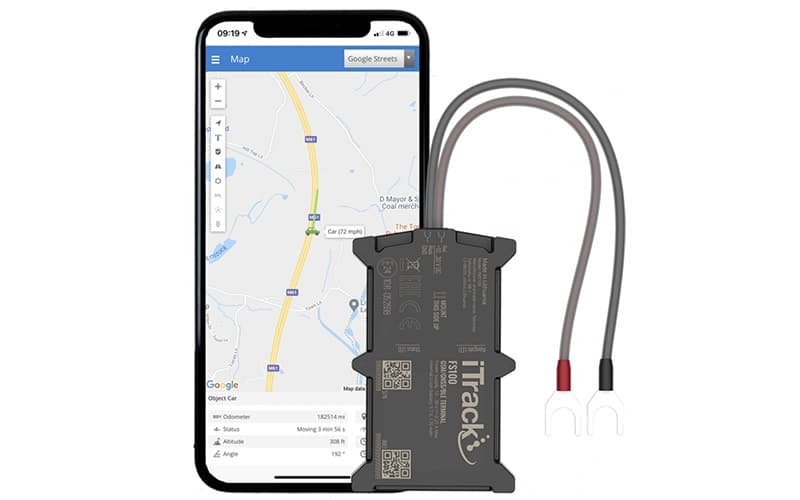
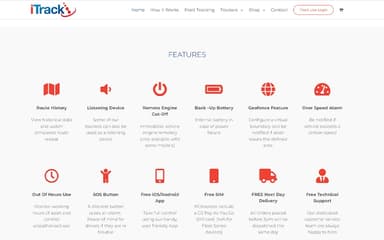
iTrack Live GPS Tracking Platform allows users to view historical location data and replay past journeys using simulated route repeat functionality. The software stores movement records for review over defined periods, helping users understand travel patterns, verify routes taken, and analyze asset usage through clearly presented location timelines.
Geofence
The platform enables users to configure virtual geographic boundaries around vehicles or assets and receive alerts when those boundaries are crossed. This functionality supports location oversight by notifying users when an asset enters or exits a defined area, helping monitor unauthorized movement and improve overall asset control.
Driver And Usage Monitoring
The software supports monitoring of driver behavior and asset usage, including speed thresholds and out-of-hours activity. By providing visibility into how and when vehicles are used, the platform helps users review operational patterns, identify irregular usage, and maintain better oversight of vehicles during working and non-working hours.
SOS Button
The software works with compatible devices that include a discreet SOS button, allowing drivers to raise an emergency alert when needed. This function provides peace of mind by supporting rapid response during incidents, ensuring that assistance can be summoned promptly while maintaining real-time location tracking of the asset.
Over Speed Alarm
iTrack Live GPS Tracking Platform provides notifications if a vehicle exceeds preset speed limits. This feature helps users monitor driving behavior and encourages safer operation, allowing fleet managers and individual users to identify potential risks, reduce accidents, and maintain control over vehicles’ speed performance during operation.
Pros And Cons of iTRACK
Pros
Helpful support when setup questions arise
Live tracking feels accurate and precise
Journey history makes location checks easier
Cons
Network coverage can cause tracking gaps
Initial configuration may take extra time
iTRACK Reviews

No reviews yet!
Be the first to review this product
Frequently Asked Questions
Does iTRACK have a mobile app?
Yes, iTRACK offers a dedicated mobile app.
What language does iTRACK support?
iTRACK primarily supports the English language.
What types of pricing plans does iTRACK offer?
Get a detailed iTRACK cost breakdown tailored to your specific requirements.
What other apps does iTRACK integrate with?
iTRACK integrates with multiple systems and platforms, including Google Maps.
Does iTRACK offer an API?
No, iTRACK does not offer an API.
What level of support does iTRACK offer?
iTRACK offers support through email, phone, and an online contact form.
Who are the typical users of iTRACK?
iTRACK features are used by a wide range of industries and sectors, including logistics, transportation, delivery, and courier services.