


MileIQ
Last Updated
Overview
MileIQ simplifies mileage tracking with automatic drive detection, classification, and reporting for individuals and teams. While location accuracy can vary in closely grouped destinations, it nonetheless reduces manual effort and improves reimbursement accuracy. For professionals managing frequent business travel, MileIQ offers a practical, time-saving solution.
Overall Rating
Based on 13 users reviews
4.7
Rating Distribution
Positive
92%
Neutral
8%
Negative
0%
Starting Price
$8
per user per month
MileIQ Specifications
- Vehicle Tracking (GPS)
- Driver Management
- Reporting & Analytics
- Trip History Logging
What Is MileIQ?
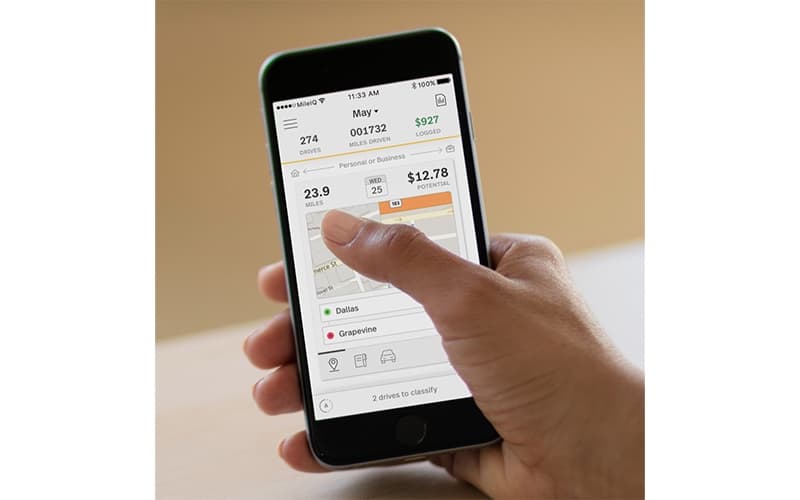
MileIQ is an automated mileage tracking application used in expense management and tax deductions for mobile workforces. Once it is set up, the software runs passively in the background of mobile devices held by employees on the move, using GPS to record trip distances and travel times for compliance and audit purposes. Drivers can use the app to classify trips and generate audit-ready financial reports for tax deductions or business reimbursements for fuel and other expenses.
What Is MileIQ Best Known For?
MileIQ is best known for its Automatic Drive Detection feature. This feature runs passively in the background of mobile devices using smartphone GPS and Bluetooth signals to monitor any movement. It senses when a user starts and stops driving without requiring them to open the app or press a start button. Once a vehicle settles at its destination, the system records the precise trip routes and total distance to make a report. This helps businesses handle missed trip logs and ensures that accurate records are maintained for tax write-offs and reimbursements.
How Much Does MileIQ Cost?
MileIQ pricing starts at $8/user/month for its Teams Lite Plan, while also offering a Free plan for starters. The software also offers pricing plans for teams, including:
- Teams: $9/user/month
- Teams Pro: $10/user/month
The software also comes with a 30-day free trial period. On top of the MileIQ subscription plans, additional costs may also apply and can vary depending on the number of users, any advanced reporting or analytics features that are needed, or optional integrations. These costs include:
- Onboarding And Training: $100–$500 - Initial setup, app configuration, and training staff to classify drives efficiently
- Reporting And Analytics Upgrades: $50–$250/year - Access to advanced reporting features for tax compliance and reimbursement audits
- Premium Support And Multi-Vehicle Management: $100–$400/year - Priority support, additional driver accounts, and multi-vehicle tracking capabilities
Disclaimer: The pricing is subject to change.
MileIQ Integrations
The vendor has not specified any third-party integrations for the software.
How Does MileIQ Work?
You can follow the steps listed below to get started with the platform:
- Install the MileIQ app on iOS or Android devices and grant background location permissions once you have logged in
- Instruct employees to drive normally while the application automatically records trip start locations and overall distances in the background
- Open the mobile application or web portal to view captured drives when working on compliance
- Swipe right in the app to mark a trip as business or swipe left to mark a trip as personal
- Apply custom drive classifications and client labels or notes to specific business drives as needed
- Set up the Frequent Drives auto-classification rules to categorize recurring routes automatically
- Export IRS-compliant PDF or CSV expense reports directly to your email or accounting software
- Review company-wide mileage totals and approve employee reimbursement requests through the administrative dashboard according to your workflow
Who Is MileIQ For?
The platform serves the needs of many industries and sectors including:
- Construction
- Real estate
- Small business
- Rideshare
- Food beverage
- Nonprofits
MileIQ Use Cases
Based on our analysis of the platform's features, here are some use cases where MileIQ can be a good fit:
Mobile Sales Teams That Require Automated Field Expense Tracking
Sales professionals traveling between client locations can lose track of total miles driven when they are relying only on manual odometer logs, resulting in unclaimed business expenses. MileIQ can solve this problem with its Automatic Background Drive Detection. With this feature, the app silently records every trip start and end point, which means teams can calculate trip lengths without needing to open the application before driving. Drivers can then swipe right during idle moments to categorize their sales runs.
Self-Employed Contractors Preparing IRS Audit-Proof Tax Records
MileIQ can help independent contractors with their monetary reimbursement compliance needs through its primary mileage tracking features. The application makes it possible for contractors to log start/end addresses for their work and total distances traveled with calculated dollar values using up-to-date IRS standard mileage rates. Self-employed users can then export detailed PDF summaries directly to their accountants at year-end, giving them complete tax compliance with minimal effort.
SMB Managers That Need Standard Team Reimbursement Approvals
Businesses with small teams of field technicians or consultants can struggle with inconsistent mileage claims and manual expense report verification. MileIQ tackles this through its Reports View feature. Managers can invite staff to a shared corporate account and set up centralized reimbursement rates. They can then view the consolidated monthly drive data in “Reports View”. This way, managers can review verified GPS-backed route submissions before issuing payroll reimbursements, which simplifies monthly accounting checks.
Healthcare And Visiting Nurses Tracking Recurring Patient Routes
MileIQ can help healthcare staff who need to make daily trips for checkups and patient care with its Frequent Drives Auto-Classification feature. When the platform recognizes recurring travel paths between set addresses, it automatically assigns a predetermined business tag or patient route label. Field staff save administrative time while keeping route logs current for weekly shift verification.
Is MileIQ Right For You?
If you are looking for an automatic mileage tracking solution that can handle background GPS logging and IRS-compliant reporting in one app, then MileIQ is worth considering. It helps businesses deal with manual paper logbooks and oversee mobile employee travel in real time. Notable clients using the platform include Zillow, PepsiCo, FedEx, and Best Buy. The platform secures sensitive drive location records using SSL/TLS encryption for data in transit. It also uses AES-256 standards for data at rest, supported by strict GDPR and CCPA data privacy controls. In compliance with federal tax guidelines, MileIQ automatically updates its engine with the annual IRS standard mileage rate, making sure that tax-deductible travel claims remain compliant and audit-proof.
Still not sure if MileIQ is right for you? Contact us at (661) 384-7070 to get expert advice.
MileIQ Features
One-Swipe Drive Classification
The platform's swipe interface allows users to categorize captured trips directly from their mobile screen without needing to add details. Drivers can swipe right to mark a trip as business and swipe left to mark a trip as personal, with options to attach custom notes and purpose labels to explain anything that needs elaboration.
Frequent Drives
This automation feature recognizes recurring travel paths between frequently visited locations and is one of the most useful automations provided by the platform. Once a user classifies the same route multiple times, the app learns the pattern and automatically classifies future matching trips.
Work Hours And Work Shift Management
The platform offers an automated scheduling tool that allows users to set up their working hours or overnight schedules in the account settings. Once that is done, the platform categorizes any drives taken outside of those designated working times as personal trips. The feature can be used by drivers with varying or non-traditional schedules to reduce manual sorting of personal travel.
Reports View
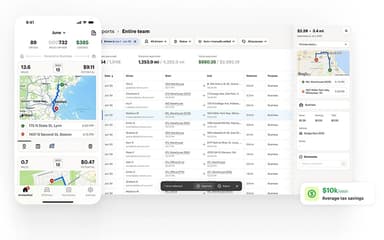
Reports View is a reporting tool accessible through the MileIQ Web Dashboard that allows users to build and download customized mileage records. Users can filter logged trips by date range and export detailed PDF or CSV reports directly to email or linked systems. It can be used by drivers and team managers to submit documentation for tax deductions and employee expenses.
Customized Commute Mileage
This automated policy tool allows administrators to establish team-wide or individual commute distance deductions. Once it is activated, the platform automatically subtracts designated commuting miles whenever a driver classifies a trip under a custom purpose. It can be used by team managers to enforce company reimbursement policies and prevent overpayment on standard employee commutes.
Pros And Cons of MileIQ
Pros
The platform simplifies mileage tracking with minimal user effort saving resources
Saves time on reimbursement and tax reporting with automated reports
Improves accuracy of business mileage records to reduce errors
Offers better location tracking for better compliance
Provides work time and personal time monitors to managers and keeps an eye on the workforce
Cons
Frequent ads on free plan can disrupt user experience
Comes with limited control over tracking personal drives
The file review process can be time-consuming in some cases
MileIQ Pricing
Teams | Pro | Teams Pro |
|---|---|---|
$8 per user per month | $9 per user per month | $10 per user per month |
|
|
|
Disclaimer: The pricing details were last updated on Oct 23, 2026 from the vendor's website. Please contact us for a tailored pricing list.
MileIQ Reviews
Total 13 reviews
4.7
All reviews are from verified customers
Rating Distribution
5
Stars77%
4
Stars15%
3
Stars8%
2
Stars0%
1
Stars0%
Share your experience
Construction, 51-100 employees
“Automated monthly trips”
Pros
Really simple to use when it comes to sorting and categorizing trips. At the end of each month, it automatically creates a report that I can send directly to my employer for reimbursement or email to myself first so I can review the logged trips before forwarding it on.
Cons
Mileage tracking can be inaccurate if the settings aren't configured properly or if your phone battery is low. Every now and then, I have to go back in and add some trips manually.
Rating Distribution
Ease of use
10
Value for money
10
Customer Support
9
Functionality
10
Manufacturing, 11-50 employees
“too many annoying ads”
Pros
Using this has been easy and the mileage tracking itself has been consistently accurate.
Cons
That said, the frequent ad pop-ups that show up every time I launch the app get really distracting. I'm also a bit disappointed that it doesn't capture my real location the way Google Maps/Google tracking does.
Rating Distribution
Ease of use
7
Value for money
6
Customer Support
6
Functionality
6
Staffing and Recruiting, 11-50 employees
“accurate location tracking”
Pros
The location tracking feels pretty accurate and it's a genuinely useful feature for keeping tabs on where trips happen.
Cons
I do wish there were more setup options, like limiting tracking to business hours only. I'd often end up deleting personal drives because I didn't feel my company actually needed my personal info. Sorting through it could get annoying and sometimes there wasn't a long enough gap between business and personal for the app to correctly treat them as separate drives.
Rating Distribution
Ease of use
10
Value for money
7
Customer Support
8
Functionality
7
Frequently Asked Questions
Does MileIQ have a mobile app?
Yes, MileIQ offers mobile apps for Android and iOS.
What language does MileIQ support?
MileIQ primarily supports the English language.
What other apps does MileIQ integrate with?
The vendor has not specified any third-party integrations for the software.
Who are the typical users of MileIQ?
MileIQ serves industries such as accounting, legal services, healthcare, construction, technology, financial services, and education.
Does MileIQ offer an API?
Yes, MileIQ provides API access.
What types of pricing plans does MileIQ offer?
MileIQ offers a Free plan and team plans, including Teams Lite at $8/user/month, Teams at $9/user/month, and Teams Pro at $10/user/month. Request a custom MileIQ price quotation.
What level of support does MileIQ offer?
MileIQ provides support via the help center.