


Canopy Connect
Last Updated
Be the first one to leave a review!
No review found

Starting Price
$120
per month
Canopy Connect Specifications
- Policy Management
- Underwriting Management
- Quote Management
- Agent Management
What Is Canopy Connect?
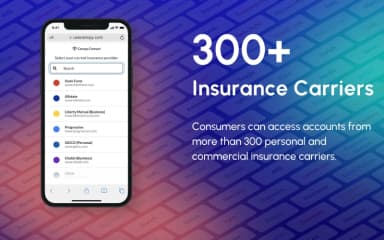
Canopy Connect is a data intake platform for insurance agents. It replaces long forms and phone interviews with direct access to verified policy information. The platform pulls policy details from more than 300 carriers within seconds. It also adds property and building data on its own, so agents don't have to look up those details elsewhere. If a carrier doesn't provide something the agent needs, the agent can build a short custom form to collect it. Policy Paste then moves the verified information into rating software.
What Is Canopy Connect Best For?
Canopy Connect is best known for DecSight, a tool that reads uploaded declaration pages and other insurance documents and pulls out structured data. It turns those files into organized records, and it can run alongside direct carrier connections in the same workflow. The software fits teams looking to cut down on manual entry and keep policy information straight during coverage verification and intake.
How Much Does Canopy Connect Cost?
The pricing for Canopy Connect starts at $120/month (3 users included, $10/additional user). This basic plan, known as Scratch, includes DecSight document upload and parsing, a standard form builder, Zapier access, and 30 Quote Points. Further pricing tiers of the software are as follows:
- Elevate: $300/month (5 users included, $15/additional user)
- Peak: $600/month (10 users included, $15/additional user)
Each plan includes a 14-day free trial period. The software also offers API plans, including a free API Sandbox for testing, an API Production plan, and an API Enterprise plan, all available at custom pricing.
In addition to the base subscription costs, organizations should account for the following expenses:
- Additional Quote Points: Priced at $4/point for the Scratch plan, $3/point for the Elevate plan, and $2/point for the Peak plan
- Implementation: Usually priced between $0–$1,500 (one-time), and agencies pay less if they handle onboarding themselves through a drop-in session rather than needing help configuring AMS and rater integrations
- Training And Onboarding: Commonly falls between $0–$1,000 (one-time), with group drop-in sessions free while larger teams asking for structured 1-on-1 onboarding pay more depending on scope
- Customization And Configuration: Often comes in at $500–$3,000, based on what a team needs for branded experiences, custom forms, and sharing workflows set up across different groups
- Data Enrichment Lookups (coverage): Generally costs $1–$5/lookup for property, driver license, or driver insight data beyond the included allowances/plan
Disclaimer: The pricing is subject to change.
Canopy Connect Integrations
The software supports integration with platforms, such as:
- PL Rating
- TurboRater
- Salesforce
- HawkSoft
- Bindable
- RiskAdvisor
- Sembley
How Does Canopy Connect Work?
Log in to your Canopy Connect software, then follow the given steps to manage insurance data intake:
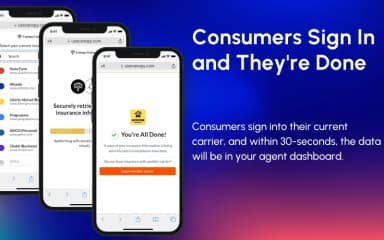
- Send intake links so clients can submit their insurance information
- Connect with carriers or upload declaration pages to gather policy details
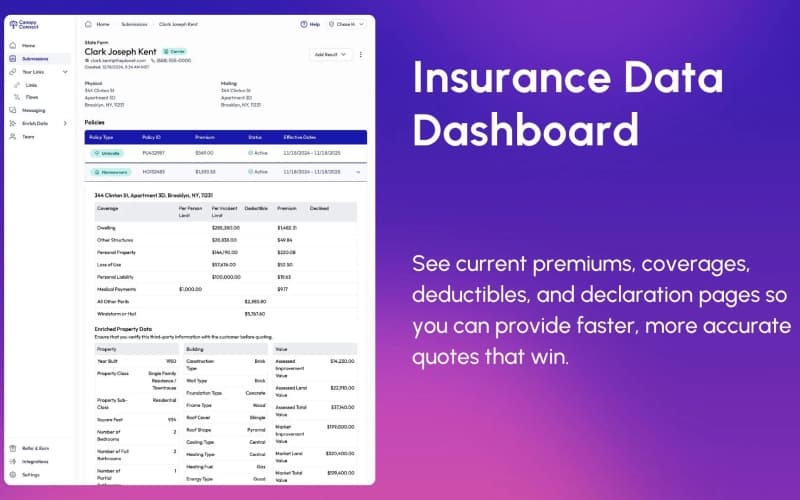
- Review each policy by checking coverage, documents, and records in one place
- Manage submitted records for quoting, verification, and client requests
- Run declaration pages through DecSight to turn them into structured records
- Move policy details into rating forms or other workflows using the platform's data tools
- Keep track of requests and update records as clients and policies change
Who Is Canopy Connect For?
Canopy Connect is suitable for industries, sectors, and business types, including:
- Insurance agencies
- Finance
- Automotive
- Technology
Canopy Connect Use Cases
Based on our analysis of user reviews of Canopy Connect's current capabilities, we have identified key scenarios where this software is a good fit for insurance agencies, lenders, and related organizations:
Independent Insurance Agencies Replacing Manual Quote Intake
Long quote forms and phone calls lose people partway through, and the details that do come in are sometimes already stale by the time an agent acts on them. Canopy Connect gets around this by pulling premiums, coverages, and declaration pages straight from the client's current carrier, so there is no form to abandon in the first place.
Mortgage Lenders Confirming Homeowners Insurance During Underwriting
Underwriters checking a borrower's homeowners coverage usually work from whatever the borrower sends over, and that paperwork is often incomplete or a version behind. With the borrower's consent, Canopy Connect retrieves the policy directly from the carrier. Loan teams get current numbers instead of waiting on a document that may need to be requested twice.
Auto Dealerships And Finance Companies Verifying Coverage At Sale
A physical insurance card or a phone call is still the usual way dealerships confirm a buyer has active coverage before closing a sale or a loan. Finance offices and auto lenders processing deals in volume can check that status against the carrier's own records using Canopy Connect, which removes a step that otherwise slows down the paperwork.
Insurtechs And Carriers Building Quoting Or Policy-Switching Workflows
Anyone building a quoting or policy-switching tool runs into the same problem. Customers already gave a carrier their policy details once, and asking them to type it all in again is where a lot of people drop off. Canopy Connect's API returns structured policy data from the customer's existing carrier, which developers can plug into onboarding, comparison shopping, or a straight policy replacement flow.
Fleet Operators And Employers Tracking Driver Insurance Compliance
Rideshare platforms and commercial fleets manage insurance compliance across a lot of drivers at once, and coverage status can lapse without anyone noticing right away. Operations and compliance teams can use Canopy Connect to check each driver's policy against carrier records on a regular schedule, which catches gaps before they turn into a bigger problem.
Is Canopy Connect Right For You?
If you need direct access to verified policy data from carriers, Canopy Connect could be a strong fit. More than 6,000 agencies, networks, insurtechs, and lenders rely on it, including Horace Mann and Better Mortgage, and the platform has shared over two million insurance policies so far. Document history goes back up to seven years, covering declaration pages, endorsements, and proof of insurance. On the security side, it holds SOC II Type 2 certification, with 256-bit AES encryption for stored data and TLS 1.3 or higher for data in transit.
Still unsure about Canopy Connect? Connect with us at (661) 384-7070 for further guidance.
Canopy Connect Features
Custom Forms
Custom Forms let teams build their own fields to capture that missing information. Agencies set these fields up according to their own intake requirements, then use them during the policy collection process to gather anything that's still outstanding.
Email And Text Templates
Consistent messaging matters when several people on a team are handling policy requests and follow-ups. Email and text templates give users a place to write, edit, and store standard messages for each stage of intake. The same template library covers inbound replies and outbound outreach to clients and partners alike.
Website Embed
Website Embed puts a data intake module directly on an agency's own site. Visitors fill out their insurance information right there, without getting redirected elsewhere. The module keeps its own look tied to the agency's site design, while every submission still goes to the same central intake system.
Links And QR Codes
Producers, referral partners, and campaigns can each get their own link or QR code for distributing intake access. Requests that come in through a specific link carry that identifier with them. That's how the system sorts incoming leads by where they actually came from, without any extra manual tagging.
Branded Experiences
An agency's logos, colors, images, and messaging can be applied across the platform's client-facing screens. Those branding choices stay in place through every step of data submission and intake. The result is an interface that reads like a natural extension of the agency's site instead of a separate, bolted-on tool.
Pros And Cons of Canopy Connect
Pros
Removes manual data entry to save time
Confirms carrier policy data is accurate
Structures the declaration page data to reduce effort
Helps teams finish quote intake faster
Improves accuracy in client policy information
Cons
Some policy data may not always transfer consistently
Customer support response times may vary
No mobile app is available for better usability
Canopy Connect Pricing
Scratch | Elevate | Peak |
|---|---|---|
$120 per month | $300 per month | $600 per month |
|
|
|
Disclaimer: The pricing details were last updated on Sep 25, 2026 from the vendor's website. Please contact us for a tailored pricing list.
Canopy Connect Reviews

No reviews yet!
Be the first to review this product
Frequently Asked Questions
What level of support does Canopy Connect offer?
Canopy Connect offers multiple support options, including in-app guided tours, a help center with detailed documentation, live chat and email support, webinars and video resources, and a user community through the Canopy Connectors Facebook Group.
Does Canopy Connect offer an API?
Yes, Canopy Connect offers an API.
What other apps does Canopy Connect integrate with?
Canopy Connect integrates with multiple platforms, including Salesforce, HawkSoft, PL Rating, TurboRater, RiskAdvisor, Bindable, and Sembley.
Who are the typical users of Canopy Connect?
Canopy Connect features are used by insurance agencies, lenders, insurtech platforms, and automotive or fleet-related businesses.
Does Canopy Connect have a mobile app?
No, Canopy Connect does not offer a dedicated mobile app.
What types of pricing plans does Canopy Connect offer?
Canopy Connect pricing starts at $120/month (3 users included, $10/additional user). Further pricing tiers include Elevate at $300/month (5 users included, $15/additional user) and Peak at $600/month (10 users included, $15/additional user). The software also offers API plans, including a free Sandbox, with API Production and API Enterprise available at custom pricing. Get a detailed Canopy Connect cost breakdown to make an informed decision.
What language does Canopy Connect support?
Canopy Connect software primarily supports English.