WorkSmart

WorkSmart

Last Updated

Overview

WorkSmart offers insurance content management and workflow software for organizing policy files, assigning tasks, and tracking document-related processes. While its task reporting could be improved, its search capabilities and workflow routing support insurance record management.

Be the first one to leave a review!

No review found

vendorReviewSummaryStar icon
Starting Price
Custom

WorkSmart Specifications

  • Policy Management
  • Claims Management
  • Agent Management
  • Broker Management
View All Specifications

What Is WorkSmart?

WorkSmart, by Vertafore, is an Enterprise Content Management (ECM) solution built for independent insurance agencies. It keeps files in one centralized location and lets staff retrieve client records or policy documents without wasting time on manual searches. The workflow tools create a more predictable way to assign and complete tasks, so agencies can maintain consistency without adding staff. The software is a practical fit for agencies handling high document volumes or working to reduce Errors and Omissions (E&O) exposure.

What Is WorkSmart Best For?

WorkSmart is best known for its document management system built specifically for independent insurance agencies. It is particularly known for its ability to organize, store, and retrieve client files, policy documents, and correspondence through an insurance-focused content management system. The software is a strong fit for agencies that handle large amounts of paperwork, deal with scattered filing systems, or need to manage documents shared across multiple staff members.

How Much Does WorkSmart Cost?

WorkSmart pricing is estimated to fall between $2,000 and $12,000/month, based on what similar insurance content management and workflow tools tend to cost. This range gives a general sense of budget scale. Actual pricing depends on the number of users, agency size, document volume, and how complex the workflows are.

In addition to the base subscription costs, organizations should account for the following expenses:

  • Implementation: Usually priced between $25,000–$150,000 (one-time), covering system setup, workflow configuration, and setting up the system for use in insurance agency environments
  • Data Migration: Commonly priced in the range of $10,000–$80,000 (one-time), depending on how much legacy policy and document data has to be moved and how messy or complex it is
  • Training And Onboarding: Typically falls around $5,000–$40,000 (one-time), covering training sessions and onboarding support for insurance teams while they learn the system
  • Integrations: Often priced between $10,000–$120,000 (one-time), depending on how many external systems need to be connected and how complicated those connections are to build
  • Customization And Configuration: Usually ranges from $15,000–$200,000 (one-time), based on how much the workflows need to be adjusted for insurance-specific processes
  • Premium Support: Typically around $5,000–$30,000 per year, covering continued vendor support outside standard assistance services
For accurate pricing based on your organization’s needs, it’s recommended to request a custom WorkSmart price estimate.

Disclaimer: Pricing references are based on publicly available third-party information and industry benchmarks. Actual costs may vary.

WorkSmart Integrations

The software supports integration with other Vertafore products, such as:

How Does WorkSmart Work?

Log in to your WorkSmart software account to access a centralized platform and follow the given steps to use its features:

  • Store client files by uploading policies, certificates, endorsements, and correspondence into a central document library
  • Organize documents by adding simple metadata and tags so files can be found later through search
  • Set up workflows by creating step-by-step processes for routing documents and assigning tasks to team members
  • Handle routine actions by sending notifications, approvals, and document handoffs based on preset rules
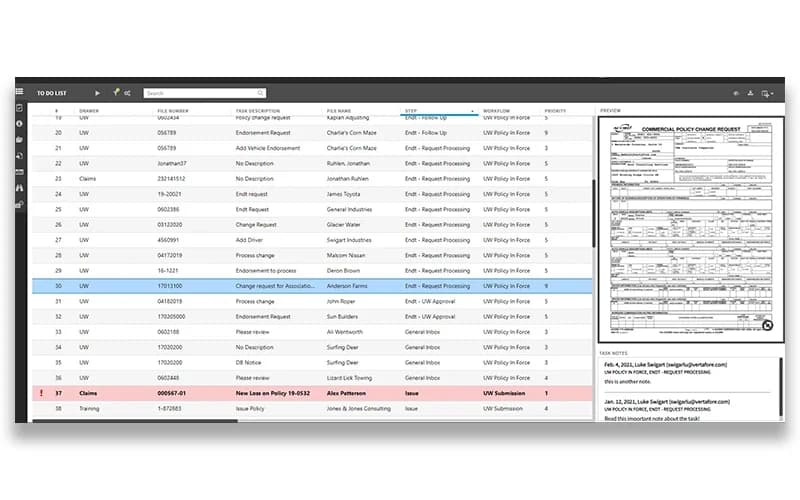
  • Manage tasks by setting deadlines, assigning work, and keeping track of priorities within the team
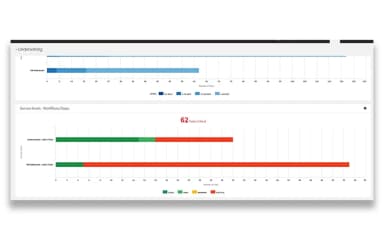
  • Check activity by viewing dashboards that show task progress and highlight where work is slowing down
  • Apply retention rules by deciding how long documents are kept and removing them when required
You can also schedule a free WorkSmart demo to explore its full functionalities.

Who Is WorkSmart For?

WorkSmart software is suitable for different types of insurance teams and roles, including:

  • Independent insurance agencies
  • Insurance brokers
  • Customer service teams
  • Accounting teams
  • Claims support teams

WorkSmart Use Cases

Based on our analysis of user reviews and WorkSmart’s current capabilities, we have identified key scenarios where this software may be a good fit for insurance agencies:

Insurance Teams Transitioning From Paper-Based Recordkeeping

Agencies that rely on physical files can struggle to locate documents quickly, especially as client volumes grow. Finding policies or correspondence can take longer than it should, particularly during renewals or audits. WorkSmart may be suitable for teams moving toward digital recordkeeping, offering a structured way to store, index, and retrieve client files as part of the shift to electronic documentation.

Growing Agencies Managing Increasing Volumes Of Policy Documentation

As an agency’s book of business expands, policies, renewals, endorsements, and related files grow with it. Staff can end up spending significant time searching for the right document version or confirming what is on file for an account. WorkSmart may suit growing organizations where structured storage and search for client files becomes an operational need rather than a nice-to-have.

Compliance-Focused Teams Addressing E&O Documentation Gaps

Insurance agencies carry ongoing regulatory and liability exposure tied to how records are maintained, retained, and produced when needed. Gaps in documentation, missing files, or inconsistent retention practices can turn into real problems during audits or claims. WorkSmart may be worth considering for organizations that have identified documentation practices as a factor in past E&O risk and want to formalize how records are preserved and retained.

Leadership Teams Seeking Visibility Into Daily Operations

Managers overseeing account management, claims support, or customer service teams can lack real-time insight into where work is stalling or how tasks are distributed. WorkSmart's process dashboards may be relevant for leadership roles that need to monitor task progress and productivity trends, particularly as agencies grow and oversight becomes harder to manage informally.

Multi-Department Operations Standardizing Internal Workflows

Agencies with separate departments for sales, service, claims, and accounting develop their own informal ways of handling documents and tasks. This can lead to inconsistency in how work moves through the organization. WorkSmart could help operations teams looking to define standardized task routing and approval steps, helping reduce variation in how similar work gets handled from one department to the next.

Is WorkSmart Right For You?

If you are an independent insurance agency looking for content management and workflow automation built for insurance work, WorkSmart could be a strong fit. It helps teams store and organize policy files, manage daily workflows, and reduce E&O exposure through structured document handling. The platform has received recognition, including the 2025 Globee Awards Gold Winner for Innovation and Insurance Business 2025 5-Star Technology and Software Provider, supporting its industry use.

Still unsure about WorkSmart? Connect with us at (661) 384-7070 for further guidance.

WorkSmart Features

Document Management System

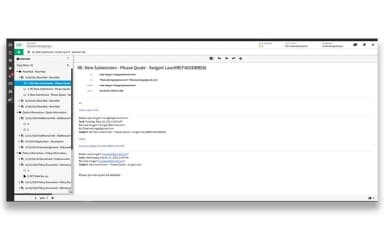
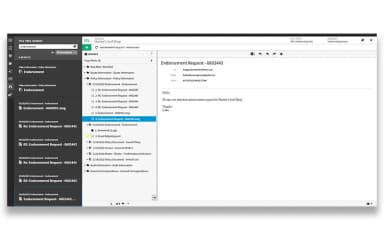
The document management system in WorkSmart gives agencies a central place to store and organize client files, policy documents, and correspondence. Staff can group records into folders and apply basic indexing so files can be located when needed. This setup supports teams that handle ongoing updates to client and policy information.

See How It Works
Task Management And Delegation

WorkSmart's task management tools let users assign tasks to staff members, set deadlines, and prioritize work based on urgency. Teams can track assigned activities and see how workload is distributed between different roles.

See How It Works
Workflow Automation Builder

The workflow automation builder lets teams design workflows that define repeatable steps for routine insurance tasks. These workflows guide how documents and requests move through set stages, so handling stays consistent throughout agency operations.

See How It Works
Document Retention Controls

The software provides document retention controls that let insurance teams define how long files such as policies, claims, and correspondence are kept in the system. Teams can define retention periods and apply disposal rules based on internal or regulatory requirements.

See How It Works
Real-Time Process Dashboards

WorkSmart's real-time dashboards show current workflow status and task progress for teams. Users can view active processes, see where work is delayed, and follow how documents and tasks move through different stages.

See How It Works

Pros And Cons of WorkSmart

Pros

  • Helps reduce time spent finding insurance documents

  • Makes client and policy records easier to access

  • Lowers risk caused by missing or misplaced documents

  • Helps staff respond faster to customer requests

  • Supports consistent handling of everyday insurance workflows

Cons

  • Exporting large documents may take longer than expected

  • Email filing accuracy can sometimes be inconsistent

  • System may feel outdated in certain areas

WorkSmart Reviews

no-reviews

No reviews yet!

Be the first to review this product

Frequently Asked Questions

Who are the typical users of WorkSmart?

WorkSmart features are used by independent insurance agencies, brokers, customer service teams, accounting teams, claims support staff, and operations teams that manage insurance documents and workflows.

Does WorkSmart have a mobile app?

No, WorkSmart does not offer a dedicated mobile app.

What types of pricing plans does WorkSmart offer?

WorkSmart pricing is estimated at $2,000–$12,000/month based on similar insurance content management and workflow tools. Get a detailed WorkSmart cost breakdown to make an informed decision.

What other apps does WorkSmart integrate with?

WorkSmart integrates with other Vertafore products, including Sagitta, AMS360, BenefitPoint, TransactNOW, and InsurLink.

What level of support does WorkSmart offer?

WorkSmart offers support via phone and an online contact form.

Does WorkSmart offer an API?

Yes, WorkSmart offers an API.

What language does WorkSmart support?

WorkSmart software primarily supports English.