


PeakoQ

Claimed
Last Updated
Overview
PeakoQ helps QA and engineering teams test application performance before release with AI-generated scripts and automated test maintenance. However, its test setup relies on Docker-based deployment. Teams can also run performance tests across development, staging, and production environments.
Be the first one to leave a review!
No review found

Starting Price
Custom Pricing
PeakoQ Specifications
- Reporting And Analytics
- Zero-Touch Deployment
- Automated Patch Management
- Predictive Maintenance Analytics
What Is PeakoQ?
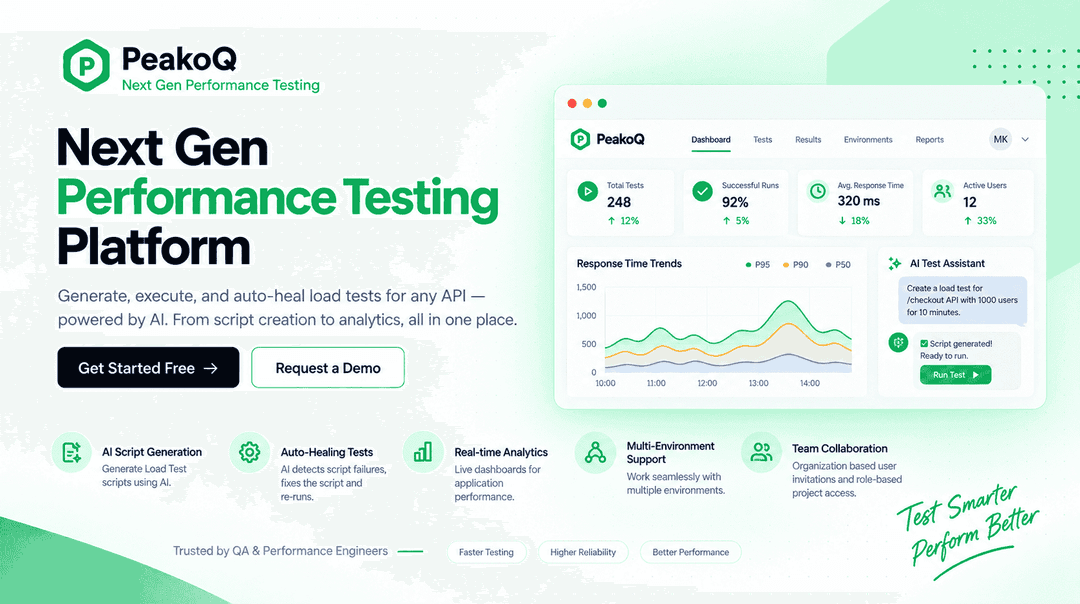
PeakoQ is an AI-powered performance testing platform developed by Quark Technologies. It helps teams test how applications respond to heavy traffic and high request volumes, allowing them to identify performance issues before they reach production.
The platform brings performance testing into one place, allowing teams to prepare and run tests, review results, and manage tests as applications change. It also integrates with CI/CD workflows, making performance checks part of the regular release process.
PeakoQ includes AI Test Script Generation, AI-Powered Auto Healing, Load Testing, and Real-Time Performance Analytics. It is available as SaaS software and can be deployed in private cloud, on-premises, or hybrid environments. It is designed for QA engineers, performance engineers, QA leads, and DevOps teams.
What Is PeakoQ Best For?
The software is best known for its AI-Powered Auto Healing capability, which detects failed performance test scripts, identifies the underlying issue, updates the script, and reruns the tests with minimal manual intervention. It is particularly relevant when performance tests need to be maintained as APIs and applications change. Users can review and customize scripts when needed, while the platform handles the correction and rerun process for supported failures.
How Much Does PeakoQ Cost?
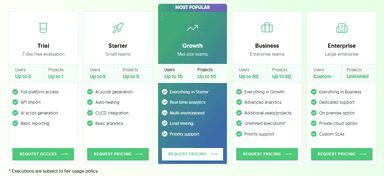
PeakoQ pricing starts at approximately $99/user/month. The platform offers the following pricing options:
- Starter: Custom pricing, for up to 5 users and 3 projects
- Growth: Custom pricing, for up to 15 users and 10 projects
- Business: Custom pricing, for up to 30 users and 20 projects
- Enterprise: Custom pricing, with custom users and unlimited projects
The paid plans differ by the number of users, projects, testing capabilities, analytics, support, and deployment options included. The vendor also offers a trial with 7-day free evaluation, with up to 2 users and 1 project.
Aside from these base subscription prices, organizations may also need to account for these estimated additional costs that are typically associated with similar software solutions:
- Cloud Testing Infrastructure: Approximately $100 – $1,000+/month, depending on test frequency, concurrent users, test duration, and whether load generators run in the cloud
- Performance Monitoring And APM: Approximately $500 – $1,500/month, for dedicated monitoring and application performance tools in a medium-sized testing environment
- Test Setup And Engineering: Approximately $40 – $90/hour, for specialist performance-testing engineers when additional help is needed
- Enterprise Implementation And Support: $1,000 – $10,000+ one-time, for more involved setup, CI/CD configuration, environment preparation, training, and customization
Disclaimer: Pricing references are based on publicly available third-party information and industry benchmarks. Actual costs may vary.
PeakoQ Integrations
PeakoQ supports integration with multiple development and CI/CD systems, including:
How Does PeakoQ Work?
To start using PeakoQ, log in to the platform and connect the API source or testing environment you want to use. You can then prepare, run, and review performance tests. Here are the steps:
- Log in to PeakoQ and connect the API source or environment you want to test
- Import your API collections so PeakoQ can use them to prepare performance tests
- Generate performance test scripts from your API sources and review them before running the tests
- Configure the test settings based on the application and environment you want to evaluate
- Run the performance test to see how the application responds under different levels of traffic or requests
- Monitor response times, throughput, error rates, and other results as the test runs
- Review failed tests and use the Auto-Healing feature to identify and correct supported script issues
- Examine the test results to identify performance bottlenecks and areas that need attention
- Connect PeakoQ to your CI/CD pipeline to include performance testing in the development and release process
Who Is PeakoQ For?
PeakoQ software serves a range of industries and sectors, including:
- Fintech
- Retail and e-commerce
- Health and pharma
- Manufacturing and logistics
- Telecom
- Automotive
- Insurance
PeakoQ Use Cases
Based on our analysis of PeakoQ features, current capabilities, and its stated focus on QA and engineering teams, we have identified a few scenarios where the software can be a better fit for performance testing workflows:
1. Development Teams Validating API Changes Before Release
Teams building API-driven applications often need to know whether a change that works correctly from a functional perspective will also hold up when the application is under load. A new endpoint, an update to an existing API, or a change in application logic can affect response times and overall system behavior once real traffic reaches it.
PeakoQ can be used to test these changes before they become part of a production release. This is particularly relevant for teams that update APIs frequently and need to check performance alongside functional changes.
2. QA Teams Maintaining Performance Tests As Applications Change
Performance testing does not end after the initial test scripts are created. As APIs change, endpoints are modified, and new versions of an application are introduced; existing performance tests can also require updates. QA teams working in active development environments may therefore spend considerable time checking whether their existing tests still work as expected before they can use the results.
PeakoQ can be used when performance tests need regular maintenance. Its Auto-Healing capability can detect supported script failures, apply corrections, and rerun the test, while users can review and customize scripts when needed.
3. Engineering Teams Making Performance Testing Part Of CI/CD
For engineering teams using continuous delivery, performance testing can become difficult to manage when it sits outside the development pipeline. A team may be releasing application changes regularly while performance checks are handled separately by QA or performance engineers at selected points in the release cycle. That approach can make it harder to maintain consistent performance validation as release frequency increases.
PeakoQ supports CI/CD integrations that allow performance tests to run as part of existing development and release pipelines. This gives engineering teams a way to include performance checks alongside their regular delivery process.
4. Organizations Testing Applications Across Multiple Environments
Performance results from one environment do not always tell the full story of how an application will behave elsewhere. Development, staging, and production environments can differ in configuration, infrastructure, traffic patterns, or other conditions that affect application performance.
PeakoQ supports performance testing across development, staging, and production environments. This allows teams to run tests at different points in the application lifecycle instead of checking performance in only one environment.
Is PeakoQ Right For You?
Are you looking for a performance testing platform that can create load test scripts from API collections and run performance checks as part of your development process? PeakoQ is built for QA, performance engineering, QA leadership, and DevOps teams.
It is particularly relevant for teams that regularly test APIs, maintain performance scripts, or want performance testing to run alongside CI/CD workflows. The platform supports SaaS, private cloud, on-premises, and hybrid deployment, while Business and Enterprise plans include SSO/SAML. Enterprise also includes dedicated support, on-premises and private cloud options, and custom SLAs.
The main limitation to consider is the deployment setup. PeakoQ uses Docker-based deployment, so teams should account for that requirement when planning their testing environment.
Software testing is increasingly incorporating AI-assisted test creation, self-healing, and continuous validation within CI/CD pipelines. PeakoQ incorporates these trends with AI-generated performance scripts, Auto-Healing, and CI/CD integrations.
Still not sure if PeakoQ is right for you? Contact our customer support team at (661) 384-7070 to discuss your requirements.
PeakoQ Features
AI Test Script Generation
Imported API collections are used to create performance test scripts for load testing. PeakoQ uses the available API requests, endpoints, parameters, and request details to generate the scripts. Users can review the generated scripts and adjust the test logic or configuration before execution.
Load Testing
Applications can be tested under different levels of traffic or requests to measure their behavior under load. Users can define the test conditions and select the application and environment to test. During execution, PeakoQ records metrics such as response times, throughput, and error rates for later review.
Automated Test Configuration
Docker-based deployment and pre-configured environments form part of the setup used to run performance tests. The deployment configuration provides the testing environment, while pre-configured settings define the conditions for execution. These configurations can be used when preparing tests for different environments.
CI/CD Integration
Performance tests can be added to development and delivery pipelines through integrations with GitHub, GitLab CI, Bitbucket, Azure DevOps, and CircleCI. Teams can configure when the tests run within their existing pipeline and include performance checks as part of the build or release process.
Real-Time Performance Analytics
During test execution, dashboards display performance measurements such as response times, throughput, and error rates. The analytics interface presents the data generated by the current test and keeps the results available for review after execution. Users can examine these measurements to compare application behavior under the configured test conditions.
Multi-Environment Testing
Development, staging, and production environments can each be used for performance test execution. Users select the environment for a test and apply the relevant configuration before running it. This allows performance tests to be carried out at different stages of the application lifecycle.
Pros And Cons of PeakoQ
Pros
Less script maintenance with AI-powered auto-healing
Earlier issue detection with real-time performance analytics
Continuous validation with CI/CD pipeline integration
Flexible testing with support for multiple environments
Easier deployment with Docker-based test configuration
Cons
Multi-environment testing is limited to supported deployment stages
Test configuration relies on Docker-based deployment environments
Auto-healing may still require review when scripts need correction
PeakoQ Pricing
Starter | Growth | Business | Enterprise |
|---|---|---|---|
Custom Pricing | Custom Pricing | Custom Pricing | Custom Pricing |
|
|
|
|
Disclaimer: The pricing details were last updated on Sep 25, 2026 from the vendor's website. Please contact us for a tailored pricing list.
PeakoQ Reviews

No reviews yet!
Be the first to review this product
Frequently Asked Questions
What types of pricing plans does PeakoQ offer?
PeakoQ price is estimated to start at $99/user/month, while the official pricing structure is custom, with the Starter plan available at a custom price. Other paid plans include Growth, Business, and Enterprise, with pricing based on the users, projects, and features included. It also offers a 7-day free trial for up to two users and one project. Request a personalized PeakoQ pricing quote today.
Does PeakoQ offer an API?
No, the vendor does not publicly document a separate public API for PeakoQ.
Who are the typical users of PeakoQ?
PeakoQ is designed for QA engineers, performance engineers, QA leads, and devOps teams.
Does PeakoQ have a mobile app?
No, the vendor does not publicly document a mobile app for PeakoQ.
What level of support does PeakoQ offer?
The vendor offers support through email, FAQs, help center, and an online contact form.
What language does PeakoQ support?
The software offers support in English.
What other apps does PeakoQ integrate with?
PeakoQ integrates with GitHub, GitLab CI, Bitbucket, Azure DevOps, CircleCI, and Docker.