


AttorneyCore

Claimed
Last Updated
Overview
AttorneyCore provides personal injury case management software built to help legal teams organize claims, track medical treatment records, and manage settlements. While initial account configuration can require establishing custom intake forms and workflow templates, its demand and negotiation workflow organizes case notes cleanly for attorney review.
Be the first one to leave a review!
No review found

Starting Price
$49
per user per month
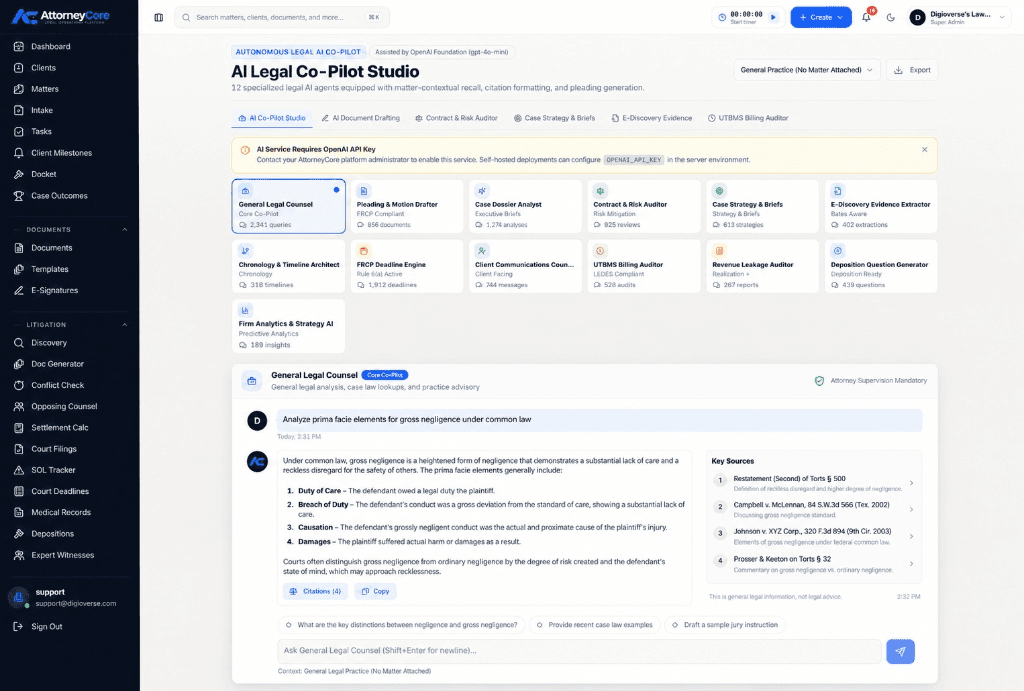

AttorneyCore Specifications
- Case Management
- Document Management
- Client Management (CRM)
- Billing And Invoicing
What Is AttorneyCore?
AttorneyCore is an AI-assisted legal practice management platform designed for personal injury (PI) law firms and legal teams. The platform guides law firm teams through the complete life cycle of a claim, covering everything from initial intake and record collection to discovery and final settlement closing. It comes equipped with AI copilot features to summarize case details and shared calendar views to keep the whole team on the same page.
What Is AttorneyCore Best For?
AttorneyCore is known for the Matter Management feature that comes with its practice management solution. The platform handles law firm operations by acting as a centralized hub where legal teams can track every case from open to close. The feature unifies step by step claim processing tasks and billing records within a connected workspace that attorneys and paralegals can access. The functionality can be used to organize cases, and billing material reduces data fragmentation issues, giving attorneys and staff any kind of context they need to keep case progress moving smoothly.
How Much Does AttorneyCore Cost?
AttorneyCore pricing starts at $49/user/month for the Starter plan, suitable for smaller teams and single practices. Other plans offered by the platform include:
- Growth: $79/user/month
- AI Pro Plus: $119/user/month
- Enterprise: Custom pricing
It also offers a 14-day free trial. In addition to the base subscription costs, companies should also factor in potential expenses, such as:
- Implementation And Onboarding: $500–$3,000 for initial workspace configuration, user setup, and workflow onboarding
- Data Migration: $500–$5,000+ for transferring client records, case files, documents, and historical data
- Training: $200–$2,000+ for staff training and assistance with adopting new workflows
- Custom Workflows And Configuration: $500–$5,000+ for specialized matter templates, billing rules, and firm-specific processes
- Integrations And API Setup: $500–$5,000+ for configuring connections with external systems, depending on complexity
Disclaimer: The pricing is subject to change.
AttorneyCore Integrations
AttorneyCore offers integrations with messaging platforms and payment solutions, including:
- Facebook Messenger
- Email via Firm Channels
- Stripe
How Does AttorneyCore Work?
Here is how your teams can get started with AttorneyCore once you have logged in:
- Access the web interface and set up firm settings, user permissions, and custom case templates
- Create a new personal injury matter by entering any relevant information which could include client contact details and incident details
- Log medical treatment providers, generating automated medical record request letters and tracking request status updates
- Monitor medical bills, health insurance liens, and subrogation claims within the centralized financial ledger
- Upload case documents, photos, and police reports into organized matter folders with automated tag assignment
- Generate settlement disbursement statements and archive completed case files upon closing the matter
Who Is AttorneyCore For?
AttorneyCore is designed specifically for legal practices working in specialties like:
- Personal Injury Law
- Immigration Law
- Family Law
- Criminal Defense Law
- Estate Planning Law
- Corporate Law
- Real Estate Law
AttorneyCore Use Cases
Based on our analysis of AttourneyCore features, we have listed a few use cases where the platform can prove to be a good fit:
Intake Specialists Managing Prospective Client Inquiries And Conflict Verification
Intake specialists in smaller law firms sometimes have to manage high volumes of incoming calls and online leads can utilize digital intake forms to capture prospect information automatically. The platform processes prospect details through an integrated pipeline, allowing users to run conflict checks against existing firm databases to prevent ethical breaches. Once verified, intake coordinators convert approved leads directly into active case files with a single click, reducing duplicate data entry and administrative delay in client intake.
Legal Teams Organizing Voluminous Litigation Files And Document Assembly
Paralegals responsible for preparing complex litigation files across multiple active matters can use matter-organized storage directories to centralize filings, evidence, and medical records. Staff can draft standardized legal pleadings and correspondence using automated template generation, while built-in version control ensures team members work from the most up-to-date document draft. Once finalized, staff securely distribute sensitive case files to clients through the authenticated client portal, reducing reliance on insecure email attachments.
Billing Professionals Working On Invoice Reviews And Expense Tracking
Billing administrators preparing monthly financial statements can consolidate billable hours, fixed-fee items, and advanced client expenses directly within unified draft invoices. The system matches time entries and out-of-pocket costs against existing retainer records, allowing firm managers to review and adjust line items before finalizing statements. This structured pre-billing review cycle reduces client invoice disputes, eliminates manual calculation errors, and speeds up firm collections across all open matters.
Firm Accountants Maintaining Audit-Ready Retainer Ledgers
Law firm accountants and compliance managers overseeing client trust funds can track individual retainer balances and transaction histories through dedicated client ledgers. The platform logs incoming retainer deposits, tracks earned fee drawdowns, and records third-party expense disbursements per matter to satisfy strict regulatory compliance standards. This automated ledger organization gives accounting staff detailed audit trails and structured transaction reports, simplifying month-end reconciliations and external financial audits.
Is AttorneyCore Right For You?
If your legal practice requires personal injury case management software to handle medical record tracking, case resolution, document creation, and settlement calculations, AttorneyCore is worth considering. The platform offers specialized plaintiff-side tools designed to eliminate manual spreadsheet tracking and keep case files organized across pre-litigation and litigation stages.
AttorneyCore supports structured law office operations through centralized case records, workflow management, and financial calculation features.
Still unsure about investing in AttorneyCore? Contact us at (661) 384-7070to make the right decision.
AttorneyCore Features
Legal Billing And Invoicing
AttorneyCore provides a billing and invoicing feature where legal teams can track and review billable time entries and retainer balances through this visual display. The system aggregates unbilled fees, allowing law firms to audit billing entries, record retainer drawdowns, and track payment receivables before finalizing statements.
Client Intake And CRM
The platform comes with web-based intake forms, a prospect pipeline tracker, and conflict-checking tools to manage prospective client inquiries. Users can use it to check prospective party names against existing firm databases to prevent conflict-of-interest issues, allowing intake teams to convert qualified leads into active case files.
Document Management
AttorneyCore organizes legal documents directly within storage folders equipped with version history control and dynamic template assembly. Legal staff can create standardized letter and pleading templates, automatically populate saved documents with case data, and manage access permissions for files stored in the firm repository.
Trust Accounting Workflows
The software provides specialized ledger tools that track client trust deposits, earned fee transfers, and third-party disbursements on a matter-by-matter basis. It maintains itemized transaction histories and client ledgers designed to support trust account reconciliations and provide clean financial audit trails for external firm accounting reviews.
Client Portal
AttorneyCore includes an authenticated online client portal that gives clients secure access to authorized case information. Through the portal interface, clients can log in to view case status updates, download shared legal documents, review outstanding firm invoices, and send direct messages to their assigned legal team.
Pros And Cons of AttorneyCore
Pros
Offers purpose-built personal injury features including medical record tracking
Comes with a built-in settlement calculator
Provides automated document assembly for an easier workflow
Comes with centralized matter dashboards for better case tracking
Provides billing templates to make sure custom actions can be added to the charge
Cons
Requires initial setup time to configure custom document templates
Feature set is less suited for general civil litigation
AI-copilot features need a separate AI provider
AttorneyCore Pricing
Starter | Growth | AI Pro Plus | Enterprise |
|---|---|---|---|
$49 per user per month | $79 per user per month | $119 per user per month | Custom Pricing |
|
|
|
|
Disclaimer: The pricing details were last updated on Oct 19, 2026 from the vendor's website. Please contact us for a tailored pricing list.
AttorneyCore Reviews

No reviews yet!
Be the first to review this product
Frequently Asked Questions
Does AttorneyCore support multi-factor authentication?
Yes. AttorneyCore lists multi-factor authentication (MFA) among its configurable security services.
Does AttorneyCore maintain an audit log of sensitive activity?
Yes. AttorneyCore describes an audit trail that records sensitive activity for accountability and operational review.
Can law firms control access to AttorneyCore based on user roles?
Yes. AttorneyCore provides role-aware access controls, including owner and administrator controls for team access and sensitive administrative areas.
Does AttorneyCore automatically verify court filing deadlines?
No. AttorneyCore provides calendar and reminder tools, but the firm and its attorneys remain responsible for calculating and verifying court, statutory, and filing deadlines.
What happens to case information when AttorneyCore AI is used?
AttorneyCore's privacy policy states that relevant matter, client, and case details entered into an AI-assisted workflow are sent to OpenAI's API for processing.