


Last Updated
Overview
Clarra is a powerful case management solution built to revolutionize the way you handle cases. While its reporting features could be more extensive, it ensures that all your case information is accessible easily, making your process more efficient and organized.
Clarra Specifications
- Case Management
- Document Management
- Client Management (CRM)
- Billing & Invoicing
What Is Clarra?
Clarra is a case management platform created to help businesses and legal teams work effectively. It offers a complete set of tools to manage every aspect of a case, from start till the end. Acting as an all-in-one solution, Clarra allows you to keep track of documents, client communications, events, timelines, and important contacts. Clarra is designed to be simple and easy to use, ensuring the case management process is smooth and accurate.
Clarra Pricing
Clarra software pricing consists of multiple pricing plans to fit the needs and budgets of different companies. Here’s the current pricing structure:
- Free: $0/user/month
- Essentials $55/user/month
- Growth: $70/user/month
- Enterprise: $85/user/month
Disclaimer: The pricing is subject to change.
Clarra Integrations
Clarra has integration arrangements with some of the top apps, including:
- Microsoft Authentication
- Google Authentication
- Zapier
- Twilio SMS
- Microsoft 365 Outlook
Who Is Clarra For?
Clarra is ideal for a wide range of industries and sectors, including:
- Legal practices
- Entertainment
- Insurance
- Management companies
- Production companies
- Studios
- Talent agencies
Is Clarra Right For You?
If you’re looking for a case management system that’s simple and easy to use and allows you to streamline your operational process, Clarra is a solid choice. It helps you keep all your matters, documents, and events organized in one place so you can focus on getting things done.
Moreover, Clarra has been recognized for its excellence in the legal technology sector. In 2024, it was honored with the "Case Management Solution of the Year for SMB Practices" award by the LegalTech Breakthrough Awards Program. The platform utilizes multi-factor authentication and integrates with Google and Microsoft logins to ensure that only authorized users have access.
Want to see if Clarra is the right fit for you? Give our support team a call on (661) 384-7070.
Clarra Features
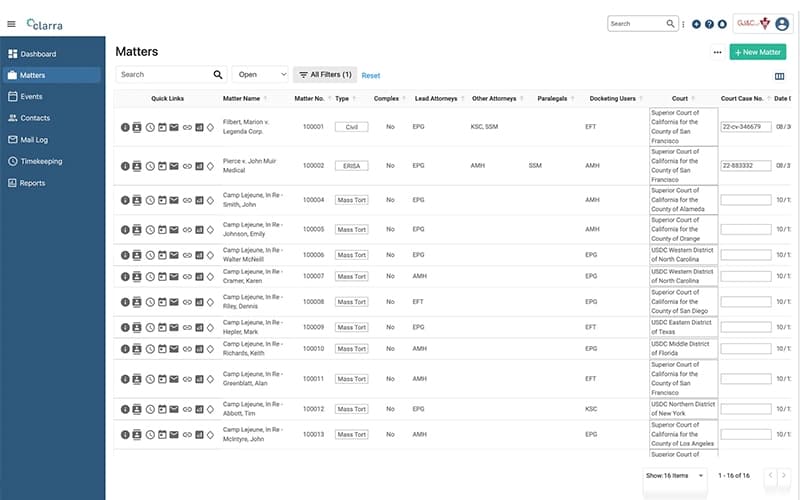
Matter Management
Forget the hassle of managing documents separately. With Clarra, you can keep track of everything related to your cases in one place. Store documents, emails, deadlines, and contact details to stay organized, save time and work efficiently.
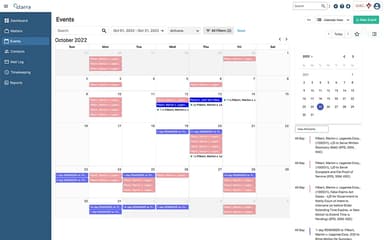
Event Management
You will never miss an important date again. From scheduling to tracking appointments, Clarra ensures it helps you manage deadlines and tasks by presenting them in a simple calendar or list view. This is the best way to stay on top of your workload.
Time Keeping
Keeping track of billing hours has never been easier. With Clarra, you can easily log billable hours and keep a record of the number of hours you spend on each case. You will never miss important work again when you stay organized with Clarra.
Contract Management
Keep all your contacts in one place from clients and team members to judges, and more. Clarra makes it easy to find the right person when you need them, saving you time and effort.
Document Management
Clarra allows you to store, organize, and access documents in one central location. Emails, letters, and case files are easy to locate, helping you stay organized and work more efficiently.
Communication
It makes communication easy. Send emails, messages, and make phone calls directly within Clarra. Keep all case-related conversations in one place where they are easy to access, so you can always review important discussions briefly.
Reporting And Analytics
Always have a clear view of your cases and workload with detailed reports generated by Clarra. It helps you track progress, identify trends, and make better decisions with real-time insights.
Accounting
Clarra provides tools to manage invoices, payments, and case-related expenses in one place. It tracks financial activity, making it easier to monitor spending and adjust your budget when needed.
Automation And AI
Clarra automates repetitive tasks, reducing the need for manual work. This helps improve workflow efficiency, allowing you to focus more on important tasks like client interactions and managing cases.
Customization
With Clarra, you can choose what you like. You can adjust settings, organize data, and use features in a way that meets your needs without applying any coding skills. It is designed to help you do your business the way you want to.
Pros And Cons of Clarra
Pros
Easy to use and understand
Tracks billing hours accurately
Clarra integrates with many applications and enhances productivity
Cons
Does not have many features for large firms
New users might experience a learning curve in trying to navigate this software
Clarra Reviews
Total 1 reviews
5
All reviews are from verified customers
Rating Distribution
5
Stars100%
4
Stars0%
3
Stars0%
2
Stars0%
1
Stars0%
Share your experience
Information Technology and Services, 101-500 employees
More than a year
“better email routing”
Pros
The tool brings a logical way to manage email and that really helps cut down on unnecessary communication.
Cons
It sends every email need to the right channel without any issues.
Rating Distribution
Ease of use
10
Value for money
10
Customer Support
9
Functionality
9
Frequently Asked Questions
What types of pricing plans does Clarra offer?
Clarra cost includes a Free Plan ($0/user), Essentials ($55/user), Growth ($70/user), and Enterprise ($85/user) per month, with prices subject to change.
What other apps does Clarra integrate with?
Clarra has integration arrangements with some of the top apps, including Microsoft Authentication, Google Authentication and Zapier.
What language does Clarra support?
Clarra's website indicates that it supports multiple languages, including English, Swedish, Finnish, German, Italian and Dutch.
Does Clarra have a mobile app?
No, it does not have a mobile app.
Does Clarra offer an API?
Yes, it offers an API.
What level of support does Clarra offer?
Clarra provides a Help Center offering support through live chat, email, and a comprehensive knowledge base with guides and FAQs to assist users.
Who are the typical users of Clarra?
Typical users include law firms, consulting firms, SMBs, and organizations needing case and document management.