


ezBriefs
Last Updated
Overview
ezBriefs streamlines legal research and case preparation with AI-powered tools that enhance efficiency. Although some users note occasional glitches in reports, the automatic verification enhances document accuracy. Its intuitive design, quick data extraction, and comprehensive search features help legal professionals work smarter and stay ahead in their practice.
ezBriefs Specifications
- Document Management
- Document Automation/Assembly
- Case Management
- Client Management (CRM)
What Is ezBriefs?
ezBriefs by Benchly is designed for legal professionals who need faster, smarter research and case analysis. It offers AI-driven insights and powerful search capabilities that help users extract key case details efficiently. Its user-friendly interface makes legal research easier, saving time and improving accuracy. ezBriefs efficiently serves law firms, attorneys, and researchers and contributes significantly by enhancing productivity and decision-making, making complex legal tasks more manageable and result-oriented.
ezBriefs Pricing
The ezBriefs price is offered through the following plans:
- Benchly for Solos: $600/year
- Benchly for Teams: Custom
Disclaimer: Prices are subject to change.
ezBriefs Integrations
Who Is ezBriefs For?
ezBriefs software serves legal professionals, including litigators, appellate attorneys, and legal assistants.
Is ezBriefs Right For You?
If you are looking for a smarter way to read and understand long documents, ezBriefs is the perfect choice. It simplifies complex content into concise summaries, saving time and effort. Whether you're a busy professional, researcher, or student, ezBriefs helps you to concentrate on your primary legal objective.
Are you still unsure about ezBriefs? Contact our support team at (661) 384-7070 for further assistance.
ezBriefs Features
Tables Of Authorities
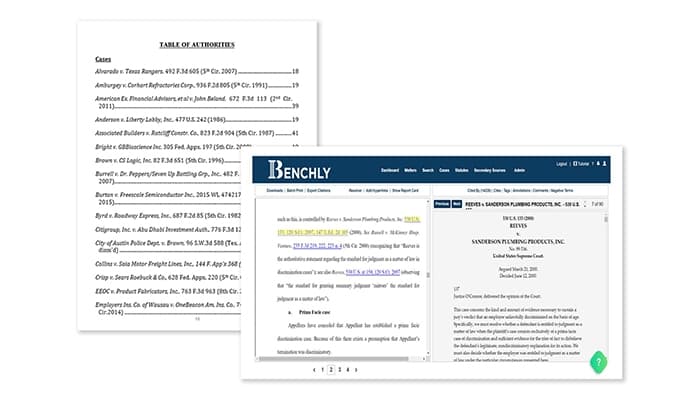
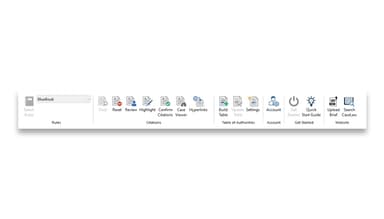
This powerful feature helps users quickly find all cited authorities in legal documents. Furthermore, it validates them with a case law database, fixes errors, and formats TOAs to meet court requirements effortlessly.
Easy, Precise Briefing
ezBriefs systemizes the entire briefing process from drafting to filing. It also ensures accuracy, efficiency, and a strategic edge over opposing counsel while simplifying document sharing and review.
Accurate And Efficient TOA
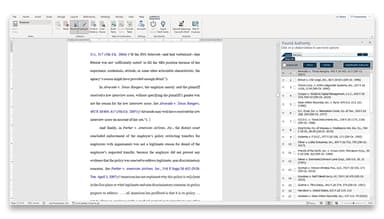
The feature utilizes Microsoft Word’s built-in TA entries. It allows smooth collaboration on TOAs across teams without requiring additional software licenses, ensuring accuracy and efficiency.
A Check In The Win Column
The software enables users to spot inconsistencies in opposing counsel’s arguments. Moreover, it provides the insights needed to strengthen legal positions and improve the chances of a favorable outcome.
Befriend The Judge
ezBriefs automatically hyperlinks cited cases, allowing judges to access case law instantly. Most importantly, it does not require logging in or needing a license, ensuring a smoother legal review process.
Cross-Platform Sharing
The feature allows users to share legal documents with anyone. It enables recipients to review, edit, and add citations without requiring an ezBriefs license, which helps in enhancing collaboration.
Pros And Cons of ezBriefs
Pros
Ensures compliance with court-approved formatting guidelines
Helps in organizing legal practice and case management
Reduces manual effort in formatting and citation management
Enhances document accuracy with automatic verification features
Cons
Financial reports lack the necessary details and insights
Reports occasionally provide different values when generated multiple times at times
Some software users suggest considerable improvements in its integration capabilities
ezBriefs Reviews
Total 1 reviews
3
All reviews are from verified customers
Rating Distribution
5
Stars0%
4
Stars0%
3
Stars100%
2
Stars0%
1
Stars0%
Share your experience
Law Practice, 1-10 employees
Free Trial
“Its a pretty decent software”
Pros
It effectively organizes our practice and handles case management matters efficiently.
Cons
I think when compared to other products, other seem to offer better job at this same price as well.
Rating Distribution
Ease of use
6
Value for money
6
Customer Support
8
Functionality
7
Frequently Asked Questions
What language does ezBriefs support?
ezBriefs supports only the English language.
What other apps does ezBriefs integrate with?
ezBriefs integration details are available through its detailed free demo.
Does ezBriefs have a mobile app?
No, ezBriefs does not have a mobile app.
Does ezBriefs offer an API?
The official website of ezBriefs does not specify if the software provides an API.
Who are the typical users of ezBriefs?
The typical users of ezBriefs include appellate attorneys, litigators, and legal assistants.
What types of pricing plans does ezBriefs offer?
The ezBriefs cost ranges in the two plans: Benchly for Solos at $600/year and Benchly for Teams with custom pricing. So, get a tailored quote as per your requirements.
What level of support does ezBriefs offer?
ezBriefs offers phone, email, and knowledge base support.