


JuraLaw
Last Updated
Overview
JuraLaw helps law firms manage court deadlines, automate calendaring, and track case-related activities. While integration with legacy systems can be complex and time-consuming, its automated court rule calculations and customizable workflows help simplify daily operations. Overall, JuraLaw is a practical solution for legal teams managing complex docketing and scheduling requirements.


JuraLaw Specifications
- Court Calendaring & Scheduling
- Workflow Automation
- Reporting And Analytics
- Compliance & Security Features
What Is JuraLaw?
JuraLaw is legal calendaring and docket management software designed for mid-sized and large law firms. It helps legal teams manage court dates, filing deadlines, and case-related schedules through a centralized system. The platform uses automated court rule calculations and court data to reduce manual errors and the risk of missed deadlines. It also provides structured workflows that help attorneys, docketing teams, and administrators maintain accurate records and follow consistent calendaring procedures.
The platform also offers customizable features, including Fields for Cases and Events, Outlook Templates, and custom reports, to support daily legal operations. It also supports data security and accountability through role-based permissions and audit trail reporting, allowing firms to control access and review calendaring activity. In addition, JuraLaw provides unlimited training and customer support to help firms adopt the platform and improve their existing workflows.
What Is JuraLaw Best For?
JuraLaw stands out for its ‘Custom Rules’ feature, which allows law firms to configure rules based on their internal procedures and unique workflow requirements. It helps reduce manual calculations, improve consistency, and minimize risks associated with calendaring processes.
How Much Does JuraLaw Cost?
JuraLaw pricing is estimated to start at $50–$150/user/month, based on industry benchmarks for comparable legal calendaring software. These estimates are intended for budgeting purposes only, and actual costs may vary depending on the firm's size and requirements.
In addition to the subscription fee, law firms should consider the following estimated costs:
- Implementation Cost: $500–$2,000 for initial setup, system configuration, and deployment
- Integration Cost: $500–$2,500 for connecting third-party apps, as per integration requirements
- Data Migration Cost: $300–$1,500 for transferring existing case records and calendaring data
- Custom Configuration Cost: $500–$2,000 for configuring internal rules and workflows
Disclaimer: Pricing references are based on publicly available third-party information and industry benchmarks. Actual costs may vary.
JuraLaw Integrations
JuraLaw supports integration with the following systems:
- Microsoft Outlook
- NetDocuments
- PACER ECF
How Does JuraLaw Work?
Here's how legal teams can use JuraLaw to manage their daily calendaring and docketing activities:
- Sign in to JuraLaw and access a personalized dashboard with configurable information portlets that display data relevant to your role and responsibilities
- Create case records and assign attorneys or docketing staff
- Enter court dates and calculate deadlines using jurisdiction-specific rules
- Review automatically loaded court data for supported jurisdictions
- Synchronize case events and deadlines with Microsoft Outlook
- Configure reminders for upcoming filing dates and hearings
- Track changes to deadlines through audit reports
- Generate reports on cases, workloads, and docketing activities
- Reassign cases when attorneys or staff responsibilities change
- Review court rule updates that may affect existing deadlines
Who Is JuraLaw For?
JuraLaw is designed for the legal services industry and is particularly suitable for:
- Mid-sized and large law firms
- Litigation-focused firms
- Multi-office legal practices
- Legal docketing departments
- Law firm operations teams
JuraLaw Use Cases
Based on our analysis of JuraLaw's features and capabilities, we have identified key scenarios where this software works well for law firms:
Law Firms Managing Increasing Caseloads With Limited Administrative Staff
A small docketing team handling cases for several attorneys may need to enter new matters, assign case events, and track filing deadlines with limited administrative support. JuraLaw's Customizable Features allow firms to adjust case and event fields to match their docketing workflows. Attorney-level customization also lets staff configure information according to individual preferences. This gives docketing teams a way to organize case details and manage event records based on their firm's requirements.
Legal Departments Struggling With Complex Reporting Requirements
During weekly workload reviews, legal administrators may need to identify pending deadlines, review case assignments, and check how work is distributed across staff. JuraLaw's Custom Reports feature allows administrators to build reports around these requirements rather than relying only on standard report options. They can also configure dashboards and save searches to access relevant docketing information. A custom workload report gives administrators a focused view of case assignments and staff responsibilities for these reviews.
Law Firms Struggling To Track Deadline Changes
When multiple employees manage the same cases, tracking who created or changed a deadline can become difficult, increasing the risk of errors and confusion. JuraLaw's Audit Trail Reporting feature records changes to court dates, deadlines, and calendaring activities. Administrators can review each audit trail record to check what changed and identify the staff member responsible for the update.
Litigation Teams Managing Cases Across Multiple Jurisdictions
Litigation teams handling cases in different courts must account for the rules and filing deadlines that apply in each jurisdiction. For example, when a docketing specialist enters a trigger date for a case in a particular court, JuraLaw's Court Rules feature calculates the related deadlines using that jurisdiction's rules. The team can then review the calculated dates when updating the case calendar and planning upcoming filings.
Is JuraLaw Right For You?
JuraLaw may be worth considering mid-sized and large law firms that need accurate deadline calculations and centralized docket management. Its automated court rules, Outlook integration, and audit trails help legal teams manage complex schedules while reducing manual work. Its customizable case and event fields, dashboards, and reports also support firms that need to adapt calendaring workflows to different staff roles and responsibilities.
As law firms increasingly focus on operational risk and data security, JuraLaw offers AWS cloud hosting, role-based permissions, multi-factor authentication, and reporting tools. Its customizable workflows and data management capabilities also support firms with changing operational requirements. However, smaller practices with basic scheduling needs may find its specialized calendaring functionality more extensive than necessary.
Still unsure whether JuraLaw software is a good choice? Call our expert staff at (661) 384-7070 for guidance.
JuraLaw Features
Court Rules Management
JuraLaw provides automated deadline calculations based on court rules across more than 2,600 jurisdictions. Users can calculate dates, review applicable rules, and receive notifications when requirements change. The system also accounts for court holidays and weekends when determining deadlines.
Automated Court Data
The software automatically imports supported Illinois and New York court dates and deadlines. It also captures federal ECF notification emails to support event calendaring. These tools help docketing teams maintain updated schedules without manually entering every court-related activity.
Customizable Dashboards
JuraLaw allows users to configure dashboards according to their responsibilities. Firms can set preferred column headings and views, create saved searches for recurring questions, and add custom fields to capture, organize, and track case and event information.
Reporting And Audit Trails
The platform provides more than 150 standard reports and supports customized reporting formats. Users can review cases without assigned attorneys and mass-assign or unassign attorneys and staff. Firm leadership can also use workload visibility to review cases, deadlines, and coverage. JuraLaw's audit trail reporting records changes to deadlines, events, and user actions to support internal controls and quality reviews.
Deadline Reminders
JuraLaw features ‘Deadline Reminders’ which allows legal teams to schedule email reminders for calendaring activities. Users can also generate a consolidated email reminder report and identify cases lacking attorney or staff coverage.
Pros And Cons of JuraLaw
Pros
Easy-to-use interface simplifies daily calendaring tasks
Centralized database makes tracking court dates easier
Accurate and updated court rules improve scheduling reliability
Effective docket monitoring helps prevent missed court dates
Trial report generation makes case tracking convenient
Automated court data collection reduces manual entry
Cons
Some settings can only be changed globally
Automated court data loading is available only for Illinois and New York courts
It lacks integration with more state court systems
JuraLaw Reviews
Total 2 reviews
4
All reviews are from verified customers
Rating Distribution
5
Stars0%
4
Stars100%
3
Stars0%
2
Stars0%
1
Stars0%
Share your experience
Legal Services, 11-50 employees
“Offers the best service”
Pros
If you are an attorney working a lot in Illinois or New York, let me tell you JuraLaw makes it impossible to miss a court date.
Cons
One thing I wish for is that it covers more jurisdictions.
Rating Distribution
Ease of use
8
Value for money
8
Customer Support
8
Functionality
7
Legal Services, 11-50 employees
“Provides excellent docket management”
Pros
JuraLaw is very easy to use. Plus the dashboard is simple to navigate and I also find the docket monitoring tools really helpful.
Cons
When I used it, it only monitored dockets in Illinois and New York. A lot of lawyers, myself included back then have cases in other states. If it could connect with more state court systems, it would be so much better.
Rating Distribution
Ease of use
10
Value for money
8
Customer Support
8
Functionality
9
Frequently Asked Questions
Does JuraLaw offer a mobile app?
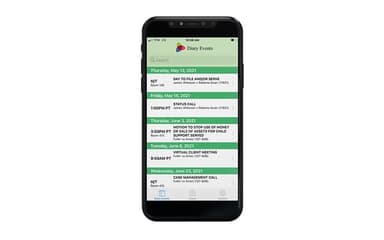
Yes, the JuraLawyer mobile app allows attorneys to view case information, comment on event outcomes, and notify docketing staff.
Can JuraLaw reassign multiple cases when staff members leave?
Yes, JuraLaw software allows administrators to assign or unassign attorneys and staff across multiple cases to maintain continuity during employee departures or role changes.
Does JuraLaw clean existing data before migration?
Yes, JuraLaw offers data migration cleansing to improve record accuracy and consistency before transferring information into the system.
Can users customize column headings in JuraLaw?
Yes, JuraLaw allows users to customize column headings and views to review information more efficiently and reduce misinterpretation.
Can JuraLaw be accessed remotely?
Yes, JuraLaw is a cloud-based legal calendaring and docketing solution that allows authorized legal professionals to access the platform remotely through an internet connection.