Article
AI In ERP: What It Can Automate (And How To Evaluate Vendors)
21 mins read
Last Updated


By Sadia Tariq and


Article
21 mins read
Last Updated
By Sadia Tariq and
Will AI eventually replace ERP?
It's one of the biggest debates in enterprise software today, and every ERP buyer is wondering if they should wait before making a decision. But that debate ignores how AI in ERP actually works.
AI is inherently probabilistic (predicting answers based on patterns), while an ERP system is deterministic, storing data in a rigid, auditable way.
One way or another, AI needs ERP to get its factual business data.
In upcoming years, AI will fundamentally change the interface of ERP, but it will not replace the underlying need for a deterministic ledger. So yes, you can move forward with your ERP implementation.
And by the end of this guide, you'll know exactly what AI in ERP is capable of today and how to separate genuine AI solutions from automation to make an informed buying decision.
AI in ERP is often misunderstood. No, it will not automate your whole business. AI in ERP means it embeds machine learning, predictive analytics, and generative AI into your core operations (finance, HR, and supply chain) to automate complex enterprise workflows and surface actionable insights.
It can turn the enterprise resource planning (ERP) system from a passive System of Record into an active System of Intelligence.
Most AI can interpret inputs in context, recognize patterns, and generate informational content that goes beyond traditional if-then logic. But it is still reactive and not active or proactive because these types of AI only deliver insights (like 'here's an anomaly' or 'here's an expected demand spike'). Humans still have to decide what action to take further.
The real 2026 shift is the System of Agency, where the Agentic AI doesn't just flag a problem, it reasons through the decision, takes the next action, and loops in a human only when something falls outside company's policy.
System Type | Core Capability | Example Scenario (Supply Chain) | Human Role |
|---|---|---|---|
System of Record (Traditional ERP) | Stores historical data via rigid 'if-then' code | Logs that a shipment is late after it misses the delivery date | Manually hunts for the data and files a report |
System of Intelligence (Predictive AI) | Recognizes patterns and predicts future anomalies | Flags a potential weather delay and predicts a (e.g., 20%) stock shortage | Reviews the alert and manually emails alternative vendors |
System of Agency (Agentic AI) | Reasons, executes actions, and operates within pre-approved policy limits | Detects the delay, automatically orders from a pre-approved backup vendor, and updates the ledger | Only intervenes if the backup vendor exceeds the approved budget |
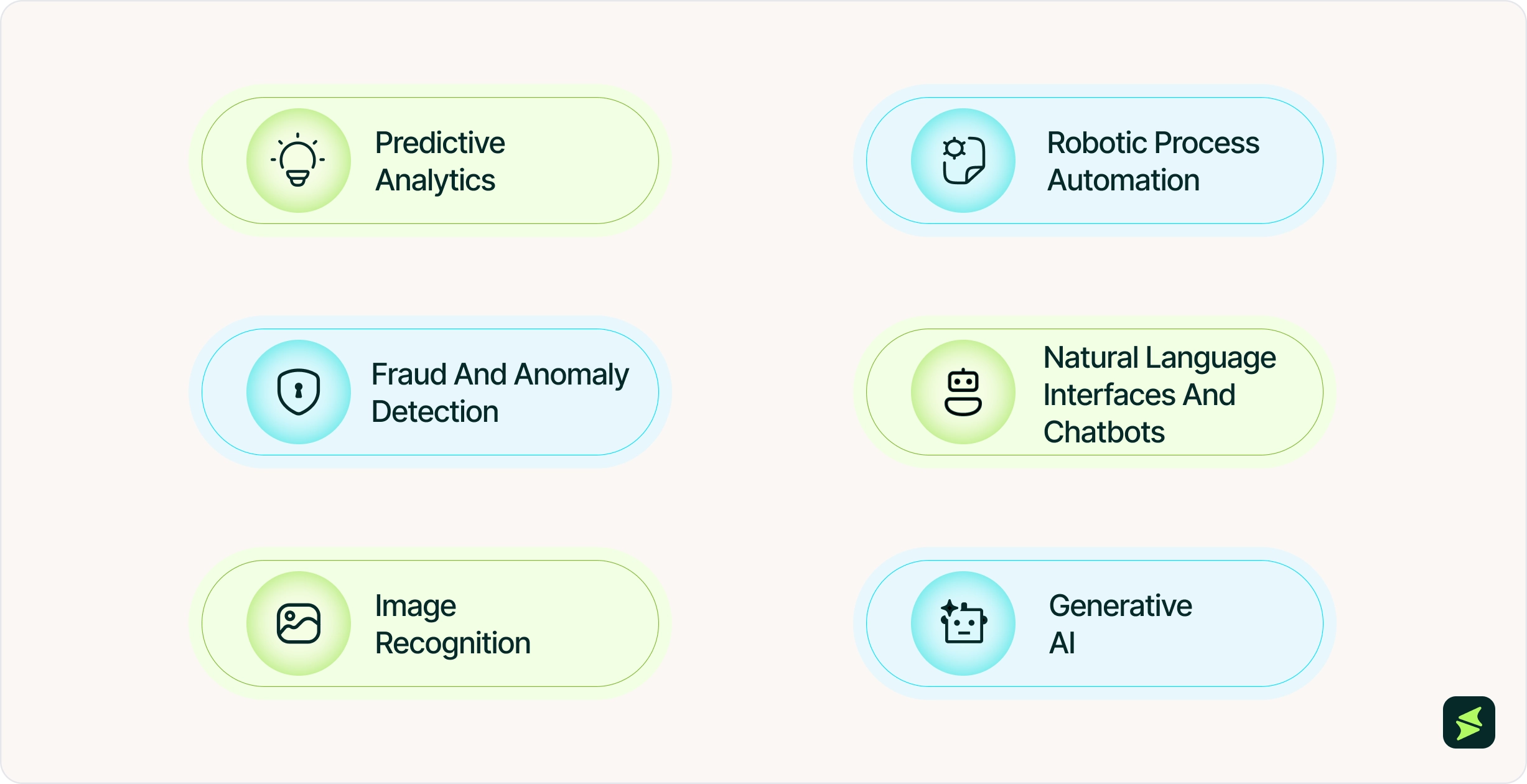
Many of the leading ERP vendors are adding AI capabilities because organizations are reporting measurable business benefits from AI adoption. A report from ResearchGate found that organizations that adopt AI capabilities see an average 20% reduction in operational costs that includes areas such as process execution, administrative overhead, and routine business operations.
However, these findings reflect the organizations included in the study and should not be interpreted as outcomes that apply universally across all businesses.
Here are some of the key AI capabilities that are shaping modern ERP systems:
Almost every vendor now has an AI feature to show. But even in 2026, true autonomy in AI agents is still not possible. Many vendors still require human confirmation before an agent executes anything consequential.
Some buyers believe that "AI is just an automation with better marketing". There is some truth to it. What happens is that few vendors are rebranding automation as AI. They have labeled some features as AI even though they are just rules-based workflows. To these buyers, this feels like fraud. And honestly, the resentment is understandable.
Some vendors charge premium prices for AI features that are fundamentally the same as the automation already found in traditional ERP systems. To avoid this trap, a buyer should know the difference between these two.
And the easiest way to distinguish them is that automation is about process execution, while AI is about decision-making. Here is how buyers can check the difference in practice.
Operational Dimension | Traditional ERP Automation (RPA / Scripts / APIs) | Autonomous ERP Agents (AI-Driven / Goal-Oriented) |
|---|---|---|
Operational Trigger | Requires an exact, structured event (e.g., a specific automated data signal or a user clicking a button) | Triggers based on goals, ambient data changes, or complex contextual anomalies (e.g., detecting a sudden market drop) |
Logic and Execution | Deterministic: Given input X, it will always execute steps A → B → C. It cannot deviate | Non-Deterministic: Given a goal, it formulates a unique plan. It might execute A → D, or bypass steps entirely based on context |
Handling Mismatches | Hard Failure: Relies on exact-match logic, so if an invoice layout shifts, a field moves, or a vendor name is slightly altered, the system misses the mismatch and alerts a human | Contextual Processing: The agent reads the unstructured document, infers intent, extracts fields semantically, and compares it against the vendor's history to catch what exact-match logic misses |
Exception Management | Defensive: It stops the workflow. Humans must manually resolve every edge case, creating massive backlogs | Proactive: It gathers missing data, contacts stakeholders via email to clarify, resolves the issue, and logs the fix |
System Interaction | Connects via rigid API endpoints or pixel-perfect UI paths. Breaks if the ERP interface is updated | Uses multi-modal tools. It can look at screen layouts, use APIs, or search databases like a human user would |
Integration Cost | High. Requires weeks of engineering to build connectors, map data schemas, and test edge cases | Low to Moderate. Plugs into existing communication channels (Slack/Email) and uses natural language to interact with ERP tools |
Scalability Limit | Limited by code complexity. It breaks under the weight of too many "If/Else" programming rules | Limited by policy rules. Scales by giving the AI agent more tools and expanding its operational permissions |
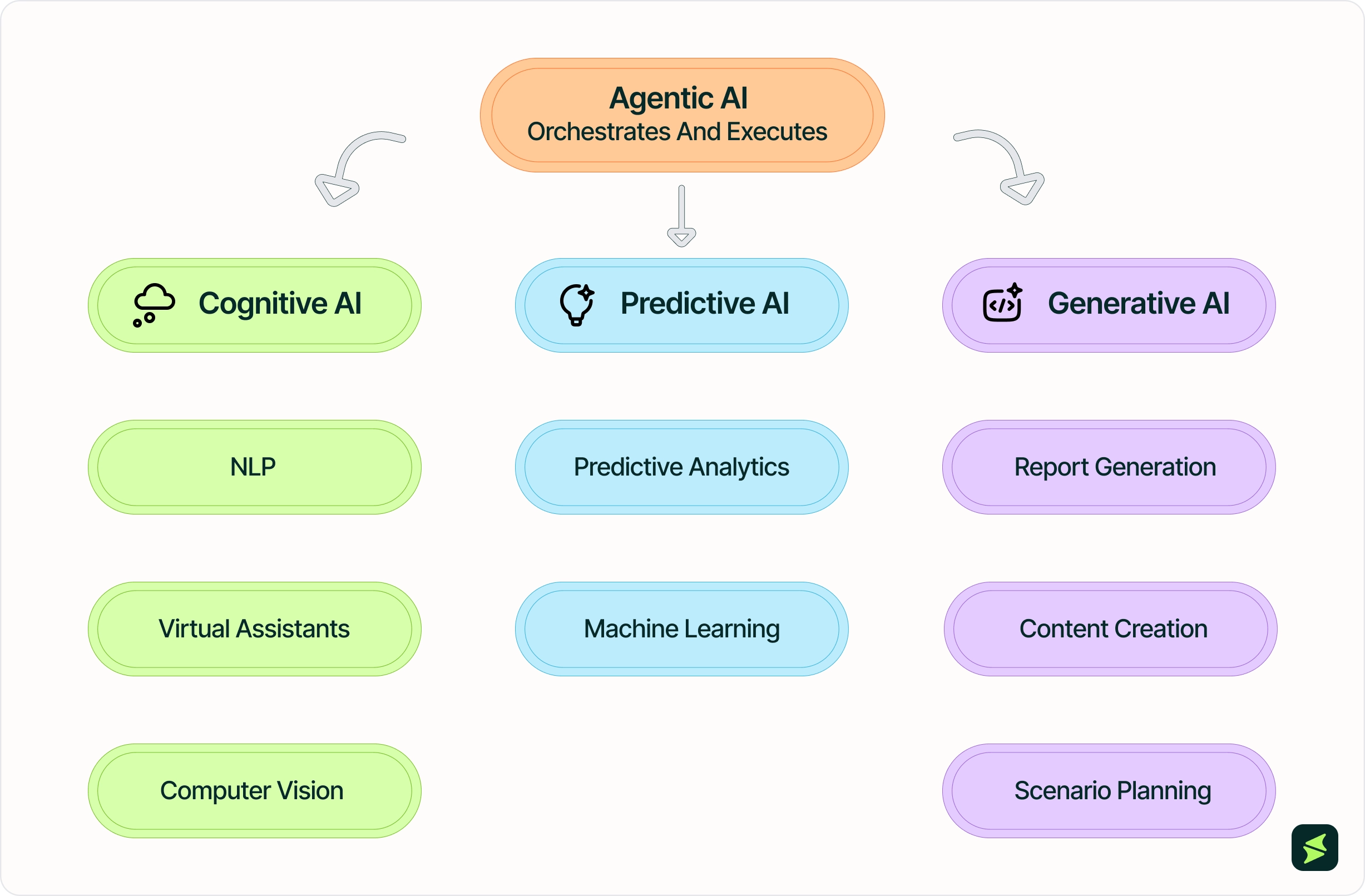
There are three major types of AI used in ERP systems. Cognitive, predictive, and generative AI, each category describes different jobs AI performs inside an ERP. A single AI agent can do all three at once (reading a document, forecasting an outcome, then drafting a summary), which is part of why 'Agentic AI' isn't a fourth category on this list.
Many people mistakenly think Agentic AI is just the next, most advanced type of AI. It is not. Agentic means an autonomous workflow. It is the intelligence layer that decides when to read data (Cognitive), when to analyze data (Predictive), and when to write data (Generative), all without a person connecting the steps manually.
Cognitive AI's job is perception. It turns unstructured input, plain text, speech, scanned documents, into structured data the ERP can understand.
For language, it uses natural language processing (NLP) that lets employees query the system or ask a chatbot a routine HR question in ordinary sentences instead of navigating menus. Computer vision does the same for visual input, reading scanned invoices or shop floor footage and converting them into searchable, structured data. Neither technology predicts an outcome or makes a decision.
In short, traditional ERPs are built for clean data with structured fields. Cognitive AI is what makes them usable in the real workflow.
Predictive AI is about estimation. It uses historical and real-time data to project what's likely to happen next, a demand spike, a cash flow gap, or a fraud pattern before it shows up in your financial records. Predictive analytics does this at the pattern level, while machine learning improves those patterns over time as it processes more organization-specific data.
But the output is still an estimate, not a fact, and its accuracy depends entirely on the data it's trained on. If your inventory data only syncs once a week, for example, your AI is confidently going to forecast a stale number that's already a week behind.
Predictive AI also stops at the recommendation. It provides the forecast, not the action/execution. A human still has to decide whether to reorder, adjust the budget, or override the forecast.
Generative AI's job is creation. It takes raw data and turns it into a finished, human-readable output, a report, an email draft, or a what-if scenario. Within ERP, generative AI applies to three specific use cases. First is report generation that turns raw transactions into a financial summary. On the communication side, it can draft routine HR responses and vendor emails using context already in the ERP.
Third is scenario planning in which generative AI generates several possible outcomes side by side, for example, the cost impact of switching suppliers under different compliance rules.
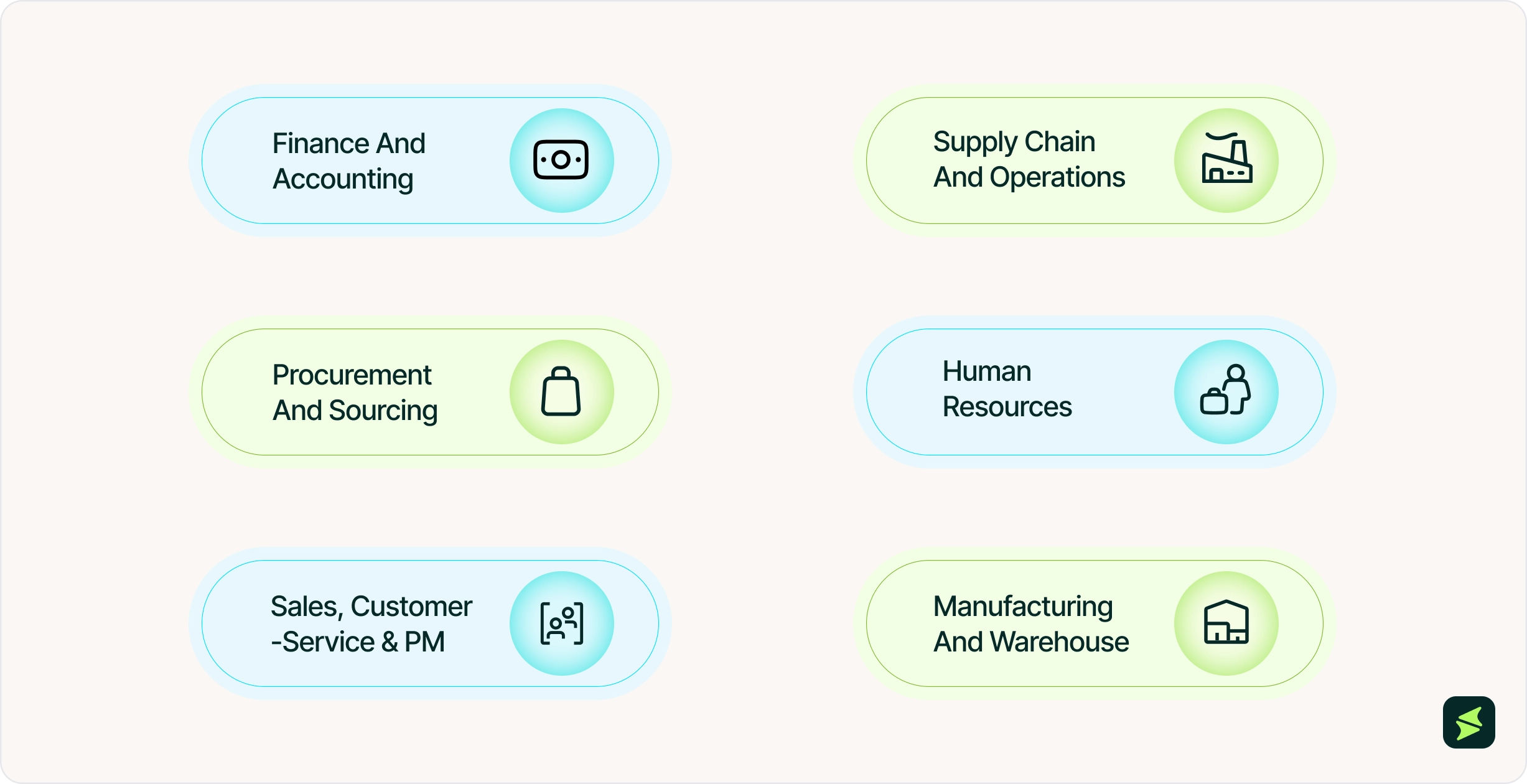
To understand how AI amplifies ERP, you have to look at what these business functions traditionally needed, what AI actually does (the use case in fact), and exactly how it changes the workflow. The AI agent within the ERP works through a consistent pipeline. It takes a user prompt, retrieves live data from the ERP, runs permission checks, applies AI reasoning, validates the result, and then delivers a response or takes action.
Here is how AI fundamentally changes the core business functions within an ERP system:
Finance teams are expected to deliver accurate numbers. They need accuracy, fast monthly book-closing, minimal human error, and a reliable view of future cash to pay bills and invest. AI takes over the mechanical, repetitive matching tasks and uses predictive models to forecast future cash positions, payment delays, and risk patterns.
Here's what AI can do in finance and accounting:
Supply chain teams are responsible for managing transportation, warehouses, inventory, and inbound and outbound logistics. Their goal is to keep the right amount of inventory in the right location at the right time. Because excess inventory eats into margins through storage and holding costs. Insufficient inventory leads to stockouts, where demand goes unmet and revenue is lost.
AI replaces traditional fixed reorder rules with demand forecasting that continuously analyzes sales patterns, inventory levels, supplier lead times, and market trends to predict how much inventory is actually needed and adjusts reorder points accordingly.
In ERP, the procurement module handles supplier identification, contracts, purchase orders, and quote comparisons. The two hardest parts are buying at the lowest cost and avoiding risk hidden inside the contract terms.
Generative AI reads through supplier contracts in seconds to flag unfavorable clauses, auto-generate negotiation points, and recommends alternate suppliers based on real-time market data. It can compare quotes across multiple vendors, and natural language processing automatically cleans and categorizes messy spend data, which allows companies to instantly see where they are overpaying and negotiate better bulk discounts.
HR has two different roles built into its job description. First is hiring new people, and second is monitoring people onsite. HR professionals can compare a resume to a job description on their own. But once employees learn their activity is being scored for flight risk, some may start acting differently on purpose, showing up more, going quiet online, specifically to avoid getting flagged. If that happens, the changed behavior would make the score less accurate over time, since it's no longer reading natural behavior.
AI can help by:
Sales, customer service, and project management share a common dynamic: most incoming work is a repeat of something already handled before (a deal structure similar to one that closed last quarter, a support ticket matching a known issue, a project budget trending off course like a previous one did). Without AI, someone still has to spot that pattern manually and work the case from scratch, even though the solution already exists in past records.
What AI actually does is catch that repetition automatically and surface the matching case, so a person isn't re-solving something that's effectively already been solved once before.
Manufacturing success usually depends on how well a factory balances uptime, quality, and raw material consumption. AI analyzes heat, vibration, and noise data coming from the machines in real time. It predicts a part will fail 2 weeks before it actually breaks, automatically orders the replacement part through the procurement module, and schedules a technician during a planned break. If an unexpected disruption does occur, the AI instantly calculates a new production schedule across the entire plant to keep orders moving.
Vendors sometimes use the same 'AI-powered ERP' label regardless of how the AI is actually integrated. But the integration model matters, because each approach has different strengths and limitations. Here's how to tell the three apart.
This is an entirely new category of ERP software built from scratch, where AI is built as part of the ERP's own code, using the exact same database tables the ERP uses to store transactions. It does not rely on rigid relational databases or traditional menus. Instead, it uses 'agentic workflows'. Autonomous AI agents constantly run in the background, communicating with each other for inventory management, book accounting entries, and handle logistics without needing a human to click through screens.
Example: Emerging, next-generation platforms designed around LLMs (Large Language Models) where the primary user interface is simply a natural language chat box built on top of that AI-native architecture.
Pros | Cons |
|---|---|
|
|
This is a traditional ERP system where the vendor has built AI features later directly into the existing software architecture. It acts as an upgrade to your existing screens, adding smart features to your daily tasks.
Example: NetSuite, an established ERP company, added a new AI forecasting tool to its existing system, one that predicts future sales and demand.
Pros | Cons |
|---|---|
|
|
This approach connects an existing, traditional ERP system to an external, third-party AI tool using APIs (Application Programming Interfaces). The ERP handles standard business operations, while the external AI tool pulls data out of the ERP, processes it, and pushes results back in.
Example: Connecting a legacy version of SAP to a standalone AI platform like OpenAI or an external predictive analytics tool to forecast sales.
Pros | Cons |
|---|---|
|
|

Traditional ERP has long helped businesses automate, align, and integrate core functions such as human resources, supply chain, sales, manufacturing, and finance within a unified system. But AI can accelerate the same process and support human decisions (and can even replace some parts of them). Here are some benefits of AI-Enabled ERP systems:
AI integration in ERP systems typically costs between $20,000 and $500,000 or more for initial implementation and first-year costs, depending on project scope. The final investment depends heavily on business size, system complexity, and whether you choose pre-built tools or fully custom AI models.
Cost Component | Cost Range | Cost Type | Key Risks if Underfunded | Negotiation Tips |
|---|---|---|---|---|
Custom AI Development | $50,000 – $200,000 | One-time | AI models may be inaccurate, and the business impact will be limited | Limit phase 1 to 2–3 high-value use cases, then expand scope later |
Off-the-Shelf AI Tools | $5,000 – $50,000 | One-time | AI remains generic, and automation benefits stay small | Ask for bundled discounts with core ERP and request a pilot or trial period |
Integration and Migration | $20,000 – $80,000 | One-time | Data errors, broken workflows, and low user trust in the system | Get quotes from certified implementation partners and demand a detailed, itemized estimate |
Licensing Fees | $10,000 – $30,000/year | Recurring | Loss of features, delayed upgrades, and weaker support | Negotiate phased licensing by module and lock in 2–3-year fixed pricing |
Maintenance and Support | $10,000 – $50,000/year | Recurring | Models become less accurate over time, performance drops, and users get frustrated | Write clear SLAs into the contract (response time, uptime, performance) and tie support levels to outcomes |
A ready-made/Off-the-Shelf AI feature costs less and takes less time to set up, because it's already built. But an AI model made specifically for one company takes longer and costs more, because someone has to build and train it from scratch. For a large enterprise, this custom-building AI cost with ERP is often the biggest expense in the whole project, bigger than licensing or implementation.
The software quote rarely covers the total cost of a live, successful deployment:
AI cannot replace human business judgement. And that, in itself, is a limitation of AI. Because of its data dependency, a lack of deterministic accuracy for accounting, and inability to understand business strategies, it will always require human oversight. Only humans can flag hallucinated data, bias, and inconsistent outputs, while enforcing compliance with governance requirements.
Forrester predicts half of ERP vendors are expected to launch modules that audit and monitor AI decisions. In other words, the same companies selling AI do not trust it to operate without human checks.
Plus, too much automation can also make a business less adaptable. Because once you automate a process, you're locked into how it works today.
Tax rates and workflow rules stay fixed at their original settings, even after market conditions change. Without regular review, that 'set it and forget it' approach can create compliance risk and inefficiency.
AI also struggles with situations it hasn't seen before. It handles familiar patterns like supplier invoice format it has seen many times, even if it's non-standard invoices. But a completely new kind of disruption still needs a person to decide how to handle it.
What AI Can Do (2026) | What AI Cannot Do (2026) |
|---|---|
Handle short, structured, reversible tasks reliably, typically 3-5 steps at a time | Reliably complete long, multi-step workflows without human checkpoints, since accuracy gets worse with every step added |
Configure standard modules from natural language descriptions, at roughly 85-90% accuracy | Handle complex, non-standard configurations without human review |
Continuously monitor systems for issues and auto-fix problems it has seen before | Reliably catch a problem it has no prior pattern for |
Draft a recommended action, like a supplier substitution or an invoice correction, for a human to approve | Execute that same action autonomously in most vendor systems today, without a confirmation step |
Work reliably as a single agent on one narrow task | Coordinate multiple agents on a complex process without a meaningfully higher failure rate |
Limit the damage once a security issue is detected | Proactively detect every threat. Current systems are built to contain a breach, not catch all of them in advance |
Perform reliably when the systems feeding it are well connected | Stay reliable when the majority of enterprise systems remain disconnected from each other, which is still the norm even at AI-forward companies |
Buying an ERP and buying AI inside that ERP used to be the same decision. Now they're not. A vendor can pass every standard ERP evaluation criteria (modules, integrations, pricing, support) and still have AI features that don't actually work on your data, or don't do anything beyond what a basic rule already did.
The core ERP evaluation checks if the system can run your business. The AI evaluation checks if the AI inside it actually thinks, or if it's just an automation. Here is what to focus on:
Most leading ERP vendors have added AI capabilities to their platforms. But buyers have to ask which specific AI features are live in current customer deployments today, with names of customers using them, not features listed as 'coming this year' or 'in beta.' Because a feature still in development isn't something you can implement today, and without live customer deployments, there's no proof it works.
Before asking what the AI does, list your own top 3 recurring operational problems, like late payments, forecasting errors, or manual invoice entry. Then ask the vendor to show that exact use case. Simply, ask the vendor to demonstrate each use case on a live system.
Ask the vendor to run their AI feature on a sample export of your own data, including duplicate records and missing fields, instead of their clean demo dataset. If they can't do this before purchase, ask why.
Also understand what happens to your data after it's processed. Ask them directly: who has access to your data? If the vendor trains their models on your data, your business logic, pricing, and customer information become part of their system.
That can lead to privacy violations and compliance failures, especially under GDPR, SOC2, or industry-specific regulations.
Check exactly how often the underlying data updates: every few seconds, every hour, or once a day. If it only updates once a day, an order placed or a payment missed right after that update won't show up until the next day's update.
Ask the vendor what the system does when it receives an input it hasn't seen before, like an invoice in an unfamiliar layout. If it adapts and explains its output, that's AI. If it simply errors out or skips the record, that's a fixed rule with an AI label on it.
The real gap between an AI feature's capability and its actual daily use is usually a trust gap, not a skill gap. Staff quietly stop using a recommendation the moment they start doubting the accuracy, because nobody wants to act on a decision they can't explain to their own manager later. So, ask what training comes with the tool, and whether it shows the reasoning behind a recommendation, not just the recommendation itself.
Integrating AI into an ERP is a sequence, not one setup step: you choose which workflow gets it first. If you pick the wrong one to start with, one that's too complex before the AI has had enough runs to prove itself, and it's more likely to make an early mistake.
Your staff will remember that mistake. Eventually, they stop trusting its output and go back to checking everything by hand, even in workflows where it was actually working fine. That reversal is what erases whatever time the AI was supposed to save.
The points below cover how to choose that first workflow, and how to expand from there without triggering that reversal.
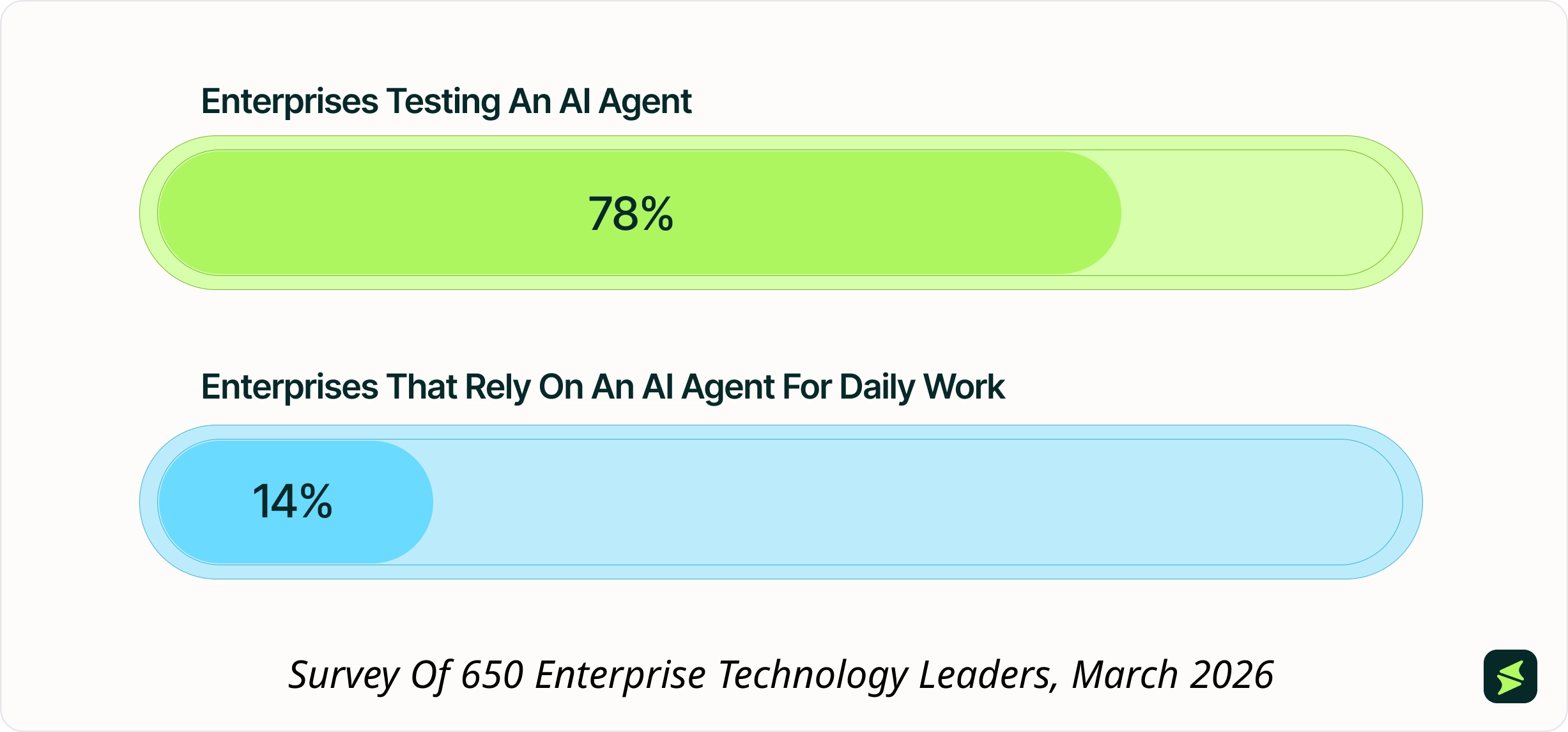
It is understandable why C-suite executives often push for AI-enabled ERP. It seems like they want to post it on their LinkedIn because it makes them look innovative to their board, investors, and LinkedIn network. But considering the pressures they face, the push is understandable. Investors usually want to hear about innovations. And if competitors are launching AI initiatives, they don't want to be left behind.
But the adoption rate is still very low if we look at the market data. Because one of the biggest mistakes people make when they implement AI in ERP is setting unrealistic expectations. Some companies expect AI to eliminate manual processes overnight, clean up bad ERP data, and fix inventory problems on its own. It is not possible. AI can make mistakes if it runs on a disorganized ERP system, which makes it less trustworthy for employees to rely on.
If your existing ERP data is poorly organized during your implementation, AI tools may simply automate existing problems faster. But with the right balance of artificial intelligence with human insights, businesses can achieve consistent, measurable results.
No, AI cannot replace traditional ERP systems. Would you trust a 'guessing machine' with your company's financial records? Not anytime soon, right?
And the reason comes back to the same point this guide opened with. AI needs a deterministic system to draw its facts from, which is ERP software in this case.
What's actually changing is the interface. Many vendors already offer conversational AI, similar to how ChatGPT works, but trained on your own company's data, so a manufacturing business could ask it a direct question and get an answer built from its own production or inventory numbers.
Industry analysts project that by 2028, one in three enterprise software interactions will shift from native apps to AI interfaces.
But conversational AI by itself doesn't complete work. It can respond, summarize, and assist, but it can't reliably execute an end-to-end business task on its own. Right now, an employee can ask a chat window for an overdue invoice status. Having that same AI move the invoice through the approval process on its own is where this is heading next; it just isn't reliable enough to trust with that yet.
For a buyer, that gap matters. Prioritize the AI capability, but plan for human oversight to stay in place for as long as that gap exists.