






Cloud payroll pricing is not as simple as it seems. Most providers mention monthly base fees, but the actual cost depends on several factors such as per-employee fees, paid integrations, global payroll, or tax filings. This appears only when you actually process the payroll.
In this guide, we have talked about pricing models and tiers along with factors you need to consider when selecting a plan.
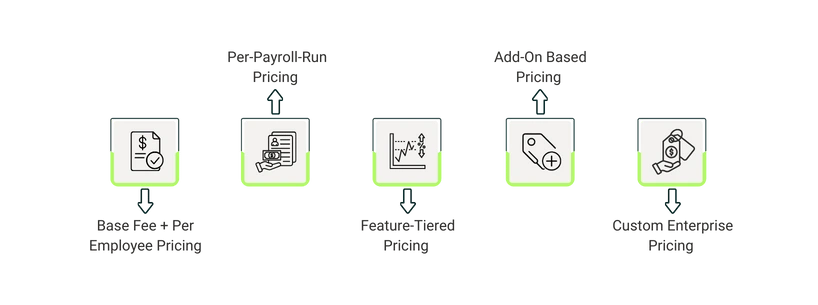
Most providers use various pricing models based on the business size, employee count, and feature requirements. Having an understanding of these pricing structures helps you compare suitable options and avoid unexpected costs.
1. Base Fee + Per-Employee Pricing
This is one of the most commonly used model, in which you are charged a fixed monthly base fee plus per employee rate. You can scale it based on your business size. This structure is suitable for small and mid-sized businesses seeking a regular payroll cycle with predictable monthly billing.
Example: A $40 base fee plus $5 per employee would cost $140/month for 20 employees.
2. Per-Payroll-Run Pricing
For this model, you are charged every time payroll is processed. As each run incurs extra cost, weekly or bi-weekly schedules cost more than a monthly payroll. This is a good option for businesses that hire seasonally and have irregular payroll schedules.
Example: A company with 20 employees running weekly payroll might pay $200/month, while the same company running monthly payroll could pay $60/month.
3. Feature-Tiered Pricing
ln this model, vendors bundle payroll, tax filing, onboarding, benefits, and HR features into tiered plans. Higher tiers cost more as they include advanced features such as automation or compliance tools. This structure benefits companies expecting their payroll needs to expand over time and prefer flexibility to add more features as they scale.
Example: Basic $50/month, Premium $150/month with tax automation and reporting.
4. Add-On Based Pricing
Under this model, extra services, such as multi-state (W-2) filings, payroll across regions, benefits system integrations, or same-day direct deposit, are billed separately rather than bundled. It is ideal for teams that want to keep base payroll low while paying only for features they use.
Example: Base $40/month + $5 per multi-state filing.
5. Custom Enterprise Pricing
Some vendors offer tailored pricing for larger organizations or multi-location teams. The cost is based on workforce size, multi-compliance states, automation customization, integration requirements, and dedicated support.
Example: For 500-employees, multi-state payroll with integrations may cost $1,500–$3,000/month.
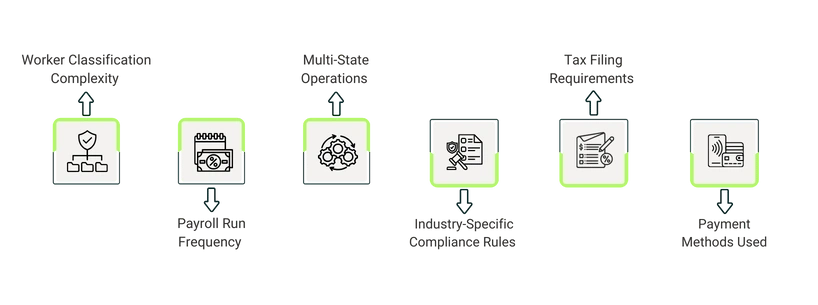
Pricing of cloud payroll is shaped based on the pay schedule and additional services apart from the base subscription. The plans can be adjusted depending on usage, compliance needs, and required automation tools. Below are the main pricing factors:
- Worker Classification Complexity: Most platforms charge per employee per month, so your cost increases as your team expands or when you bring on seasonal staff
- Payroll Run Frequency: Weekly or bi-weekly pay cycles cost more than monthly schedules because each run triggers additional processing
- Multi-State Operations: Supporting employees across several states adds extra fees for state tax setup, filings, and ongoing compliance
- Industry-Specific Compliance Rules: Regulated industries like healthcare, construction, and finance require more frequent compliance checks, which vendors offer in higher tiers and charge more price
- Tax Filing Requirements: W-2s, 1099s, amendments, and year-end filings often carry separate fees unless bundled into a higher-tier plan
- Payment Methods Used: Direct deposit, contractor payments, and same-day or expedited payouts may come with per-transaction fees
Cloud payroll providers structure their pricing into tiers that group features, automation levels, and compliance support. These tiers determine how much you pay each month and what capabilities are included. While names vary across vendors, most cloud payroll platforms follow a similar tier pattern.
1. Basic Tier For Small Business (1-20 Employees)
This tier includes core features like paycheck calculations, employee profiles, and standard direct deposit. Most tax filing services, multi-state support, and year-end forms are somewhat limited. It is ideal for small teams with a single-state payroll and minimal compliance needs.
2. Standard Tier For Mid-Sized Businesses (21–200 Employees)
This tier usually includes automated tax filings, basic reporting, and W-2/1099 preparation. It supports more structured workflows and reduces manual processing as headcount increases. This is suitable for companies running regular payroll cycles with growing compliance needs.
3. Premium Or Advanced Tier For Large Businesses (200–1,000+ Employees)
Expanded automation, advanced error detection, garnishment handling, and integrations with HR or accounting systems are offered in this tier. It is best for large businesses with distributed or multi-state teams
4. Enterprise Tier for Organizations with Multi-State or Multi-Entity Payroll
This tier includes custom integrations, multi-entity management, priority support, and volume-based pricing. It is tailored for organizations operating across several locations or requiring more specialized payroll workflows.
Asking the right questions helps clarify your needs and gives you a realistic picture of what you’ll actually pay each month. Consider the following:
- How many employees and contractors do you pay each month, and will this number change?
- How often do you run payroll, weekly, biweekly, or monthly?
- Are you operating in multiple states or plan to expand into new ones?
- What tax services will you want to include in your desired plan?
- What integrations do you require, such as accounting, Human Resource Information System (HRIS), time tracking, or benefits?
- What type of support or onboarding assistance do you require?
Pro Tip: Sometimes, providers may offer a low base fee, which can mislead users. They charge separately for each W-2, each state's filing, or each additional pay run, making the total monthly cost far higher than expected. Understanding your specific payroll requirements will ultimately determine which plan best fits your business.
In order to select a cloud payroll system, the base fee is just one piece of the puzzle. You also need to assess how each vendor structures its fees for additional services. You need to compare solutions based on your payroll volume, compliance needs, required integrations, and add-ons you expect to use. When you focus on these elements, you can determine monthly costs and pick out a system that fits your budget without incurring unexpected charges.