

Comparison
Connecteam Vs Homebase: Complete HR, Payroll, Compliance, And Scheduling Comparison
9 mins read
Last Updated


By Hina Anwar and


Managing hourly and shift-based teams manually often involves scheduling conflicts, time tracking problems, and compliance concerns. Over time, these issues lead to human resources (HR) workloads. Choosing a suitable workforce management software can simplify operations, reduce mistakes, and improve team accountability.
Connecteam and Homebase both target small to medium-sized enterprises, but they take on HR, payroll, and compliance in different ways. Connecteam provides modular, mobile-friendly hubs for scheduling, task management, training, and employee engagement, giving HR teams control over workflows and accountability. Homebase focuses on per-location efficiency, integrating scheduling, payroll, and compliance alerts to simplify day-to-day workforce management.
This comparison helps HR managers determine which platform fits their team’s structure and priorities. Explore scheduling, payroll, compliance, and engagement tools to make informed decisions that optimize HR processes and reduce administrative workload.
Features | Connecteam | Homebase |
Scheduling And Time Tracking | Drag-and-drop schedules, shift attachments, GPS/geofenced clock-ins, mobile approvals, timesheets. | Drag-and-drop schedules, open shift claiming, shift trades via app, real-time attendance, labor cost tracking via POS. |
Payroll And Compensation | Export-based payroll integrations (QuickBooks, Gusto, ADP, Xero, Paychex); payroll executed outside platform. | Integrated payroll with automated taxes, direct deposits, pay stubs, early wage access. |
Compliance And HR Administration | Document storage, mobile training/onboarding, employee lifecycle tracking, expiration alerts. | Digital onboarding, employee handbook templates, policy sharing, compliance alerts. |
Communication And Task Management | Tasks with checklists/attachments, push notifications, newsfeed, pulse surveys, engagement tracking. | Shift updates, time-off requests, shift swaps, task assignment and notifications. |
Integrations And Ecosystem | Payroll, accounting, communication, POS systems; supports distributed teams. | Payroll, POS, accounting; automatic syncing of schedules, time clocks, and labor data. |
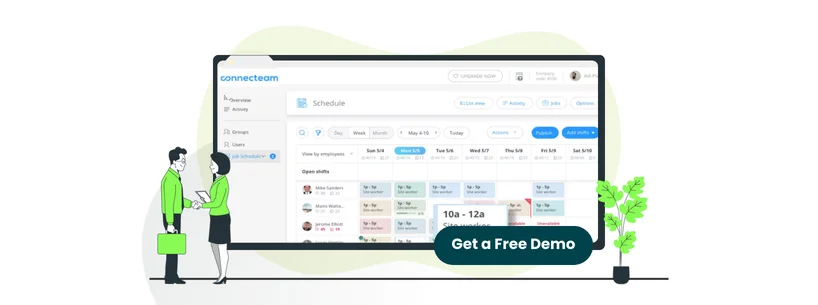
Connecteam is designed for HR teams that manage hourly, shift-based, or deskless employees, especially when those teams are not bound to one location. Instead of only managing payroll and scheduling, it focuses on making day-to-day tasks easier and more organized.
HR teams can assign shifts with task attachments, track employee progress, deliver training modules, monitor certifications, and store critical documents on a single platform. This approach allows managers to reduce follow-ups, maintain compliance, and maintain consistency between teams, without having to manage multiple tools at the same time. Connecteam presents itself as a central location for companies that prioritize internal workflow control, task completion, and employee engagement.
Unique Features Of Connecteam
- Continuous Geofencing For Time Tracking: Makes sure that the employees clock in from fixed locations to provide HR teams with real-time visibility into employee attendance, while preventing time theft, managing overtime alerts, and facilitating accurate payroll from desktop or mobile phones
- Org Chart Builder: Provides HR teams with a visual hierarchy of their workforce, automatically generating and updating the company structure, based on manager relationships. It defines reporting lines, facilitates planning, and speeds up onboarding by making organizational roles and connections visible at a glance
- Learning And Development: Allows HR teams to create and deliver mobile-accessible courses and onboarding materials, track employee progress and completion in real time, and incorporate quizzes and interactive content for continuous skill building and compliance
Connecteam Pros And Cons
Pros | Cons |
|
|
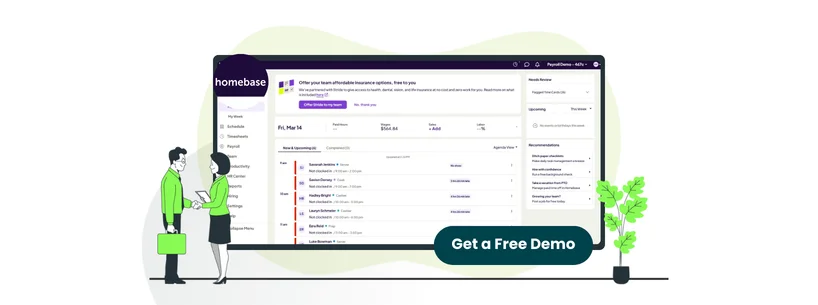
Homebase caters to small to medium-sized businesses with hourly employees and fixed work locations, such as restaurants, retail stores, and local service teams. From an HR standpoint, the platform focuses on simplifying day-to-day workforce administration by integrating scheduling, time tracking, payroll, and hiring into a single system.
The software’s main strength lies in lowering operational friction for managers who need reliable labor coverage, accurate time records, and built-in compliance support without having to maintain separate HR tools. Its features, such as automatic scheduling logic, integrated payroll processing, digital onboarding, and labor law alerts, assist teams in staying compliant while handling labor expenses.
Unique Features Of Homebase
- Built-In Payroll Processing: Automatically syncs schedules and timesheets to calculate wages, taxes, tips, and overtime, which facilitates compliant payroll runs, tax filing, and payments from one system without the need for third-party integrations
- Applicant Tracking And Offer Letter Generation: Lets HR teams manage candidates in a single system, screen applicants, communicate effectively, and send digital offer letters and onboarding documents without having to deal with different hiring platforms
- Photo Verification: Uses individual pins, images, and GPS snapshots to confirm employee hours, prevent buddy punching, enforce geofencing, and provide real-time notifications to maintain accurate payroll and labor compliance
Homebase Pros And Cons
Pros | Cons |
|
|

Connecteam uses a modular, per-user pricing model based on separate product hubs for Operations, Communications, and HR & Skills. Each hub is priced separately, allowing HR teams to pay only for the features they actually use. Small Business Plan costs $0 and is free for life for up to 10 users, making it suitable for early-stage or growing businesses along with a 14-day free trial. Connecteam offers the following pricing plans for all hubs:
- Basic: Starting at $35/month (for the first 30 users) + $0.6/user/month
- Advanced: Starting at $59/month (for the first 30 users) + $1.8/user/month
- Expert: Starting at $119/month (for the first 30 users) + $3.6/user/month
- Enterprise: Custom Pricing
Disclaimer: The pricing is subject to change.
This price structure is valuable for HR teams managing distributed or role-based workforces in which not all employees need the same level of access. However, costs can increase as more hubs or users are added.
In contrast, Homebase offers a per-location pricing model, with most workforce management tools bundled into a single plan for each business location, regardless of employee count. This approach makes budgeting easier for fixed-location businesses with expected staffing needs. Homebase pricing includes:
- Basic: $0 (Free plan for one location with up to 10 employees)
- Essentials: $30/location/month
- Plus: $70/location/month
- All‑in‑One: $120/location/month
Disclaimer: The pricing is subject to change.
Payroll is available as a separate add-on for a monthly base fee of $39 plus $6/paid employee, which can be cost-effective for teams wanting fully integrated payroll and tax filing in the same system.
Takeaway: Connecteam is best suited for teams needing flexible and scalable feature plans, while Homebase is beneficial for small businesses looking for upfront monthly pricing and integrated workforce management.

Connecteam and Homebase address different HR requirements, which makes picking the right one dependent upon the nature of your workforce and business objectives.
Connecteam is best for mobile or field teams that require flexible scheduling, geofenced time tracking, mobile training, and task coordination. Its modular design lets HR teams expand features and connect with payroll providers while following compliance policies and maintaining employee accountability.
Homebase is ideal for fixed-location teams looking for simplicity and efficiency. Integrated payroll, automated tax filings, compliance alerts, and synchronized POS/accounting systems reduce HR workload and maintain accurate labor tracking.
You must weigh your workforce distribution, payroll preferences, and compliance priorities. Both platforms lessen administrative effort, improve time-off tracking, and strengthen compliance, but the final choice comes down to the scale and structure of your workforce.