



The majority of law firms are already using legal technology in some way, but its role has changed fast in recent years, and it isn't the same anymore. What legal technology means today is entirely different from what it meant five years ago. AI now manages most of the legal work that used to require paralegals and junior associates to spend hours completing. Additionally, it not only conducts legal research but also automatically reviews contracts.
The only hurdle is understanding what these technologies can actually do for your firm and how to integrate them into your operations. This guide clarifies both. It will explain the major types of legal technology available today, what each category delivers in practice, and how to determine which tools address your firm's actual operational needs.
The term ‘Legal Technology’ or ‘Legal Tech’ refers to a variety of digital platforms used to automate, streamline, and enhance the overall efficiency of a lawyer's firm. Moreover, these platforms also improve communication and collaboration between clients and attorneys. Legal Tech includes all sorts of applications that help automate routine tasks, such as contract review, electronic discovery, and document management.
Law firms that use modern legal technology generate higher revenue, retain more clients, and operate with lower overhead than competitors that rely on manual processes. This competitive advantage comes from practical improvements that legal technology brings to daily operations.
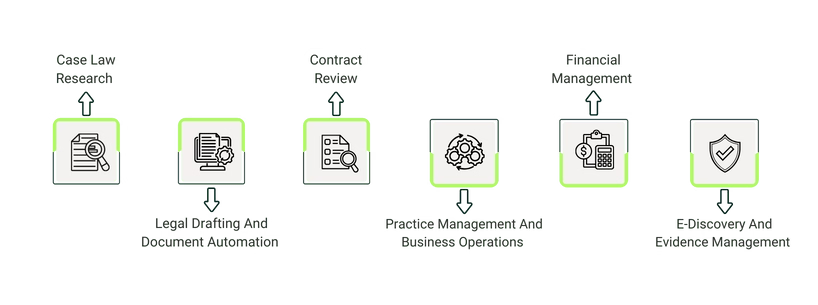
1. Case Law Research
Regardless of the level of experience - novice, intermediate, or senior - case law research is an essential tool for every lawyer. The most useful case law research tool streamlines queries for quick, accurate results while offering a well-organized system for absorbing content and connecting interrelated cases.
AI-assisted legal research tools are empowering lawyers by enabling them to start their research faster and provide answers sooner than ever before. As a result, the time lawyers previously spent researching legal information has greatly decreased because the AI handles this aspect of research for them.
Key Features To Look For:
- Comprehensive database coverage (federal and state)
- AI capabilities that understand legal language
- Integration with your document management system
- Citation verification that catches outdated or overturned cases
2. Legal Drafting And Document Automation
Drafting technology reduces errors and shortens legal document creation time. Lawyers use generative AI drafting tools to find starting points in the drafting process, quickly detect changes, and efficiently finalize documents.
Through drafting technology, lawyers can prepare, format, and review a legally compliant document for their client in a matter of minutes or submit a legally compliant electronic document (e-file) to the court.
The Advantages Of Document Automation
Document automation makes document creation easier with a few clicks, eliminating the need to recreate boilerplate contracts or other agreements repeatedly. Instead, it allows attorneys to become more efficient and to focus on providing better service to their clients through technology.
What This Means For Your Practice
- Estate planning firms generate complete document sets in minutes
- Corporate attorneys customize standard agreements quickly
- Litigation teams produce consistent, error-free pleadings
- New associates access templates with embedded guidance
3. Contract Review
Using AI to review contract documents and identify potential issues is like having a digital assistant always available. AI technology enables users to access many thousands of documents when searching for an indemnification clause, a sunset provision, or a liability clause.
It retrieves results in seconds. Instead of simply searching for a particular word within a document, AI will search based on the meaning of the specific legal concept, the author's intent, and the patterns of word use within the document.
Real-World Applications
Mergers & Acquisitions (M&A) due diligence used to mean junior attorneys spending long hours reviewing large volumes of documents, often under tight deadlines. Nowadays, lawyers work in paperless environments, with the benefit of using databases digitally and quickly analyzing and presenting their findings with AI tools.
For example, when a lawyer wants to review a seller's records to determine whether the company has non-compete agreements with its staff, due diligence tech enables them to do so with unprecedented speed and efficiency.
4. Practice Management And Business Operations
Numerous legal practice management and business operations applications exist to optimize a firm's operations. These types of applications allow lawyers and legal support staff to collaborate on legal documents at a higher level. This helps them access relevant legal and business information without going through several different databases.
To get a clearer picture of which platforms handle these operations in practice, it helps to look at the specific software law firms use for case management, billing, document storage, and client communication.
Core Capabilities
- Matter Management: Centralized source for legal matter details throughout the matter's lifecycle
- Time And Billing: Automated invoice workflows and auditing tools that improve accuracy
- Client Communication: Secure portals where clients can track progress and share documents
- Document Management: Organized storage with version control and access permissions
Why Integration Matters
When case management, billing, and communication operate in separate systems, your team ends up consuming time entering duplicate information and reconciling data. Integrated platforms eliminate these kinds of inefficiencies.
5. Financial Management
To achieve cost savings by improving operational efficiency and reducing operating expenses, corporate legal departments use artificial intelligence (AI) as a central repository for their financial data. The use of automated invoice review and approval systems enables quicker workflow turnaround times, improving processes.
The use of auditing software increases invoice accuracy and reduces the likelihood of errors. Additionally, it allows corporate legal departments to analyze invoice rates and benchmark them against current market trends in real-time.
This shift toward AI-driven financial oversight is part of a broader wave of emerging legal technology trends, from cloud adoption to cybersecurity, that are actively reshaping how law firms manage both their cases and their costs.
Tracking Outside Counsel Spend
One effective way to lower outside counsel costs is to track legal spending more accurately. Spend management tools provide clear visibility into where costs are going and highlight areas where they can be reduced. For example, these tools let you compare your legal spend with what similar companies in your industry pay for outside counsel, helping you spot pricing gaps.
6. E-Discovery And Evidence Management
How do you improve case management efficiency? Employ tools to organize and share evidence with all essential parties in a case. These systems allow attorneys to view court reports, conduct research, analyze discovery documents, and create a timeline to review all pertinent evidence. Lawyers can also watch depositions being taken from anywhere and collaborate in real time with their staff.
The Transformation
Now, attorneys can perform due diligence in a paperless manner and access databases with all types of information related to companies (corporate filings, federal employer identification numbers (FEINs), dockets, etc.) from anywhere. AI systems quickly analyze large amounts of data and provide attorneys with the information they need in a required format.
Implementation is where most legal technology investments fail—not because the software doesn't work, but because firms underestimate the human challenges of adopting new systems. Understanding the actual problems legal professionals face during technology transitions helps you plan for them.
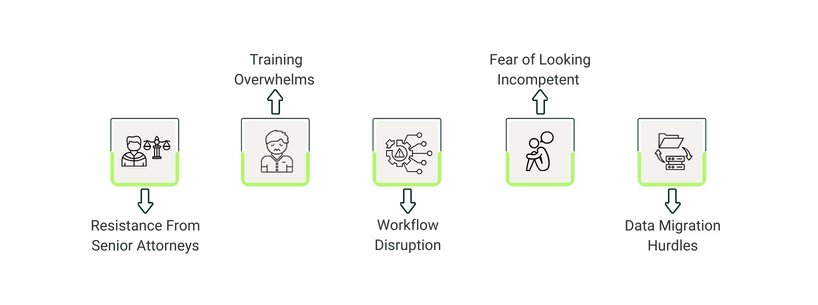
Real Resistance You'll Encounter:
- Resistance From Senior Attorneys: Older partners don't want to learn new systems - they're comfortable with how they've always worked. They usually say, "I've practiced law for 30 years without this, why do I need it now?"
- Training Overwhelms: Staff get frustrated when they have to learn while still doing their regular work. They feel it's an extra burden without an immediate payoff.
- Workflow Disruption: During the transition, work slows down as people learn. Cases still need attention, but everyone is adjusting to new processes.
- Fear of Looking Incompetent: No one wants to ask "premature questions" about basic software features in front of colleagues, so they struggle quietly instead of getting help.
- Data Migration Hurdles: Moving years of files and client data from old systems to new ones without losing anything or creating chaos.
What To Look For When Choosing Legal Tech Software For Easy Implementation
First, check if the interface is complicated or straightforward. If senior partners are hesitant to complete routine tasks, they won't use it regardless of its capabilities. The second thing to check is vendor training and support. How much training does the company provide? Just one introductory webinar isn't sufficient; you need responsive customer service.
Plus, it must integrate with your existing tools. For example, with your current email, calendar, accounting software, or any other tool you might use. Lastly, it's best if the software supports a gradual rollout. Because with this functionality, you can implement phase-wise (first one department, then another).
If you're ready to move from evaluation to selection, reviewing the best legal software options currently available can help you shortlist platforms that meet these implementation criteria, with verified ratings, pricing, and feature comparisons across leading tools.