


Poster POS
Last Updated
Overview
Poster POS is a smart, cloud-based point-of-sale system for cafes, restaurants, and retail businesses. Although occasional bugs occur in packaging and supply adjustments, Poster POS provides detailed analytics for better decision-making. The seamless order processing, real-time inventory tracking, and intuitive analytics optimize your operations and enhance customer experiences.


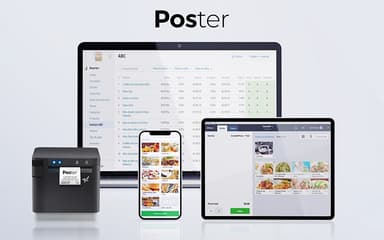
Poster POS Specifications
- Sales Orders
- Invoicing
- Sales Tracking
- Customer Management
What Is Poster POS?
Poster POS is a reliable cloud-based POS solution built for cafes, restaurants, and retail stores. It helps businesses systemize daily operations with fast order processing, inventory control, and employee management. It supports modern interface and mobile accessibility, enhancing efficiency and customer satisfaction. Poster POS software is trusted by businesses worldwide for its user-friendly, affordable, and advanced features. Therefore, the software is a considerable option for growing businesses looking to modernize their sales and management processes.
Poster POS Pricing
- Mini: $29/month (Monthly payment) or $24/month (Annual payment)
- Business: $49/month (Monthly payment) or $44/month (Annual payment)
- Pro: $69/month (Monthly payment) or $64/month (Annual payment)
So, get a detailed analysis of the Poster POS cost packages to pick the one that fits your business needs and budget. Moreover, the software also comes with a 15-day free trial option.
Disclaimer: Prices are subject to change.
Poster POS Integrations
Poster POS integrates with over 20 different apps, including:
- Poster QR
- Cloudbeds
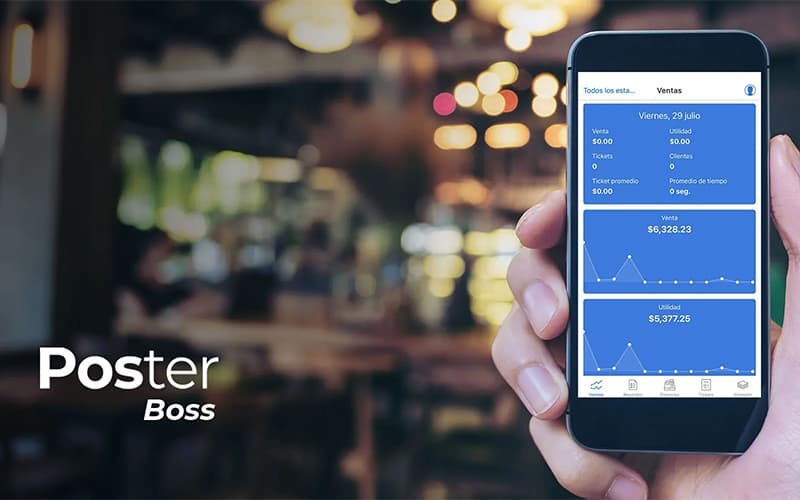
- Poster Boss
- Xero
- Kitchen Kit
- P&L
- Hey Waiter!
Who Is Poster POS For?
Poster POS serves a wide range of food and beverage businesses, including restaurants, coffee shops, bars, bakeries, and franchises. It also helps businesses that focus on delivery services and is successfully used by:
- Fast food outlets
- Food trucks
- Candy shops
- Gift shops
- Pizzerias
- Sushi spots
- Pubs
- Dark kitchens
Is Poster POS Right For You?
Poster POS is a considerable choice for restaurants, cafés, bars, and food businesses looking for an easy, all-in-one solution to manage orders, inventory, and sales. Whether you run a food truck, bakery, or franchise, it simplifies daily tasks with automation, loyalty programs, and delivery management. If you want efficiency and growth, Poster POS is the one for you.
Are you still not sure about Poster POS? Contact us at (661) 384-7070, and our support staff will assist you with any further queries.
Poster POS Features
Point of Sale
This feature helps transform any tablet, laptop, or PC into a full-fledged POS system. It allows staff to take orders, accept payments, manage tables, and even operate offline, ensuring smooth service and faster transactions.
Analytics
With this feature, businesses can track sales, monitor trends, and make informed decisions. It enables users to access real-time reports from anywhere. It also assists in optimizing operations, identifying top-selling items, and understanding customer preferences.
Menu
It simplifies menu creation by organizing ingredients, dishes, and pricing in one place. Moreover, it allows businesses to track food costs, manage modifiers, and update prices instantly, ensuring an efficient and profitable menu.
Inventory
Poster POS helps track stock levels, manage supplies, and reduce waste. It ensures that businesses never get short of ingredients and keeps operations running smoothly through real-time monitoring and automated alerts.
Finance
This feature provides clear financial reports, such as P&L and cash flow statements. It minimizes manual work by automating calculations, giving businesses a true picture of their financial position at any time.
Marketing
It helps attract new customers, boost profits, and encourage repeat visits by offering loyalty programs, promotions, and personalized discounts. The feature also enhances customer engagement and increases sales by integrating with marketing tools.
Pros And Cons of Poster POS
Pros
Offers detailed analytics for better decision-making
Supports multiple devices, including tablets and phones
Flexible system with customizable menu options
Stable and efficient for restaurant order management
Cons
Occasional bugs in packaging and supply adjustments
Limited ticket printing customization options
Lacks frequent updates or feature improvements
Poster POS Reviews
Total 2 reviews
5
All reviews are from verified customers
Rating Distribution
5
Stars100%
4
Stars0%
3
Stars0%
2
Stars0%
1
Stars0%
Share your experience
Hospitality, 1-10 employees
Less than 6 months
“Able to learn all easily”
Pros
Poster POS is easy to use once I get the hang of it. Plus I really love the analytics as they help me make better decisions. I also like the support as it is reliable and timely.
Cons
So far there is nothing I do not like. It's been serving me well up until now.
Rating Distribution
Ease of use
9
Value for money
10
Customer Support
8
Functionality
8
Food and Beverages, 11-50 employees
Less than a year
“Works well and keeps evolving”
Pros
Not only is it really flexible but simple to use and very fast. In short it gets the job done for me.
Cons
There are a few bugs to watch out for. For example when I change the packaging type during supplies, sometimes the numbers in the amount field disappear.
Rating Distribution
Ease of use
10
Value for money
9
Customer Support
10
Functionality
9
Frequently Asked Questions
Who are the typical users of Poster POS?
The typical users of Poster POS include coffee shops, bakeries, bars, and restaurants. It is also regularly used by fast food outlets, food trucks, pizzerias, sushi spots, pubs, dark kitchens, candy shops, gift shops, and franchise owners.
Does Poster POS offer an API?
Yes, Poster POS provides an API.
What types of pricing plans does Poster POS offer?
The Poster POS cost consists of three plans: Mini ($29/month), Business ($49/month), and Pro ($69/month). Furthermore, a 15-day free trial for Poster POS is also available.
Does Poster POS have a mobile app?
Yes, Poster POS has a mobile app for Android and iOS users.
What other apps does Poster POS integrate with?
Poster POS integrates with various apps, including Poster Boss, Cloudbeds, P&L, Kitchen Kit, Poster QR, Hey Waiter!, and Xero.
What languages does Poster POS support?
Poster POS supports various languages, including English, Spanish, Russian, and Ukrainian.
What level of support does Poster POS offer?
Poster POS offers support through chat, phone, and a knowledge base.