


Latitude WMS
Last Updated
Overview
Latitude WMS streamlines warehouse management to improve inventory accuracy and workflow efficiency. Although its extensive customization options can result in a longer implementation process, Latitude WMS remains a robust solution for businesses seeking to optimize logistics and adapt to complex supply chain demands.
Latitude WMS Specifications
- Inventory Management
- Order Fulfillment
- Procurement Management
- Logistics & Transportation
What Is Latitude WMS?
Latitude WMS is a cloud-based warehouse management software designed for businesses in the distribution and logistics industries. It offers comprehensive solutions that enhance inventory control, streamline warehouse processes, and optimize overall supply chain efficiency. The software helps companies address common challenges such as managing complex inventories, optimizing storage, and improving order fulfillment accuracy. Several users laud Latitude WMS for its efficient abilities to streamline sales, cash flow, and profitability.
Latitude WMS Pricing
So, request a detailed analysis of the Latitude WMS price tailored to your business.
Latitude WMS Integrations
Who Is Latitude WMS Software For?
Latitude WMS software is for businesses of all sizes across various industries, such as:
- Electrical distribution
- Retail distribution
- Wholesale distribution
Is Latitude WMS Right For You?
As a reliable choice in the supply chain management and distribution industry, Latitude WMS has earned a strong reputation for its scalability and adaptability in managing diverse warehousing needs. Since it provides real-time visibility and robust operational tools, the software helps businesses reduce errors, cut costs, and boost productivity. That’s why Latitude WMS serves thousands of businesses worldwide, including Guspro Inc., The Peelle Company Ltd., and Red-L Distributors Ltd.
Still not sure about Latitude WMS software? Contact us at (661) 384-7070 and get expert assistance regarding any further queries.
Latitude WMS Features
Slotting Optimization
It ensures that inventory is stored in the most efficient locations based on demand and item characteristics. This feature reduces travel time for warehouse workers. It improves picking efficiency, ultimately speeding up order fulfillment and reducing operational costs.
Tool Crib Management
The feature tracks the availability and usage of tools in a warehouse or distribution center. It helps prevent tool shortages, ensures tools are maintained and returned, and reduces downtime caused by misplaced or broken tools, enhancing overall productivity.
Serial Number Tracking
The software enables businesses to trace individual items using their unique identifiers. It ensures better accountability, improves product traceability for quality control, and aids in warranty management to reduce potential losses or misplacements.
Lot Control And Inspection
Latitude WMS enables companies to manage inventory in batches or lots, ensuring quality compliance. It supports regulatory requirements and helps quickly identify defective products. The software assists in minimizing waste, reducing recall risks, and providing customer safety and satisfaction.
Consignment Inventory
Users can manage stock owned by a supplier but stored at their facility through this feature. It enables better inventory visibility, reduces the risk of stockouts, and ensures that goods are only paid for when used or sold, improving cash flow management.
Pros And Cons of Latitude WMS
Pros
Streamlines warehouse operations for improved efficiency
Robust customization options for tailored workflows
User-friendly interface simplifies training and onboarding
Real-time inventory tracking ensures accuracy
Seamless integration with ERP systems
Cons
Requires robust IT infrastructure for optimal performance
Some users suggest adding more offline functionalities
Initial setup may be complex for smaller teams
Latitude WMS Reviews
Total 4 reviews
5
All reviews are from verified customers
Rating Distribution
5
Stars100%
4
Stars0%
3
Stars0%
2
Stars0%
1
Stars0%
Share your experience
Wholesale, 51-100 employees
More than a year
“A powerful WMS that keeps up with us”
Pros
I love how Pathguide's support team is always there to help whenever we run into an issue. Also it is highly customizable and integrates seamlessly with our ERP, SAP Business One. We handle dozens of pallets every month with over 20,000 different SKUs and Latitude keeps everything running smoothly without causing any trouble.
Cons
The system is really powerful and loaded with features. Like there are tons of options, tweaks, buttons and dropdowns. That's definitely great but it can feel a bit overwhelming for new users. The result of it is that if someone in our team starts changing settings without fully understanding them, it lead to some issues.
Rating Distribution
Ease of use
8
Value for money
10
Customer Support
10
Functionality
10
Medical Devices, 51-100 employees
More than a year
“Proven quite beneficial for us...”
Pros
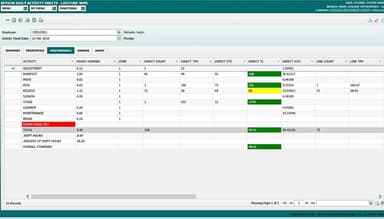
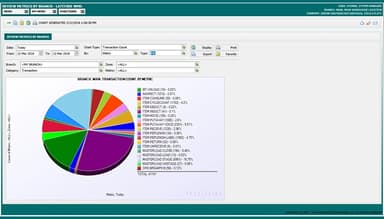
Latitude has completely changed how we manage our inventory and track user performance. Before, things were a bit disorganized, but now everything runs way smoother. The Pathguide team really stands behind their products (WMS/LMS) and their support has been awesome. My favorite part? The metrics and KPIs. They help track performance, time management and problem areas, especially when it comes to employee reviews.
Cons
We only had to find a workaround for the returns process. If we get defective products back and process the return through WMS, our ERP registers it as restocked before a return to vendor is approved. This means it could get allocated to a back-ordered sale by mistake. To avoid this, we process returns through the ERP first and if the product is good to go back into stock, we add it in Latitude.
Rating Distribution
Ease of use
10
Value for money
10
Customer Support
10
Functionality
10
Warehousing, 51-100 employees
More than a year
“Delivers what it promises”
Pros
So easy to use and it covers everything I need. Plus, their support is great.
Cons
Honestly, I haven't come across anything that I didn't like.
Rating Distribution
Ease of use
10
Value for money
10
Customer Support
10
Functionality
10
Frequently Asked Questions
Does Latitude WMS offer an API?
No, Latitude WMS doesn’t provide an API.
What language does Latitude WMS support?
Latitude WMS supports English.
What other apps does Latitude WMS integrate with?
Schedule a free Latitude WMS demo to learn about its integrations.
Does Latitude WMS have a mobile app?
No, Latitude WMS does not have a mobile app.
What type of pricing plans does Latitude WMS offer?
The Latitude WMS price is custom and depends on your business needs. Users can get custom pricing of Latitude WMS software specific to their organization.
Who are the typical users of Latitude WMS?
The typical users of Latitude WMS are those in the electrical distribution, wholesale distribution, and retail distribution industries.
What level of support does Latitude WMS offer?
Latitude WMS offers support through form submission, support portal, and phone.