


Last Updated
Overview
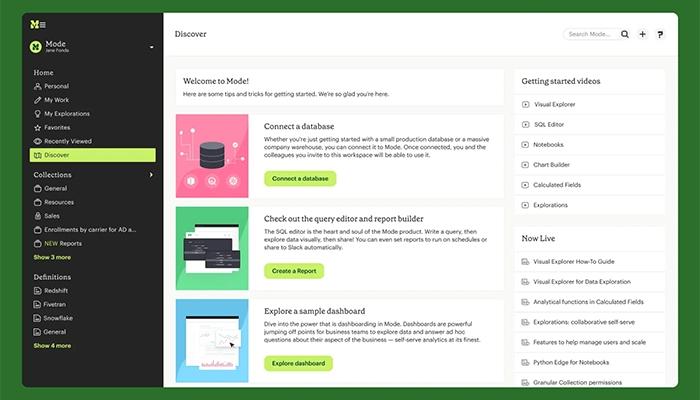
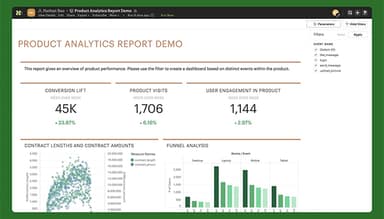
Mode analytics software combines ad hoc analysis and self-serve reporting, streamlining data workflows. While its advanced capabilities can be complex for beginners, it empowers teams to model, visualize, and share insights effectively. Overall, Mode’s collaborative platform is ideal for businesses aiming to make data-driven decisions quickly.
Mode Software Specifications
- Data visualization
- Customizable dashboards
- Data analysis and reporting
- Scheduled Reporting
Mode Software Features
SQL Editor
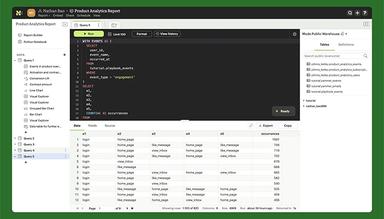
Mode features SQL editor, which lets users query connected cloud data warehouses efficiently. It supports quick iteration through datasets, enabling seamless exploration and visualization creation from a single query. This empowers analysts to deliver insights faster, enhancing business decision-making.
Python and R Notebooks
Integrated Python and R notebooks enable users to perform advanced statistical analysis and create custom models directly within Mode. This bridges SQL data exploration with powerful coding capabilities, enabling deeper insights and more precise predictions.
Visual Exploration
This feature offers an intuitive interface for non-technical users to analyze and interact with data visually. By simplifying the exploration process, it promotes data-driven decisions across teams without requiring coding knowledge.
Identity Management and Provisioning
Mode includes robust identity management tools, integrating with single sign-on (SSO) systems to streamline user access control and ensure security. It simplifies onboarding while maintaining compliance with organizational security policies.
Pros And Cons of Mode Software
Pros
Mode is straightforward to set up, use, and organize
It supports Python and SQL for sophisticated data analyses and queries
Generates impressive dashboards and reports, helping visualize data effectively
Enables easy collaboration by allowing reports to update for all users when changes are made
Adaptable to various data sources and integration needs
Cons
Requires significant training for those unfamiliar with SQL or analytics platforms
Some options require unnecessary steps and could be more intuitive
Does not effectively catch syntax errors in queries early in the process
Mode Software Reviews
Total 11 reviews
4.2
All reviews are from verified customers
Rating Distribution
5
Stars27%
4
Stars64%
3
Stars9%
2
Stars0%
1
Stars0%
Share your experience
Filippo
IT, 500+ employees
More than a year
“An incredibly powerful reporting tool of our data”
Pros
The ability to apply various filters to break down data across different dimensions is really useful.
Cons
The lack of customization in the interface is noticeable. The user interface can feel clunky and not as intuitive as it should be, which means the learning curve is steeper than necessary for someone working independently.
Rating Distribution
Ease of use
6
Value for money
7
Customer Support
7
Functionality
6
Gaurav
IT, 500+ employees
Less than 6 months
“Its really useful for attribution modeling”
Pros
It's a great way to track performance across different teams, offering multiple features that can be used simultaneously by different people from various teams.
Cons
The platform is expensive to use and tends to give errors when running queries multiple times. Also, tracking can be buggy if there's something from the engineering team affecting it. It requires very precise data science modeling and the initial definitions can be tough to understand, meaning a lot of the information needs to be stored in Confluence.
Rating Distribution
Ease of use
8
Value for money
7
Customer Support
8
Functionality
8
Anonymous
IT, 500+ employees
More than a year
“Great for data handling”
Pros
Mode Analytics makes it easy to connect, analyze and visualize data from multiple sources, which is perfect for SEO data analysis. Its SQL interface lets me craft complex queries and dive deep into the data to uncover key trends and insights. Plus the ability to collaborate on reports and analyses with teammates and stakeholders makes it easy to make data-driven decisions. The platform also offers many visualization options, which helps communicate data insights clearly to both my team and clients.
Cons
The steep learning curve for the SQL-based interface makes it difficult for new users to fully take advantage of the platform's potential. Also the pricing can be expensive, especially for larger teams or organizations with many users.
Rating Distribution
Ease of use
8
Value for money
7
Customer Support
8
Functionality
9
Frequently Asked Questions
Does Mode software offer an API?
Yes, Mode software offers an API.
What other apps does Mode software integrate with?
Mode software integrates with Oracle Snowflake, MariaDB, Impala, Amazon Athena, and more.
Does Mode software have a mobile app?
No, Mode software does not have a mobile app.
What type of pricing plans does Mode software offer?
Mode analytics pricing depends on your business needs. Users can also get pricing for a tailormade plan.
Who are the typical users of Mode software?
The typical users of Mode software are those in the transportation, real estate and sports industries.
What level of support does Mode software offer?
Mode software offers email, chat, phone support and Knowledge Base.