


Boomi
Last Updated
Overview
Boomi helps large enterprises unify fragmented systems and automate business processes with AI-driven integration and automation. While complex, high-volume transfers can affect performance, its strong governance and extensive connectivity make it a reliable platform for driving digital transformation.
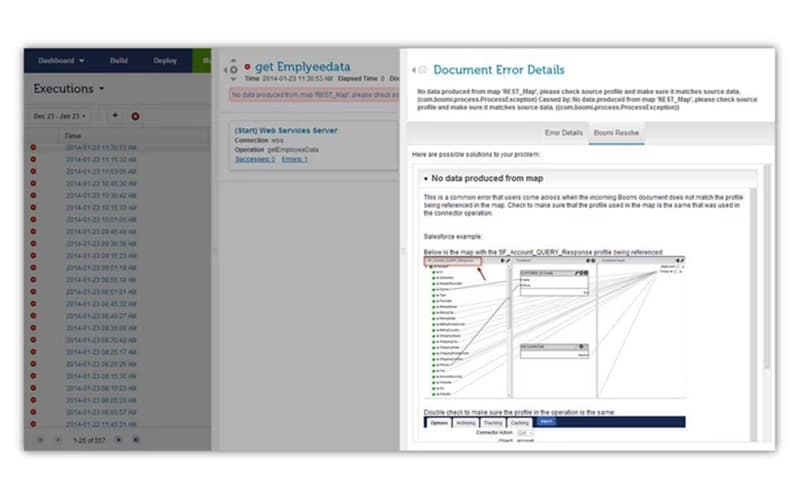
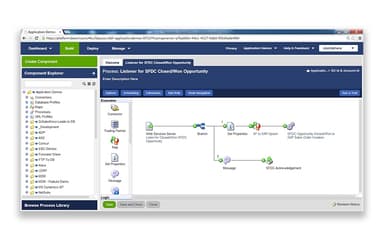
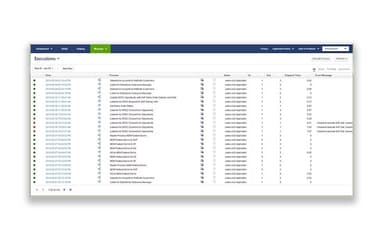
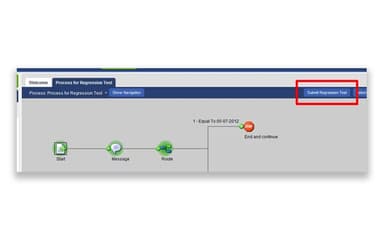
Boomi Specifications
- Automation
- Bot Design & Deployment
- Multi-Language Support
- Context Awareness
Boomi Features
Boomi Data Management
Boomi helps organizations connect, clean, and synchronize data across different sources and systems. It creates trusted golden records by matching and validating fragmented data. Meanwhile, it keeps information updated across operational platforms. Teams can also add shared business definitions and governed knowledge, so AI agents can work with accurate data and the right business context.
Integration And Automation
The platform brings applications, APIs, data, and AI agents together through pre-built connectors and reusable integration recipes. Its AI-guided tools can assist with data mapping. Furthermore, hybrid deployment supports integrations across cloud, on-premises, and edge environments. Teams can also extend these integrations into API management, EDI, data management, and workflow automation without moving to separate platforms.
Boomi API Management
With this feature, organizations can bring APIs from different gateways into one governed environment and maintain visibility across their API landscape. It covers the full API lifecycle, from design and discovery to security, policy management, traffic control, and performance monitoring. AI-assisted tools can generate API specifications and documentation, while MCP support lets teams expose selected APIs and integrations as governed tools for AI agents.
Boomi Agentstudio
Boomi brings the full AI agent lifecycle into one environment, covering agent creation, testing, governance, and orchestration. Teams can build no-code agents using business data, knowledge bases, APIs, and MCP-enabled tools. They can then register agents from both Boomi and third-party providers. Real-time monitoring, audit logs, guardrails, anomaly detection, and a kill switch give organizations greater control over agent activity.
Pros And Cons of Boomi
Pros
Easy-to-use drag-and-drop interface for building integrations
Wide range of connectors for applications
Supports low-code integration development and complex data transformations
Strong documentation, community resources, and support materials
Fast deployment and reusable components for recurring integration needs
Cons
Debugging complex processes and errors can be challenging
Some components require considerable manual configuration
Large data payloads can put pressure on system resources
Boomi Pricing
Boomi Free Trial | Pay-As-You-Go | Professional | Professional Plus | Enterprise | Enterprise Plus |
|---|---|---|---|---|---|
$0 | $99 | Custom Pricing | Custom Pricing | Custom Pricing | Custom Pricing |
|
|
|
|
|
|
Disclaimer: The pricing details were last updated on Sep 14, 2026 from the vendor's website. Please contact us for a tailored pricing list.
Boomi Reviews
Total 4 reviews
3.8
All reviews are from verified customers
Rating Distribution
5
Stars0%
4
Stars75%
3
Stars25%
2
Stars0%
1
Stars0%
Share your experience
Pharmaceuticals, 500+ employees
“Broad coverage but notable limits”
Pros
Boomi covers a wide range of needs, not just API management but also streaming and data integration which makes it appealing as a broader platform.
Cons
The time to value can be quite long for iPaaS when SaaS is not used because of the infrastructure overhead. It still relies on outdated Java 11 which affects performance and limits stronger real-time capabilities. Scalability is also restricted, with a maximum of 10 nodes or molecules and only 4 nodes in the API gateway. Security vulnerabilities are not clearly exposed and the pricing lacks transparency since it changes over time and some components seem to be available only to new customers. Support is relatively weak and mainly comes from Asia. Major upgrades are limited and sometimes require additional payment. On top of that not all the features can be used on-premises or outside AWS which creates a heavy dependency on a single cloud provider.
Rating Distribution
Ease of use
6
Value for money
5
Customer Support
6
Functionality
5
Information Technology and Services, 101-500 employees
“Powerful connectors with easy setup”
Pros
It really shines when it comes to integrations especially being able to connect with multiple systems through predefined connectors without writing huge amounts of code. If I need to work with platforms like Salesforce or Shopify, the connectors are already there and I usually just have to enter a few configuration details to get connected. Getting started with it was also very easy thanks to the guide and the support team. I use it every day and I am genuinely impressed by what it can do. I'd rate it 9 out of 10 and would definitely recommend it to others.
Cons
One area that still needs improvement is process reporting because the documents do not always load in real time as quickly as they should. Even after a process finishes successfully, there are times when the processed documents take around 15 to 20 minutes to appear and that ends up creating delays in operations.
Rating Distribution
Ease of use
7
Value for money
8
Customer Support
9
Functionality
6
Small Business, 11-50 employees
“Promising AI workflow boost”
Pros
One of the newest updates in Boomi is the built-in AI agents and it's a really useful addition since they can be integrated directly into workflows.
Cons
The downside is the usability and learning curve because it takes quite a bit of effort to fully understand and make the most of its different features.
Rating Distribution
Ease of use
7
Value for money
8
Customer Support
9
Functionality
6
Frequently Asked Questions
What level of support does Boomi offer?
Boomi offers support via documentation, customer hub, AI assistant (Ask Mira), and ticket system.
Does Boomi offer an API?
Yes, it offers API access.
Who are the typical users of Boomi?
The platform is used by businesses across different industries and sectors, healthcare, life sciences, manufacturing, and retail.
What other apps does Boomi integrate with?
It integrates with different third-party systems such as Stripe, Slack, Workday, and Microsoft Teams.
Does Boomi have a mobile app?
No, it doesn't offer a dediacted mobile app.
What types of pricing plans does Boomi offer?
The vendor offers a Pay-As-You-Go model starting at $99/month, along with a Boomi Free Trial at $0 for 30 days. Multiple subscription-based plans are also available. These include Professional, Professional Plus, Enterprise, and Enterprise Plus, all available on custom pricing. Get in touch for a tailored Boomi cost estimate.
What language does Boomi support?
Boomi software is available in multiple languages, including English, German, French, and Italian.