


Genie AI
Last Updated
Key Takeaways
Generated from the text of customer reviews
GenieAI is an AI-powered legal software that drafts, reviews, edits, and negotiates contracts. It suits legal, sales, procurement, and commercial teams handling frequent agreements. While the platform is appreciated for its extensive library of templates, user interface often draws criticism. As of July 30, 2026, GeneiAI now lets users draft legal letters and other non-contract documents.
Our Verdict
GenieAI is a strong option for businesses managing frequent legal work and contract volumes. It suits growing companies, commercial teams, and lean legal departments that need more capacity without expanding headcount. Pricing is reasonable for organizations with smaller teams or freelancers. We recommend it for growing companies that handle enough contracts to justify dedicated contract software.
Overall Rating
Based on 25 users reviews
4.1
Rating Distribution
Positive
80%
Neutral
20%
Negative
0%
Starting Price
$75
per month
Genie AI Specifications
- Natural Language Dialogue
- Automation
- Entity Extraction With Text Analytics
- Multi-Language Support
What Is GenieAI?
GenieAI is a legal AI platform for drafting, reviewing, editing, and negotiating contracts and other legal documents. It helps teams analyze agreements, check terms, answer document-related questions, and manage contract-related tasks. These capabilities can reduce manual legal work, shorten contract cycles, and help teams handle agreements more efficiently.
What Is GenieAI Best For?
GenieAI is best for teams reviewing contracts against company-specific positions before negotiations. Its review agent reads individual clauses and rates them red, amber, or green based on their alignment with accepted positions. This helps legal and business users quickly identify terms requiring negotiation, additional review, or no changes. It is particularly useful for teams handling frequent agreements without reviewing every clause manually.
How Much Does GenieAI Cost?
Genie AI starting price is $75/month under its Pro plan. It allows one user login, insights from 50 documents, AI legal editor for word and excel, etc. Additional GenieAI pricing tiers include:
- Business - $320/month
- Enterprise - $600/month
It also offers a Free plan with complete AI document toolkit. Besides the monthly subscription costs, users should also account for additional charges to consider the total cost of ownership. It includes, but is not limited to, the following:
- Onboarding/Setup Fee - $500 – $2,500 one-time
- Data Migration- $1,000 – $5,000 one-time
- Additional User Seats- $30 – $75/user/month
- Extra Document/Insight Capacity - $0.50 – $2/additional document/month
Disclaimer: The pricing is subject to change.
GenieAI Integrations
The platform integrates with Microsoft Word.
How Does GenieAI Work?
After logging in, here's how to get started:
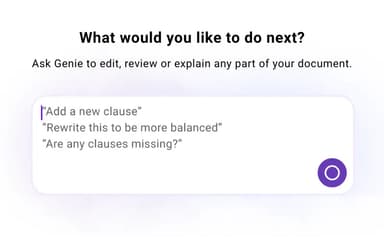
- Draft tailored contracts instantly from plain-English prompts
- Review incoming agreements to detect risks and non-standard terms
- Redline non-compliant clauses using your team playbooks
- Examine documents directly to receive quick, cited answers
- Extract key metadata into structured tabular views automatically
- Convert scanned PDFs into fully editable text files
- Collaborate across dedicated department spaces with integrated tools
Who Is GenieAI For?
GenieAI is ideal for business operating in different industries and sectors, including:
- Technology
- Energy
- Mining
- Construction
- Real estate
GenieAI Use Cases
Based on our assessment of GenieAI’s capabilities, we have identified several situations where the platform is well suited for organizations responsible for managing physical assets and equipment:
1. Sports Commercial Teams Sending Partnership Contracts Faster
Once a sponsorship deal is confirmed, commercial teams can prepare partnership agreements directly through the GenieAI platform. Contracts can be drafted and sent without routinely waiting for outside legal counsel. This helps keep contract preparation aligned with fast-moving sponsorship and partnership discussions.
2. Energy Sales Teams Handle Contracts Without In-House Legal Support
Energy companies without dedicated legal teams can use the platform to draft and review routine commercial agreements. Salespeople can prepare contract changes themselves before sending documents to clients. The platform can support teams handling frequent negotiations across different markets and customer relationships.
3. Solo Lawyers Reduce Time Spent on First Drafts
For independent lawyers, preparing the first contract draft can take considerable time. GenieAI can assist with initial drafting, giving lawyers more time for client conversations and other legal work. They can then refine the draft around case-specific requirements before sharing it with clients.
4. Lean Consultancy Teams Review More Contracts Internally
Consultancies with growing contract volumes can use GenieAI to handle more agreement reviews internally. Teams can focus outside legal support on contracts requiring additional expertise. This approach may help smaller teams manage routine documents without involving external reviewers every time.
5. Property Sales Teams Create Contracts Without Starting From Scratch
Routine property transactions often require similar agreements with only a few details changing. Using GenieAI, sales teams can generate an initial contract and adjust it before approval. This gives commercial staff a practical starting point for recurring transactions without rebuilding each agreement from scratch.
Is GenieAI Right For You?
GenieAI may suit businesses that regularly draft, review, negotiate, or update contracts without large internal legal teams. It can also work for in-house lawyers managing repetitive commercial agreements and standard contract positions.
Larger organizations may find GenieAI relevant when contract standards are documented through templates, clauses, and negotiation playbooks. Enterprise users can apply internal playbooks during contract reviews and maintain records of contract actions. Its notable customers include Checkmate, HealthConnect, and Blockworks.
Security may also influence the decision for teams handling commercially sensitive documents. GenieAI is ISO 27001 certified and SOC 2 Type II compliant. It also states that customer documents and interactions are not used for model training.
Want to learn more about GenieAI? Contact our team at (661) 384-7070 for detailed guidance.
Genie AI Features
Contract Drafting
GenieAI features contract drafting that creates complete drafts from plain-language instructions, allowing users to describe the agreement they need without starting from a template. It selects relevant clauses and structures the document around the requested terms. Users can also reuse approved company templates to maintain consistency across recurring agreements and commercial documents.
Review And Risk Flagging
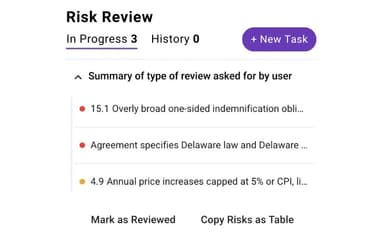
The platform reviews contract clauses against a company's preferred positions and highlights terms in red, amber or green, that require attention. Clauses receive risk ratings with explanations written in plain language. Users can identify problematic provisions before reviewing every section manually, helping them focus their attention on terms that differ from approved positions.
Redline Suggestions
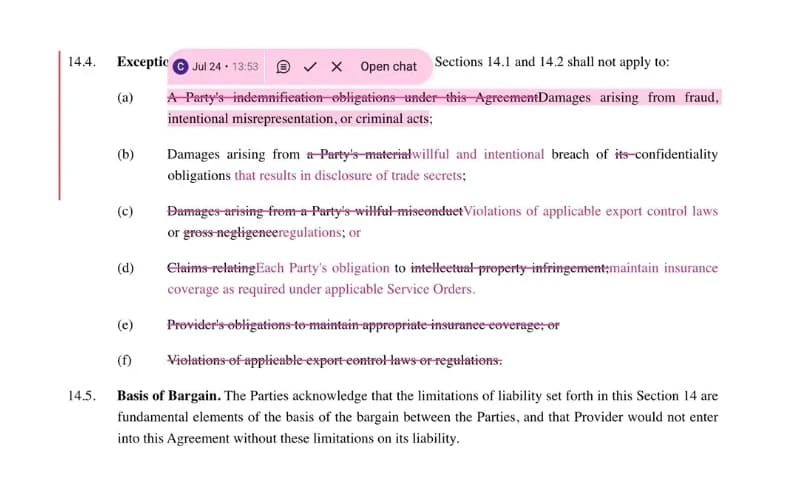
This feature suggests contract edits based on a team's preferred positions and fallback language during negotiations. It produces clause-level redlines rather than general comments for proposed changes. Users can accept, reject, or modify each suggestion while tracked changes record revisions and preserve visibility throughout the negotiation process.
Document QnA
Users can ask questions about contracts using everyday language and receive answers based on the document's contents. Each answer links back to the relevant clause and page for verification. The feature can also summarize key obligations, risks, deadlines, and terms across individual contracts or related document sets.
Editing Assistance
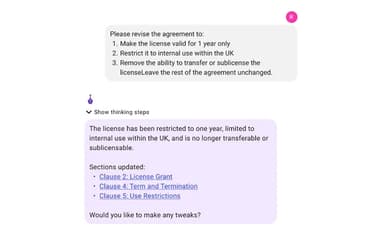
The contract assistant makes document changes based on written instructions, such as revising language or adding specific rights. It applies changes across the wider contract to maintain consistency between related sections. The assistant also tracks outstanding tasks and remembers previous decisions as contracts move through different versions.
Pros And Cons of Genie AI
Pros
Enables non-lawyers to draft contracts independently, reducing reliance on external counsel
Supports extensive customization
Reusable templates maintain consistency and speed up recurring agreement types
Full transparency with tracked edits, timestamps, and agent labels
Efficiently answers questions and gathers data
Cons
Some document types are initially unavailable for urgent needs
Responses may feel less personalized compared to other AI tools
At times, the responses may not be objective
Genie AI Pricing
Pro | Business | Enterprise |
|---|---|---|
$75 per month | $320 per month | $600 per month |
|
|
|
Disclaimer: The pricing details were last updated on Sep 25, 2026 from the vendor's website. Please contact us for a tailored pricing list.
Genie AI Reviews
Total 25 reviews
4.1
All reviews are from verified customers
Rating Distribution
5
Stars32%
4
Stars48%
3
Stars20%
2
Stars0%
1
Stars0%
Share your experience
Education Management, 11-50 employees
More than a year
“smooth process but lacking creativity”
Pros
I really like how it makes my work a lot more efficient. It's super helpful when I need to draft detailed information for my company. Everything is a lot more aligned and it saves me time when I am putting together complex documents. I can rely on it to get the job done quickly and effectively.
Cons
It has a bit of a less personalized feel with its responses compared to other AI tools I have used. It sometimes lacks when it comes to handling more creative requests which can be disappointing at times.
Rating Distribution
Ease of use
7
Value for money
7
Customer Support
7
Functionality
6
Legal Services, 1-10 employees
Less than a year
“Open-source solution”
Pros
Genie AI is super user friendly. I love that it's open-source which makes it easy to customize. It has an amazing range of templates that I can adapt to suit my clients' needs in a bespoke way. No need to start from scratch each time and the templates make the whole process smoother. Honestly, I can't recommend it enough to anyone who needs a tool like this.
Cons
I have not faced anything that's been an issue yet. But I am sure I'll have some suggestions as I continue using it and find any challenges along the way.
Rating Distribution
Ease of use
10
Value for money
10
Customer Support
10
Functionality
8
Medical Practice, 1-10 employees
Less than a year
“Quick info but missing objectivity”
Pros
It's great for doing research and searching for basic information. Whenever I need quick answers or need to gather data...it delivers. It saves me a lot of time by pulling together the key facts I need... all in one place.
Cons
Honestly... its like it's programmed to just stick to a certain agenda especially with the leftwing propaganda and viewpoints. It's disappointing because it does not feel balanced or objective.
Rating Distribution
Ease of use
7
Value for money
7
Customer Support
7
Functionality
6
Frequently Asked Questions
Does Genie AI offer an API?
The vendor hasn’t provided details about API availability.
What types of pricing plans does Genie AI offer?
The vendor has three pricing plans. Pro: $75/month, Business: $320/month, and Enterprise: $600/month. Get a flexible GenieAI cost today.
Does Genie AI have a mobile app?
Yes, GenieAI has a mobile app available on iOS and Android devices.
What other apps does Genie AI integrate with?
GenieAI integrates with MS word.
What language does Genie AI support?
GenieAI supports multiple languages, including English, Dutch, German, Turkish, Italian, Arabic, and French.
What level of support does Genie AI offer?
GenieAI provides FAQs and email support to its users.
Who are the typical users of Genie AI?
Typical users of GenieAI include lawyers, property sales teams, sports commercial teams, etc.