


Last Updated
Overview
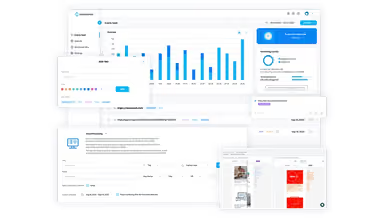
Hexowatch software offers automated website monitoring for changes in visuals, content, and more. While setting up multiple monitors can take time, its detailed tracking and customizable alerts are highly effective. Hexowatch provides peace of mind by helping companies stay updated on critical site changes.

Hexowatch Specifications
- Natural Language Dialogue
- Smart Data Discovery
- Self-Service Dashboards
- Text to Speech & Speech to Text
Hexowatch Features
Visual Monitoring
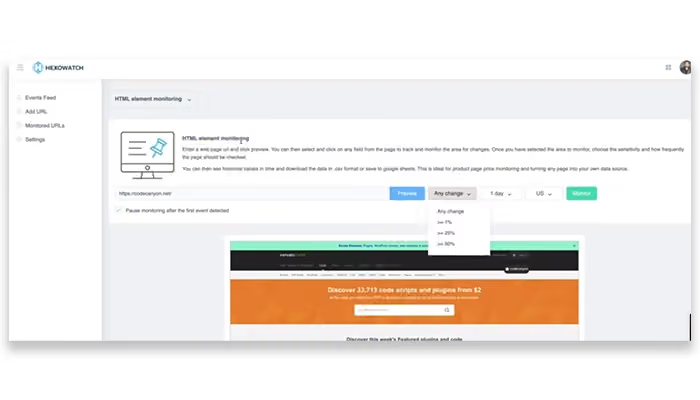
Hexowatch enables users to track visual changes on a webpage, such as layout or design alterations. This capability helps identify issues like responsive design flaws, ensuring that your website provides a consistent user experience across devices.
Source Code Monitoring
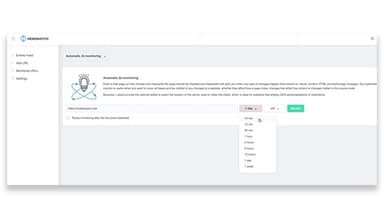
With source code monitoring, the software checks for changes in web pages' HTML or underlying code. This is crucial for detecting unauthorized modifications and helping maintain website security and functionality without manual inspection.
Keyword Monitoring
The software offers keyword monitoring to track the presence or absence of specific keywords on web pages. This helps monitor brand mentions, competitor activity, or any relevant terms, ensuring you stay updated on significant content changes.
Content Monitoring
Users can keep an eye on changes in visible text across web pages. This is particularly useful for tracking updates to competitors' content or industry news, helping you remain informed about critical developments.
Backlink Monitoring
Hexowatch's backlink monitoring feature ensures that your backlinks remain intact and functional. It alerts you to any changes made by linking sites, which is vital for preserving your SEO efforts and maintaining an effective online presence.
Pros And Cons of Hexowatch
Pros
Enables competitor analysis
Excellent customer support
Intuitive website monitoring
Saves users a lot of time
Cons
Advanced features can be complex
Setup can be time-consuming
Alerts may not always come on time, according to software users
Hexowatch Reviews
Total 7 reviews
4.7
All reviews are from verified customers
Rating Distribution
5
Stars71%
4
Stars29%
3
Stars0%
2
Stars0%
1
Stars0%
Share your experience
Chris D.
Information Technology and Services, 1-10 employees
Less than 6 months
“powerful visual monitoring options”
Pros
Visual monitoring comes with a lot of flexibility and you can interact with every element on a webpage to track exactly the changes you care about.
Cons
Honestly I'm struggling to come up with any real issue because there really wasn't one. If I had to suggest something, it would be nice to have phone call or SMS alerts when the page change percentage goes past a certain threshold and stays there for a few checks.
Rating Distribution
Ease of use
10
Value for money
10
Customer Support
10
Functionality
10
Brandon T.
Computer Software, 11-50 employees
Less than 6 months
“detailed competitor tracking”
Pros
It gives me a really convenient way to monitor both my own site and competitor websites in a lot of detail. The AI Monitoring Ttool is especially useful because it lets me pull far more detailed insights from competitor sites than I used to get with FollowThatPage.
Cons
Getting started took a little time because there's some initial difficulty. Setting up the basics is easy but each monitor comes with a lot of options and many of them either aren't clearly documented or the interface doesn't make them obvious. Because of that I ended up wasting some credits while figuring things out. Also the content change report arrives as one large block of content which makes it a bit harder to spot exactly what text changed.
Rating Distribution
Ease of use
7
Value for money
8
Customer Support
8
Functionality
8
Svend Bertil F.
Internet, 51-100 employees
More than a year
“reliable website monitoring value”
Pros
From day one this has felt like a very accessible and well rounded website monitoring tool! It makes it simple to keep track of website uptime, response times and overall performance. The platform includes useful features like real time alerts, detailed reports and customizable dashboards. On top of that the 24/7 customer support is a big plus and the pricing is very affordable!
Cons
One limitation with the software is that it only monitors websites so it does not cover other types of web based applications. Another downside is that its reporting capabilities are not as in depth as those offered by some higher priced competitors.
Rating Distribution
Ease of use
10
Value for money
10
Customer Support
10
Functionality
10
Frequently Asked Questions
Does Hexowatch offer an API?
Yes, Hexowatch offers an API.
What language does Hexowatch support?
Hexowatch supports the English language.
What other apps does Hexowatch integrate with?
Hexowatch integrates with Slack, Google and Zapier.
Does Hexowatch support mobile devices?
Hexowatch supports Android and iOS devices.
What types of pricing plans does Hexowatch offer?
Hexowatch price starts at $29/month. Users can get custom Hexowatch pricing plans for their businesses.
Who are the typical users of Hexowatch?
The typical users of Hexowatch are those in hospitality, financial services, and marketing and advertising.
What level of support does Hexowatch offer?
Hexowatch offers email, Knowledge Base, chat, helpdesk, and FAQs.