

Labelbox Software
Last Updated
Overview
Labelbox software simplifies data annotation for machine learning by providing intuitive tools for labeling and managing data efficiently. While it offers robust features, users may encounter a learning curve and some limitations in customization. Overall, its functionality and user-friendliness make it a valuable resource for data-driven projects.

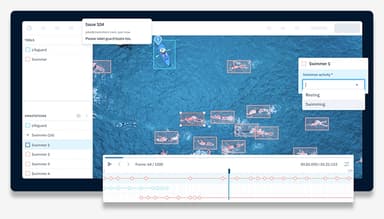
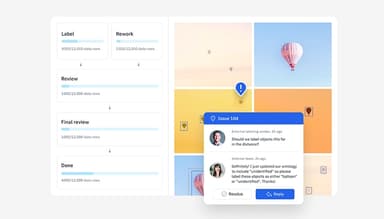
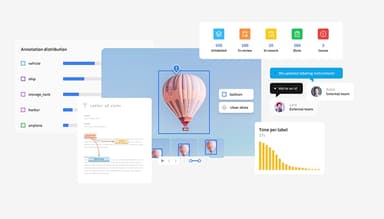
Labelbox Software Specifications
- Natural Language Dialogue
- Smart Data Discovery
- Self-Service Dashboards
- Text to Speech & Speech to Text
What Is Labelbox Software?
Overview
Labelbox is a cloud-based platform designed for organizations needing to efficiently label and manage large volumes of data for machine learning projects. It caters to industries like technology and healthcare, offering solutions that streamline the data annotation process and improve data quality. By addressing common problems such as data labeling bottlenecks and inconsistencies, Labelbox enhances productivity and accuracy in machine learning workflows.
Labelbox Software Pricing
The software offers two main packages:
- Starter: $0.10/LBU (for small and medium-sized AI teams)
- Enterprise: Minimum spend commitment required (for medium and large-sized AI teams)
Disclaimer: The pricing is subject to change.
Labelbox Software Integrations
Labelbox software seamlessly integrates with various business applications, including:
- AWS
- Azure
- Google Cloud
- Databricks
- Snowflake
- Amazon SageMaker
Who Is Labelbox Software For?
The software is designed for businesses of all sizes across various industries, such as:
- Financial services and insurance
- Retail and e-commerce
- Healthcare and life sciences
- Media and internet
- Industrial
Is Labelbox Software Right For You?
Labelbox, a leading data labeling platform, helps teams improve model performance and accelerate development cycles. Scalable and secure, it is SOC 2 Type II certified, and compliant with GDPR and HIPAA standards. Trusted by thousands of companies worldwide, including John Deere, P&G, and Advent, Labelbox delivers reliable solutions for data-driven organizations.
Still not sure if Labelbox software is right for you? Get in touch with our customer support team at (661) 384-7070, and it will help you make the best decision.
Labelbox Software Features
Shelf Optimization
This feature helps retailers and manufacturers enhance product placement and inventory management through accurate image labeling. It improves shelf space utilization, boosts sales, and reduces waste by ensuring optimal product visibility and stock levels.
Generative Captioning
This tool automatically creates descriptive text for images, facilitating more effective content management and retrieval. It benefits users by saving time on manual captioning, enhancing searchability, and improving the overall accessibility of visual data.
Medical Imaging
Labelbox software supports medical imaging by providing precise annotation tools for diagnosing and analyzing medical images. This accelerates the development of medical AI models, improving diagnostic accuracy and aiding healthcare professionals in making more informed decisions.
Preventative Maintenance
The software enables accurate labeling of equipment and machinery data to predict and prevent potential failures. It minimizes downtime and maintenance costs by enabling proactive repairs and extending the lifespan of critical assets.
Invoice and Document Processing
Users can automate the extraction and classification of data from invoices and documents. This reduces manual data entry errors, speeds up processing times, and improves accuracy in financial and administrative workflows.
Pros And Cons of Labelbox Software
Pros
Support for multiple data types
Scalable solutions
Intuitive interface
User-friendly
Customizable workflows
Cons
Can be expensive for smaller teams
UI lacks smoothness; tools feel clunky
Limited offline access
Customer support could be better
Labelbox Software Reviews
Total 25 reviews
4.9
All reviews are from verified customers
Rating Distribution
5
Stars88%
4
Stars12%
3
Stars0%
2
Stars0%
1
Stars0%
Share your experience
IT, 500+ employees
Less than 6 months
“Data preparation software Tool”
Pros
It's extremely precise and has significantly streamlined the data preparation process. The built-in features for searching, organizing, and saving parts of datasets make managing data easy.
Cons
I haven't found any drawbacks, everything is functioning well with no problems at all.
Rating Distribution
Ease of use
10
Value for money
10
Customer Support
10
Functionality
10
IT, 500+ employees
Less than 6 months
“Amazing tool for data prepration”
Pros
This software really helps in getting data ready, and it offers a range of built-in tools for searching, saving, and organizing. Plus, its ability to integrate with other softwares is a big advantage.
Cons
It's a bit challenging to process images, but aside from that, I haven't had any other issues.
Rating Distribution
Ease of use
10
Value for money
10
Customer Support
10
Functionality
10
Full Stack, 11-50 employees
Less than 6 months
“Was simple to use and labeling was generally user-friendly”
Pros
The color coding feature stood out for me, making it much easier to organize different data categories in an image.
Cons
The interface felt a bit rough and lacking in smoothness. It would be great if the tools were a bit less complicated.
Rating Distribution
Ease of use
10
Value for money
10
Customer Support
10
Functionality
10
Frequently Asked Questions
Does Labelbox software offer an API?
Yes, Labelbox software offers an API.
What language does Labelbox software support?
Labelbox software ssupports English.
What other apps does Labelbox software integrate with?
Labelbox software integrates with Azure, AWS Google Cloud.
What types of pricing plans does Labelbox software offer?
Labelbox software price will differ according to varying needs. Users can get custom pricing for their businesses.
Does Labelbox software support mobile devices?
Labelbox software supports Android and iOS devices.
Who are the typical users of Labelbox software?
The typical users of Labelbox software are those in the media, internet, healthcare, and life sciences industries.
What level of support does Labelbox software offer?
Labelbox software offers Knowledge Base.