


SOUNDRAW
Last Updated
Overview
SOUNDRAW generates customizable, royalty-free AI music, enabling content creators to tailor tracks for video, podcasts, and games. Although some users note that melodies can feel repetitive over time, the platform’s intuitive interface and speed make it highly efficient. Furthermore, it can generate music across diverse genres with no legal gray areas.
Overall Rating
Based on 11 users reviews
4.2
Rating Distribution
Positive
91%
Neutral
9%
Negative
0%
Starting Price
$9.99
per month


SOUNDRAW Specifications
- Self-Service Dashboards
- Automation
- Predictive Capabilities
- Context Awareness
What Is SOUNDRAW?
SOUNDRAW is a cloud-based tool that generates instrumental music using artificial intelligence. Businesses and creators use it to make royalty-free music and beats for videos, podcasts, games, and other commercial projects. Users pick a genre, mood, tempo, length, and other musical settings, and the tool creates a track from those choices. Genres can also be combined to form different styles. Finished tracks download as MP3, WAV, or separate stems. Content teams can use these features to produce their own background music instead of licensing it from an outside source.
What Is SOUNDRAW Best For?
SOUNDRAW is best known for its Mixer. It lets users adjust melody, backing, bass, drums, and fills in different sections of a track, and change intensity, instruments, tempo, key, volume, and length as needed. That level of control fits content creators, filmmakers, and musicians who need to adjust music for a specific project, build different versions of a generated track, or match music to the pace and mood of their content.
How Much Does SOUNDRAW Cost?
SOUNDRAW pricing starts at $9.99/month. This basic plan, known as Creator, includes commercial use, background music use, unlimited monthly downloads, and MP3 format. Further pricing tiers of the software are as follows:
- Artist Starter: $19.99/month
- Artist Pro: $29.99/month
- Artist Unlimited: $49.99/month
- Enterprise: Custom pricing
The software also offers API plans priced at $29.99/month for API Starter and $300/month for API Pro.
In addition to the base subscription costs, organizations should account for the following potential expenses:
- Implementation: Usually priced between $0–$3,000 (one-time) for setup and configuration on Enterprise and API plans, and self-serve tiers generally don't need any implementation work at all
- Integrations: Often come in between $2,000–$15,000 (one-time), depending on how complex it is to connect the SOUNDRAW API with a video editor, app, or existing content workflow
- Customization And Configuration: Ranges between $1,000–$8,000 (one-time), based on needs such as custom parameter tuning, catalog curation, or workflow-specific setup for Enterprise and API customers
Many users describe SOUNDRAW's pricing as high. They say the subscription can feel expensive over time, and regular use makes the costs add up. Several also point out that the free version does not let them download tracks.
Disclaimer: The pricing is subject to change.
SOUNDRAW Integrations
The software supports integration with platforms such as:
- CyberLink
- Captions
- Wondershare Filmora
- Canva
How Does SOUNDRAW Work?
Log in to your SOUNDRAW account, then follow the steps below to use its features:
- Choose a genre, mood, theme, instrument set, tempo, and track length before you begin
- Generate music from those choices and listen through the tracks it gives you
- Pick a track and adjust its instruments, intensity, tempo, key, length, and flow
- Use the Mixer if you want to fine-tune specific instruments or sections
- Play the track against your video to see whether it actually fits
- Download the finished track in the format you need
Who Is SOUNDRAW For?
SOUNDRAW is suitable for industries, sectors, and professional use cases, including:
- Digital marketing
- Video production
- Game development
- Social media content creation
- Music production
- Educational institutions
- Podcasting and broadcasting
SOUNDRAW Use Cases
Based on our analysis of user reviews and SOUNDRAW’s current capabilities, we have identified key scenarios where this software is a good fit for content creators, musicians, businesses, and educational institutions:
Marketing Agencies Managing Multiple Client Accounts
Video projects for ten clients at once can mean managing ten sets of music rights if you're doing it strictly by the book, and renegotiating terms for each client isn't realistic on a production schedule. SOUNDRAW's Enterprise plan puts everything under one company account, with unlimited downloads, worldwide licensing, and invoice billing instead of per-project purchases. That means an agency can move between client campaigns without pausing to sort out rights each time.
Software Platforms Adding Music Generation As A Feature
A video editor or captioning tool doesn't need to build music generation from scratch to offer it. The software's API lets that capability sit inside someone else's product directly, so the feature feels native rather than like a handoff to another app. The integration with Captions is a working example of this.
Retail And Hospitality Businesses Managing In-Store Audio
Music playing through store speakers can involve different licensing rules as opposed to music in a video or a podcast. SpaceMusic is made for that specific case. Its AI-generated background music is built for physical spaces, which suits businesses running the same background music across several locations without separate music licensing or PRO fees.
Independent Artists Releasing Music Commercially
Some people using the platform aren’t creating background music for videos. They’re making their own songs. The Artist plans to start with an AI-generated beat, let the Artist build a full track around it, and support the release on Spotify and Apple Music, with the Artist keeping full royalties. However, the beats must be modified with personalized vocals or instrumental tracks played by users. The final version of the track needs to be clearly distinguishable from the original downloaded track.
Is SOUNDRAW Right For You?
If you are involved in content creation, music production, or any such business, or are an educational institution that needs copyright-safe music for digital or commercial projects, then SOUNDRAW could be a strong fit. The platform's client list includes Forbes, LG, and Canva. Its API supports 100 to 1,000 song generations per month, and it also follows GDPR rules for users in the EEA.
As concerns around ethical AI grow in the music industry, more musicians are asking where AI training data actually comes from and whether the Artists behind it got paid or credited. SOUNDRAW's answer is that its model is trained only on music its own in-house team made. It does not scrape songs from other Artists, and it does not clone voices or imitate existing tracks.
Still doubtful if SOUNDRAW software is the right fit for you? Connect with us at (661) 384-7070 for further guidance.
SOUNDRAW Features
Genre Blending
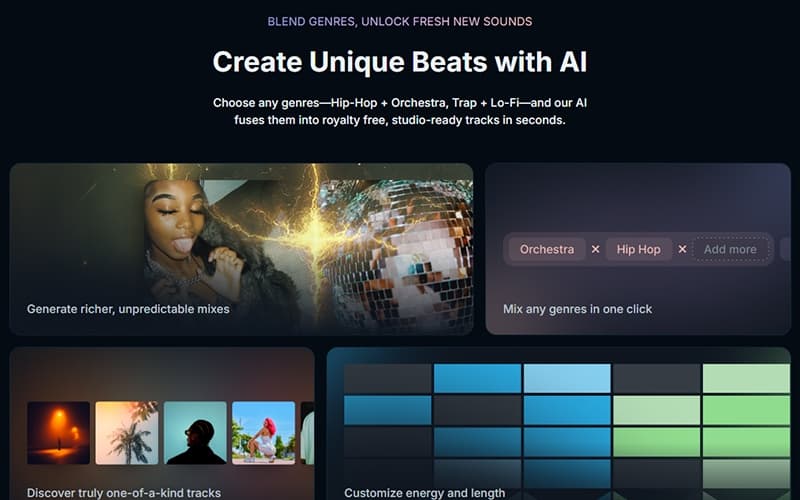
Users can combine multiple genres when generating a track, for example Hip-Hop and Orchestra, or Trap and Lo-Fi. The generator builds the arrangement around the selected combination during track creation. There is no need to merge separate songs manually.
Unlimited Music Downloads
Subscribers can download as much AI-generated music as they want while their subscription is active. This includes full tracks and stems in formats such as WAV. Users can sync these songs into their own projects.
Perpetual Project Rights
If a project is already finished, the music downloaded for it keeps its usage rights even after the subscription ends. Users can leave those finished projects published. To start a new project with previously downloaded music, the subscription needs to be active.
Worldwide Licensing
There is no geographic restriction on where a downloaded track can be used. The license also covers use across different channels and platforms. Enterprise customers can request an invoice addressed to their company that documents the license terms.
Stem Downloads
A generated song can be downloaded as separate WAV stems. The WAV + Stems option provides individual files for drums, bass, melody, vocals (when present), and effects. These files work in DAWs such as Ableton, Logic, or FL Studio for further mixing, processing, or recording.
In-House Trained AI Model
SOUNDRAW's in-house team records and produces the music used to train its AI model. According to the company, the model is not trained on existing songs taken from outside sources. SOUNDRAW holds the master recording and publishing rights to that training material.
Pros And Cons of SOUNDRAW
Pros
Makes it easy to create polished music without advanced skills
Saves time you would spend searching for soundtracks
Gives you control over each musical part
Keeps your output consistent across frequent uploads
Matches the music to your intended mood
Cons
Same settings tend to produce nearly identical tracks
Mixer controls take practice to use well
Getting the right sound often takes several tries
SOUNDRAW Pricing
Creator | Artist Starter | Artist Pro | Artist Unlimited | Enterprise |
|---|---|---|---|---|
$9.99 per month | $19.99 per month | $29.99 per month | $49.99 per month | Custom pricing |
|
|
|
|
|
Disclaimer: The pricing details were last updated on Oct 12, 2026 from the vendor's website. Please contact us for a tailored pricing list.
SOUNDRAW Reviews
Total 11 reviews
4.2
All reviews are from verified customers
Rating Distribution
5
Stars27%
4
Stars64%
3
Stars9%
2
Stars0%
1
Stars0%
Share your experience
Entertainment, 11-50 employees
“mood-based music generation”
Pros
It really nails the vibe I'm aiming for!! Instead of wasting time hunting through playlists, I can build the music around the emotion I want listeners to feel which gives me a lot more creative control. That mood-driven approach is what makes it stand out for me.
Cons
AI generated tracks can occasionally come with small imperfections and the emotional nuance sometimes feels a bit thin compared to something fully human. I'd also like more control for shaping very specific musical ideas so the final result feels more like something I envisioned from the ground up rather than something that's clearly AI generated.
Rating Distribution
Ease of use
8
Value for money
7
Customer Support
8
Functionality
10
Entertainment, 11-50 employees
“Amazing creativity with AI music”
Pros
This software has become my go-to for turning ideas I'm picturing in my head into actual music, even when I'm not trained in anything music-related. I like how the platform lets me experiment with different sounds and then reshape the tracks depending on my mood. It also pushes me to explore angles and music concepts I probably wouldn't have tried otherwise. Overall, it really simplifies music creation without making it feel limiting.
Cons
Because the tracks can come out a little too polished and sometimes repeat patterns, it doesn't always hit the same emotional depth you'd expect from a piece made by a person from scratch. The AI side is excellent for getting started but it would feel even more powerful if there were stronger options for creative control so users could customize more specifically on their own.
Rating Distribution
Ease of use
10
Value for money
9
Customer Support
9
Functionality
10
Music, 11-50 employees
“music shaping without production learning”
Pros
Soundraw makes it simple for me to turn vague ideas into actual music. I really appreciate that I can tailor the viewer's experience with the soundtrack instead of just throwing in generic background audio. It also genuinely saves time since I can generate tracks that fit what I'm trying to do without spending hours learning complex, professional music production software.
Cons
I can't fine-tune every musical detail to the level of precision I'd prefer. Getting the small adjustments I want often means running multiple generations and testing variations so the editing workflow can feel a bit slower than I'd like.
Rating Distribution
Ease of use
10
Value for money
7
Customer Support
7
Functionality
7
Frequently Asked Questions
What other apps does SOUNDRAW integrate with?
SOUNDRAW integrates with CyberLink, Captions, Wondershare Filmora, and Canva.
Who are the typical users of SOUNDRAW?
Typical users include professionals in digital marketing, video production, and game development.
What types of pricing plans does SOUNDRAW offer?
SOUNDRAW pricing starts at $9.99/month for the Creator plan. Other plans include Artist Starter at $19.99/month, Artist Pro at $29.99/month, Artist Unlimited at $49.99/month, and Enterprise with custom pricing. API plans start at $29.99/month. Get a detailed SOUNDRAW cost breakdown to make an informed decision.
What language does SOUNDRAW support?
SOUNDRAW software is available in English and Japanese.
What level of support does SOUNDRAW offer?
SOUNDRAW offers support via online ticketing, a help center, and FAQs.
Does SOUNDRAW offer an API?
Yes, SOUNDRAW provides API access.
Does SOUNDRAW have a mobile app?
Yes, SOUNDRAW offers a dedicated iOS app called SOUNDRAW Grid.