


Playbooks
Last Updated
Overview
Playbooks helps sales teams manage outreach, automate administrative tasks, and prioritize leads effectively. Its reporting, automation, and buyer intelligence features provide clarity and efficiency. While some features may require a learning period, the platform’s structured workflows and CRM integration ensure consistent sales processes across teams.
Playbooks Specifications
- Call Recording
- Call Monitoring
- Call Reporting and Analytics
- CRM Integration
Playbooks Features
Sales Cadences
Sales cadences help teams create structured, repeatable outreach processes across calls, emails, SMS, social steps, and more. The feature organizes follow ups, supports consistent engagement, and guides reps with templates and recommendations, so prospects receive timely, well-paced communication throughout each stage of the sales cycle.
Automation Workflows
Playbooks uses Robots to automate administrative tasks, CRM updates, and opportunity engagement. Reps save time as leads, contacts, and opportunities are auto-enrolled, data is synced, and alerts are triggered, allowing teams to focus on high-value selling while maintaining consistent, repeatable sales processes.
Buyer Intelligence
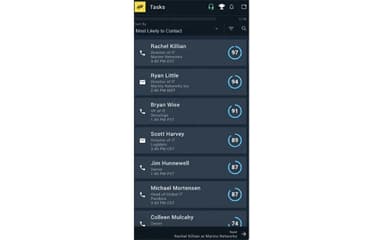
Playbooks leverages AI-powered buyer intelligence to guide reps toward the most promising leads. It predicts engagement likelihood, optimal contact times, and preferred communication channels, enriches CRM data, and highlights additional decision-makers, helping sales teams focus on high-value opportunities and increase overall contact and conversion rates.
Reporting
The software provides detailed reporting and dashboards to track team and individual performance. Users can monitor calls, emails, account engagement, and Play effectiveness, gaining actionable insights to optimize strategies, improve productivity, and make informed decisions that drive higher conversion rates and overall sales success.
Scoring
Playbooks features scoring of leads, accounts, and opportunities by engagement and close likelihood, helping teams prioritize high-value tasks, focus on the right contacts, make data-driven decisions, improve productivity, increase contact rates, and drive higher win rates across the sales pipeline.
Pros And Cons of Playbooks
Pros
Enhances daily productivity with clear task guidance
Improves outreach consistency across sales teams
Automates repetitive tasks to save time
Cons
Limited flexibility in adjusting daily routines
Mass emailing functionality is not available
Playbooks Reviews
Total 3 reviews
3.7
All reviews are from verified customers
Rating Distribution
5
Stars33%
4
Stars33%
3
Stars0%
2
Stars33%
1
Stars0%
Share your experience
Computer Software, 500+ employees
More than a year
“great follow up flow”
Pros
One of the best parts for me is how it automatically dials either a local number or my own number. It keeps me productive throughout the day by prompting me when it's time to make the next call or send the next email. I also really appreciate that it syncs with Salesforce so I don't have to enter my notes twice. On top of that it even lines up the next follow up call for me.
Cons
Since it's still technology, there are times when it goes down but their support team is quick to get everything back up and running.
Rating Distribution
Ease of use
10
Value for money
10
Customer Support
9
Functionality
9
Information Technology and Services, 500+ employees
More than a year
“support is hard to reach”
Pros
It had been working up to this point but now the system is down and nobody is helping us.
Cons
At the moment we're completely offline and can't reach support or get anyone on the phone even though this is critical for our business.
Rating Distribution
Ease of use
4
Value for money
2
Customer Support
2
Functionality
2
Marketing and Advertising, 51-100 employees
Less than a year
“useful Salesforce calling integration”
Pros
This works really well with Salesforce and it makes handling a high volume of calls quick and efficient.
Cons
There are occasional outages that can be difficult to get resolved and the support team could definitely be better.
Rating Distribution
Ease of use
7
Value for money
8
Customer Support
7
Functionality
8
Frequently Asked Questions
Who are the typical users of Playbooks?
Playbooks serves industries including sales teams, B2B technology, professional services, telecommunications, financial services, manufacturing, and healthcare.
Does Playbooks have a mobile app?
No, Playbooks does not have a mobile app.
What other apps does Playbooks integrate with?
Playbooks integrates with CRM platforms.
What language does Playbooks support?
Playbooks supports the English language.
What level of support does Playbooks offer?
Playbooks provides support via phone, chat, email, help center, and customer case portal.
What types of pricing plans does Playbooks offer?
Playbooks pricing follows a custom-quote model, with price starting at $99/month. Request a custom Playbooks price quotation.
Does Playbooks offer an API?
Yes, Playbooks offers API access.