


Sideline
Last Updated
Overview
Sideline gives professionals and small business owners a dedicated second phone number on an existing device, giving users a separate number for work calls and texts. While occasional account blocks without prior notice can interrupt client communication, setup is quick, and desktop texting makes it practical for everyday business use.
Overall Rating
Based on 20 users reviews
4
Rating Distribution
Positive
70%
Neutral
25%
Negative
5%
Starting Price
$14.99
per month


Sideline Specifications
- Voicemail And Callback Management
- Call Reporting And Analytics
- Call Transfer And Conferencing
- Call Routing
Sideline Features
Work Texting
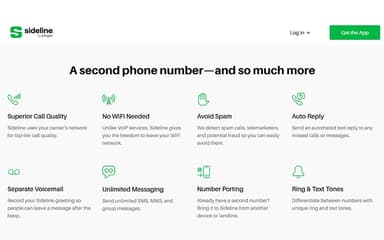
The Work Texting inbox is tied exclusively to the Sideline number and isolated from the device's personal messaging app. It supports unlimited SMS and MMS, and a web portal allows texting from a laptop or desktop browser without switching devices.
Auto-Reply
This automated response tool sends configurable text replies when calls or messages to the Sideline number go unanswered. Separate replies can be set for inbound calls, inbound texts, or specific situations, with each supporting custom text and an optional image or logo.
Number Porting
An existing phone number from another device, carrier, or landline can be transferred to Sideline with the original digits preserved. Contacts do not need to be notified of a change, and porting is available at no additional cost.
Group Messaging
Multi-participant conversations run through the Sideline number as a single shared thread. All replies from each contact appear in the same place, without creating separate one-to-one conversations for individual participants.
Separate Caller ID
Each outbound call from the Sideline number displays a distinct caller identity, separate from the personal line on the same device. Recipients see the Sideline name and number rather than the personal number, regardless of which line initiates contact.
Voicemail To Text
Voice messages left on the Sideline number are transcribed automatically and delivered alongside the original audio recording. Users can read the transcription or listen to the message depending on their preference or context.
Pros And Cons of Sideline
Pros
Carrier network calling gives reliable quality away from WiFi
Unlimited SMS and MMS keeps client messaging cost predictable
Web messaging portal is a dedicated inbox for the second number
Auto-Reply is a configurable automated response for missed contacts
Separate voicemail is an independent inbox exclusive to the second number
Cons
Account blocks can occur without notification, interrupting client communication
Application updates require a complete reinstallation instead of background refreshing
Caller ID can occasionally display incorrect names or numbers
Sideline Reviews
Total 20 reviews
4
All reviews are from verified customers
Rating Distribution
5
Stars50%
4
Stars20%
3
Stars20%
2
Stars5%
1
Stars5%
Share your experience
Human Resources, 11-50 employees
Less than a year
“weak support”
Pros
Getting started is very quick which works well if you are a single user and only need something basic. We had been using their enterprise option before they started phasing it out. The setup itself is very simple, with no TCR application to deal with and no extra management needed, it just runs.
Cons
The support is pretty disappointing since there is no way to call anyone directly. Everything has to go through chat support. On top of that an account can get blocked at random with no warning if they think you are spam even when you are not and they do not notify you when it happens. That means you are left checking with clients to figure out how long messages may have been missed. It also lacks important features such as call transferring, recording and even the ability to download voicemails.
Rating Distribution
Ease of use
2
Value for money
3
Customer Support
1
Functionality
4
Entertainment, 1-10 employees
More than a year
“excellent for business texting”
Pros
Being able to text from my business line has been really useful and the pricing is excellent.
Cons
Call quality can be inconsistent at times and porting my number took a while.
Rating Distribution
Ease of use
10
Value for money
9
Customer Support
9
Functionality
10
Hospital & Health Care, 1-10 employees
Less than a year
“clean interface”
Pros
The interface looks clean and is very simple to navigate.
Cons
One downside is that it used to be available for free and that's no longer an option.
Rating Distribution
Ease of use
10
Value for money
9
Customer Support
9
Functionality
9
Frequently Asked Questions
What level of support does Sideline offer?
Sideline offers support via email and live chat.
What language does Sideline support?
Sideline primarily supports English language.
What other apps does Sideline integrate with?
The vendor has not provided details about third-party integrations for this software. Users can, however, import contacts from sources such as Google Contacts, Salesforce, and Zoho using VCF or CSV files.
Does Sideline offer an API?
No, Sideline does not offer an API.
What types of pricing plans does Sideline offer?
Sideline pricing starts at $14.49/month, with 6-month and 12-month plans available for $69.99 and $129.99, respectively, both charged upfront. Request a personalized Sideline cost estimate for your business.
Does Sideline have a mobile app?
#fa#Yes, Sideline does offer a mobile app for iOS and Android users.
Who are the typical users of Sideline?
Sideline is suitable for a range of users and professionals, including small business owners, freelancers, online sellers, privacy-conscious users, and professionals.