


Last Updated
Overview
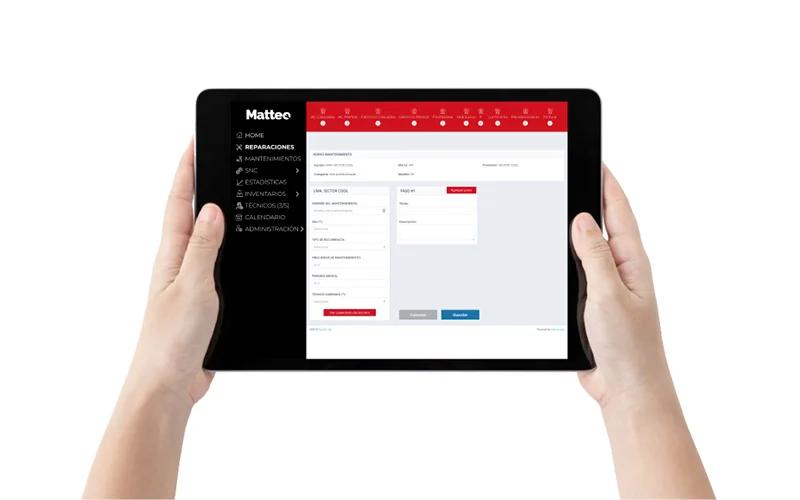
Matteo helps maintenance teams keep work orders, schedules, and inventory management in one place. This way, tasks are easier to manage and follow through. While it may not offer enterprise CMMS capabilities, it provides practical tools for organizing maintenance activities. Overall, it is suitable for maintenance teams handling day-to-day operations.
Be the first one to leave a review!
No review found

Starting Price
Custom
Matteo Specifications
- Work Order Management
- Maintenance Logs
- Facilities Maintenance
- Mobile Access
What Is Matteo?
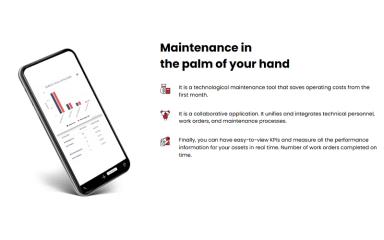
Matteo is a mobile Computerized Maintenance Management System (CMMS) that helps maintenance teams manage work orders, resources, and equipment more efficiently. The platform supports corrective and preventive maintenance, making day-to-day planning easier through better task assignments, real-time updates, and automated reports. Its mobile-first approach also allows technicians and managers to stay connected and respond to maintenance needs directly from the field.
What Is Matteo Best For?
The platform stands out for its preventive maintenance feature. It helps teams plan and manage recurring maintenance work. Users can create task schedules, share maintenance calendars with the team, and add checklists and reminders to each job. This helps keep routine maintenance organized and reduces the risk of missed tasks.
How Much Does Matteo Cost?
Matteo price starts at $675/month, requiring a minimum upfront purchase of one year at $8,100. In addition to the base subscription costs, maintenance teams should consider the following potential expenses:
- Data Migration (Assets, Maintenance History, Facilities Data): Approximately $500–$1,200 depending on data volume and format complexity
- Training (Admins + Technicians): May range between $500–$1,500 depending on team size and adoption support level
- Integrations (IoT Sensors, ERP, Accounting, APIs): Estimated between $1,000–$10,000 depending on system complexity and number of connections
- Ongoing Support Or Advanced Service Tiers: Approximately 10%–20% of annual subscription cost in enterprise setups
Disclaimer: The pricing is subject to change.
Matteo Integrations
The software integrates with different third-party systems and platforms, including:
- SAP
- Microsoft Dynamics
- Microsoft Excel software
- Odoo
- Oracle
How Does Matteo Work?
Here’s how you can access the platform and start using its features:
- Create a maintenance account to access the system and set up your organization profile
- Configure assets by adding equipment details, locations, and relevant maintenance information into the system
- Set up preventive maintenance schedules by defining recurring tasks, checklists, and reminder intervals
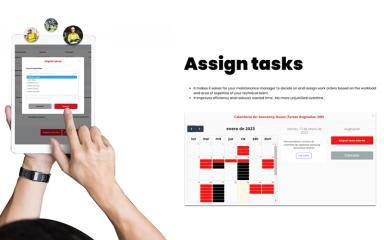
- Assign work orders to technicians based on task type, priority, and availability within the team
- Track task progress through a centralized view of ongoing maintenance activities and updates
- Manage alerts and notifications to stay informed about upcoming tasks, equipment needs, or changes in schedules
- Generate reports to review maintenance history, task completion, and operational performance over time
Who Is Matteo For?
Matteo is ideal for businesses across a range of industries and sectors, including:
- Restaurant
- Healthcare
- Construction
- Food and beverage
- Fleet maintenance
Matteo Use Cases
Based on our analysis of Matteo’s current capabilities, we have identified key scenarios where this software is a good fit for maintenance-driven organizations:
1. Manufacturing Teams Managing Routine Equipment Maintenance
Manufacturing teams use Matteo to organize recurring maintenance tasks and keep schedules structured across production equipment. Its preventive maintenance tools help technicians follow consistent checklists instead of relying on informal reminders. This setup is often used to keep day-to-day operations stable and reduce unexpected interruptions on the shop floor.
2. Multi-Site Operations Coordinating Maintenance Activities
Organizations with multiple locations use Matteo to keep maintenance work aligned across sites. Managers can assign and monitor tasks from a central system without relying on separate tools for each facility. This keeps reporting and execution more consistent across distributed teams.
3. Facility Managers Scheduling Ongoing Maintenance Work
Matteo is used by facility managers to plan and track regular maintenance activities for buildings and infrastructure. They can create work calendars and task schedules, which makes it easier to organize recurring inspections and servicing. The result is a more structured maintenance routine.
4. Field Maintenance Teams Handling Urgent Work Orders
Matteo is useful in industries where equipment issues require immediate attention. It logs corrective tasks and tracks resolution progress in a structured manner. Managers can assign tasks quickly and track them until completion within a single workflow. They can also benefit from its real-time alerts and automatic reporting capabilities for better visibility into task status and completion.
Is Matteo Right For You?
Matteo can be the right choice for organizations that want to take control of maintenance without relying on scattered spreadsheets and manual reporting. With mobile access and a range of built-in tools, it supports faster communication, better coordination between teams, and more informed decision-making across daily maintenance tasks.
Moreover, the platform also helps reduce downtime, which is critical for asset-dependent industries. It is trusted by leading names in the industry, such as McDonalds and Cinemark.
Still not sure if Matteo is the right fit for you? Connect with us at (661) 384-7070 for further guidance.
Matteo Features
Corrective Maintenance
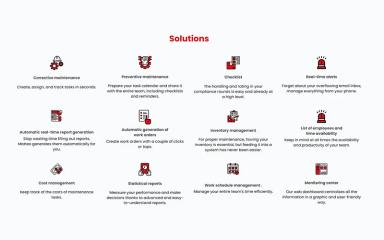
Matteo makes it easy for teams to quickly log, assign, and resolve corrective maintenance tasks whenever equipment issues come up. It keeps the response process smooth by ensuring problems are properly recorded and dealt with right away. This helps improve equipment uptime and reduces disruptions in day-to-day operations.
Monitoring Center
The monitoring center provides a clear, centralized view of all ongoing maintenance activities. Managers can track task progress and system status in real time from one dashboard. This approach improves visibility and supports faster decision-making in maintenance operations.
Real-Time Alerts
Matteo sends instant notifications whenever there’s a critical maintenance event, equipment issue, or task update. These alerts help teams respond quickly to potential failures or urgent maintenance needs. As a result, operations stay more stable and downtime is minimized.
Inventory Management
The platform helps teams keep track of maintenance parts and supplies in a simple, organized way. Users can monitor stock levels, usage patterns, and availability in real time. This reduces delays caused by missing components and improves maintenance planning efficiency.
Work Schedule Management
Using Matteo, teams can plan and manage technician schedules more effectively. It keeps workloads balanced and ensures the right people are assigned to the right jobs. This leads to better coordination and more timely completion of maintenance work.
Statistical Reports
The system generates detailed reports on maintenance performance, asset status, and operational trends. These insights help managers understand what’s working and what needs improvement. It supports better, data-driven decision-making across maintenance operations.
Pros And Cons of Matteo
Pros
Offers a centralized control of assets, teams, and maintenance history
Provides useful reporting and productivity analytics for decision-making
Comes with built-in inventory and cost tracking tools
Offers real-time alerts and KPI tracking to improve visibility
Strong focus on sustainability and energy efficiency initiatives
Cons
Interface may feel slightly complex for new users
May require initial training for a thorough understanding
Customer support response time can be inconsistent
Matteo Reviews

No reviews yet!
Be the first to review this product
Frequently Asked Questions
Does Matteo have a mobile app?
Yes, it offers a mobile app for Android and iOS devices.
Who are the typical users of Matteo?
Matteo features are used by businesses across different industries, such as construction, restaurant, healthcare, and food and beverage.
What languages does Matteo support?
Matteo software is primarily available in Spanish.
What other apps does Matteo integrate with?
Matteo integrates with various systems such as SAP, Oracle, Microsoft Dynamics, and Microsoft Excel.
Does Matteo offer an API?
The vendor hasn't provided details about API availability.
What types of pricing plans does Matteo offer?
Matteo price starts at $675/month. It requires a minimum upfront purchase of one year at $8,100. Get in touch for a tailored Matteo cost estimate.
What level of support does Matteo offer?
Matteo provides support through an online contact form.