

Apty
Last Updated
Key Takeaways
Generated from the text of customer reviews
Apty is an enterprise digital adoption platform (DAP) used by IT and change management teams to drive software adoption across manufacturing, consumer goods, and hospitality organizations. Users consistently note responsive implementation support, while some cite a need for initial guidance for advanced workflow features. Apty recently introduced Apty AI, adding AI-driven adoption signals and guidance, alongside Apty Pulse, which gives teams live workflow monitoring, engagement tracking, and early risk and compliance alerts.
Our Verdict
The software is a considerable fit for large enterprises managing complex, multi-application software stacks. The software's all-inclusive, custom-quote pricing provides long-term value for organizations who are scaling. However, it may not suit teams requiring smooth translation as translating workflows into other languages currently requires manual effort rather than an automatic option. We recommend Apty for enterprises who prioritize measurable adoption over fast onboarding.
Apty Specifications
- Automation & Workflow
- Analytics & Reporting
- User Management
- Security & Compliance
What Is Apty?
Apty is a cloud-based digital adoption platform. It is designed for helping enterprises to effectively drive adoption of their core business applications. The platform serves transformative solutions to challenges faced by organizations in change management, training, data quality improvement, and enforcing process compliance across various software applications. The platform is especially designed to support digital transformation initiatives and help businesses get more value from the technologies they have already invested in.
What Is Apty Best For?
Apty is best known for guiding employees through complex, multi-application software stacks with less reliance on IT for ongoing guidance creation. In most companies rolling out new software, low adoption is a big reason it doesn't pay off. Apty's Smart In-App Guidance feature helps with that, as it turns hard workflows into simple, step-by-step guides. This functionality helps employees complete tasks correctly across Workday, and other core business applications.
How Much Does Apty Cost?
The pricing of Apty falls between $8 and $40/user/month, according to industry benchmarks for similar Digital Adoption Platform (DAP) solutions. This range is intended for general budgeting purposes, as actual costs can differ based on the number of users, selected modules, and specific implementation needs.
In addition to the base subscription costs, organizations should account for the following potential expenses:
- Implementation: approx. $5,000–$15,000 for SMBs; $20,000–$75,000 for complex deployments
- Content Migration: around $2,000–$10,000 based on data volume and conversion requirements
- Admin And Instructor Training: up to $1,000–$5,000
- SSO, HRIS, And API Integrations: around $2,500–$15,000, depending on integration scope
Reviewers generally find Apty's pricing reasonable given its feature set and the implementation help if offers. Some note the lack of published starting figures complicates early budget planning, while others mention that costs can climb for smaller teams once implementation and integration add-ons are factored in.
Disclaimer: Pricing references are based on publicly available third-party information and industry benchmarks. Actual costs may vary.
Apty Integrations
The software supports integration with 100+ enterprise apps, including:
- Salesforce
- Workday
- ServiceNow
- Microsoft Dynamics
- Coupa
- Infor
How Does Apty Work?
Here's how you can get started with the software:
- Create an admin account and connect your core enterprise applications
- Map user roles and page frames within each connected system
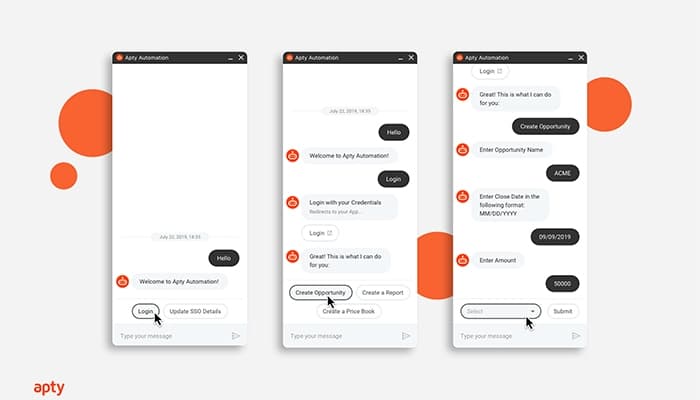
- Build in-app guidance content using the no-code visual editor
- Configure workflow validations and step-by-step walkthroughs for key processes
- Deploy AI-driven tooltips, announcements, and task lists to end users
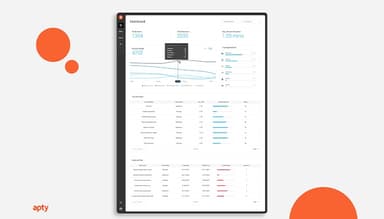
- Monitor usage, friction points, and completion rates through the analytics dashboard
- Adjust and version guidance content based on real-time adoption data
Who Is Apty For?
Apty software is suitable for the following:
- Enterprise IT teams
- Change management leaders
- Training and L&D departments
- HR and onboarding teams
- Operations teams
Apty Use Cases
Based on our analysis of user feedback and Apty features, we have identified key scenarios where the software can help:
IT Teams Standardizing Salesforce Adoption Across Global Sales Teams
When sales teams are spread across regions, inconsistent CRM usage leads to messy data and missed follow-ups. Apty's in-app walkthroughs and validations guide reps through the correct steps in Salesforce as they work, reducing manual data entry errors. IT teams get visibility into where reps are getting stuck without pulling them into separate training sessions.
HR Departments Reducing Support Tickets During Benefits Enrollment
Open enrollment is rough on HR help desks. The same questions come in repeatedly, mostly because people get stuck somewhere in Workday and aren't sure what to click next. Apty fixes that by adding step-by-step guidance right on top of the enrollment screens. As a result, employees can figure things out on their own instead of looking for HR support. The payoff is simple: fewer basic tickets landing on HR's desk during the busiest stretch of their year.
Change Management Leaders Rolling Out ERP Migrations Without Disrupting Operations
Moving to a new ERP system can be challenging for a business. In such a scenario, employees often find workarounds, and that can cause daily operations to suffer. Apty helps here by tracking whether people are completing the new workflows, not just clicking through them. If something is not working, real-time friction data points it out, so change management leaders can step in before a small issue turns into a bigger rollout problem.
Compliance Teams Enforcing Standard Operating Procedures Across Applications
Regulated industries need proof that employees are following approved processes, not just completing tasks. Apty's governance and approval workflows let compliance teams build required steps directly into the software employees already use.
Is Apty Right For You?
Apty matches the needs of large enterprises that need consistent software adoption and process compliance across multiple connected applications, rather than a single-product training tool. The platform follows enterprise security standards and supports compliance requirements like SOC 2 Type 2, AICPA SOC 2, GDPR, ISO 27001, and is FIPS-validated, offering governance and security controls aimed at protecting organizational data.
Enterprise clients including Hitachi, Mary Kay, Mattel, Wyndham, Philips, and Lockheed Martin use Apty. For businesses that lay emphasis on security, Apty offers role-based access controls and governance features built for large organizations.
Still doubting Apty software? Connect with us at (661) 384-7070 today.
Apty Features
Workflow Automation And Validations
This feature automates repetitive workflow steps and checks that required fields and actions are completed correctly before a process can move forward. It can help reduce manual clicks and rework while enforcing standard operating procedures across connected applications.
Usage And Process Analytics
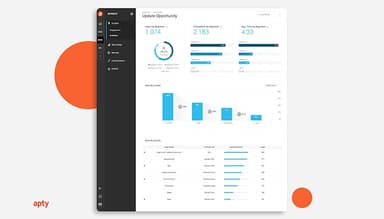
The software tracks the user journey in real time across connected applications to identify friction points and usage gaps before they affect return on investment. It also reports on how the guidance content itself performs, such as which walkthroughs are viewed, skipped, or completed. Administrators can view completion rates and time spent on specific workflows page by page, alongside data on how individual pieces of guidance are performing.
Smart Rules
This feature lets administrators set conditional rules that trigger specific guidance, validations, or actions based on a user's role, activity, or the data entered in a form. It helps different users to follow different guidance paths without building separate content for each.
Cross-Application Guidance
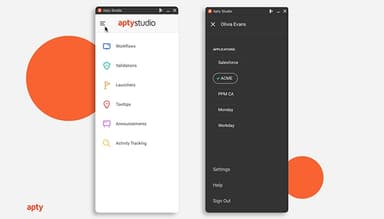
Apty delivers in-app guidance that follows a user across multiple connected applications rather than staying siloed in one system. As a result, tooltips, walkthroughs, and task lists stay consistent whether an employee is working in Salesforce, Workday, or a custom application.
AI-Powered Recommendations
Apty AI analyzes how users actually move through connected applications and surfaces recommendations on where guidance is breaking down. This feature aims to show teams what to fix rather than only reporting that clicks occurred.
Process Compliance
This feature enforces required steps and standard operating procedures inside connected applications, flagging or blocking actions that skip mandatory fields or steps. This gives compliance-focused organizations a way to confirm that all procedures were followed correctly.
Content Creation And Knowledge Management
Administrators can build walkthroughs, task flows, tooltips, and checklists using templates and a visual editor without development resources, then organize that content into a searchable knowledge base so users can find help on demand rather than only in the moment. Content can be published once and reused across similar screens throughout the connected application.
Pros And Cons of Apty
Pros
Easy-to-use, no-code editor makes creating in-app guidance faster
Usage analytics catch friction points early, before they can affect ROI
Responsive implementation and support teams can help make enterprise rollouts smoother
Wide range of enterprise integrations can help the need for custom dev work
Multi-language support can help ease onboarding for global teams
Cons
Guidance is required for advanced workflow and validation features limits fast onboarding
Highly customized or bespoke web applications can be complex to configure accurately
Initial deployment and integration can take significant time in complex environments
Apty Reviews
Total 10 reviews
4.9
All reviews are from verified customers
Rating Distribution
5
Stars90%
4
Stars10%
3
Stars0%
2
Stars0%
1
Stars0%
Share your experience
Customer Service, 500+ employees
Free Trial
“Apty empowers with in-depth Analytics”
Pros
Apty includes an analytics tool that makes it one of the most effective onboarding solutions available. Although we expected it to be complex due to its many features, the customer success team guided us through it quickly and we began seeing benefits almost instantly.
Cons
Deployment and integration took a bit of time which is understandable, but their support was so good that it made us ignore the delay.
Rating Distribution
Ease of use
10
Value for money
10
Customer Support
10
Functionality
10
IT, 500+ employees
Free Trial
“Apty - A product with incredible support”
Pros
Apty's customer support is excellent. Since our users need constant assistance throughout their software implementation having Apty integrated into the software has made things much easier for us. Since we started using Apty, our helpdesk support calls have decreased by over 55%.
Cons
Frankly, I do not have any cons to mention. This is one of the best products I have come across.
Rating Distribution
Ease of use
10
Value for money
10
Customer Support
10
Functionality
10
Human Resources, 500+ employees
Less than a year
“Boosted Clarity-PPM adoption rate”
Pros
Navigating Clarity-PPM was difficult for our users so we turned to Apty to help with that. Its no surprise that Apty supports our users at every stage of their adoption process.
Cons
Well we did face some issues during the first few weeks but the support team was helpful and got us up to speed.
Rating Distribution
Ease of use
10
Value for money
10
Customer Support
10
Functionality
9
Frequently Asked Questions
Does Apty offer an API?
Yes, Apty does offer an API.
What languages does Apty support?
Apty software primarily supports English along with 30 other languages.
What other apps does Apty integrate with?
Apty integrates with enterprise applications including Salesforce, Workday, ServiceNow, Microsoft Dynamics, Coupa, and Infor, among others.
Does Apty have a mobile app?
No, Apty does not offer a dedicated mobile app.
What types of pricing plans does Apty offer?
Apty price falls between $8 and $40/user/month. Get a detailed Apty cost breakdown based on your needs.
Who are the typical users of Apty?
Apty is used by IT teams, change management leaders, training and L&D departments, and operations teams at large enterprises.
What level of support does Apty offer?
Apty offers a dedicated customer support center, along with implementation support noted by users during setup and deployment.
What is a Digital Adoption Platform?
A Digital Adoption Platform (DAP) is a software that provides in-app guidance, walkthroughs, and analytics to help employees learn and correctly use business applications. These can include apps like Salesforce or Workday. It closes the gap between having software features and employees actually using them, improving adoption, compliance, and productivity across an organization.
What does Apty Company do?
Apty is a Digital Adoption Platform (DAP) company that helps enterprises drive software adoption across applications like Salesforce, Workday, ServiceNow, and custom systems. It provides in-app guidance, workflow automation, real-time validation, and usage analytics, so employees use business software correctly. Moreover, it provides IT and change management teams with visibility into adoption, compliance, and process performance.