


Last Updated
Overview
BlueMail centralizes communication by combining unlimited email accounts into a universal interface to help with efficient workflow management. While the initial setup can take some time, the platform’s ability to declutter inboxes with smart clusters and GemAI makes it a reliable choice for productivity.
Be the first one to leave a review!
No review found

Starting Price
Custom

BlueMail Specifications
- Real-Time Communication
- File Sharing & Management
- Task & Project Management
- Calendar & Scheduling
What Is BlueMail?
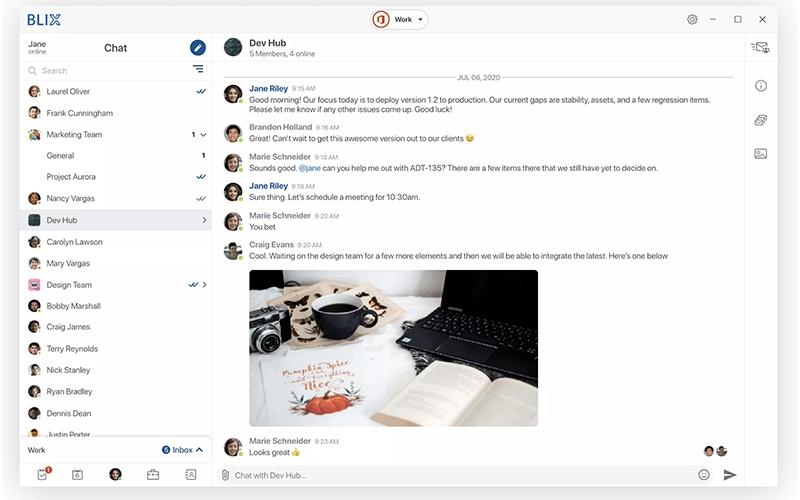
BlueMail is a universal email client designed for professionals and consumers who need to manage multiple digital identities in one place. The software features a unified inbox to merge accounts from any provider, GemAI for generative writing assistance, and MagicSync for seamless cross-device setup.
Its key features help users reduce inbox clutter and improve response times, which solves the pain point of fragmented communication channels.
BlueMail Pricing
The BlueMail cost breakdown includes the following options:
- Standard: Free
- Plus: $5/user/month
- Team: $12/user/month
- Enterprise: Custom pricing
Disclaimer: The pricing is subject to change.
BlueMail Integrations
Who Is BlueMail For?
The software is ideal for a wide range of industries and sectors, including:
- Technology
- Risk management
- Travel
- Education
- Music
Is BlueMail Right For You?
BlueMail is an ideal fit for businesses that intend to organize their communication channels and automate routine email tasks. The platform combines a unified inbox and a generative AI assistant to help freelancers, consultants, and businesses manage client relationships. BlueMail confirms compliance with global data privacy legislation including the General Data Protection Regulation (GDPR) and the California Consumer Privacy Act (CCPA).
Still unsure about BlueMail? Contact our support team at (661) 384-7070 for further guidance.
BlueMail Features
Unified Inbox
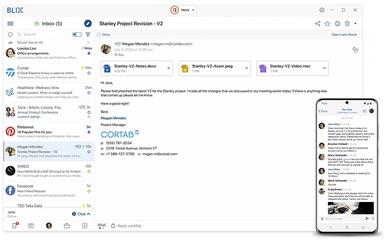
This feature brings together messages from all connected accounts into one single, complete viewing area. The Inbox provides a full overview of all incoming mail from every service at the same time, which makes messages clear and easy to see. This arrangement makes it simple to manage and place importance on the entire email flow within one application.
Get Stuff Done
BlueMail works as a dedicated task board for managing email inside the platform. Messages are marked for attention later using specific groups like read later or reply later. The system guarantees effective follow-up by turning email actions into organized trackable items for reliable mailbox control.
Share Mail
The Share Mail feature allows quick sharing of email content without using the normal forwarding method. This function simplifies content sharing with contacts outside and inside the organization. The feature creates a unique link that is then sent using established messaging applications.
Integrated Calendar
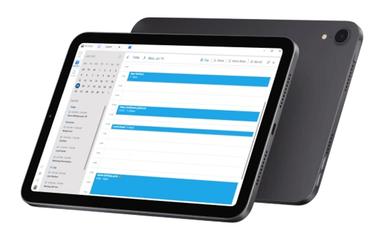
BlueMail software provides a calendar that is available directly within the main application interface for quick planning. Users can easily schedule events, invite contacts, and set notifications directly from this component. The calendar automatically updates as needed to confirm immediate availability of all appointments.
Generative Email
This feature is powered by Gem AI, which acts as an advanced artificial intelligence assistant for writing mail. It is designed to ease the process of summarizing long emails and writing new messages in an effective way. The resulting function provides a faster work method that helps increase productivity when managing mail communication.
Pros And Cons of BlueMail
Pros
Offers cross platform desktop support including Linux
Able to manage multiple accounts, including Office 365 for Business
Offers a simple and intuitive operation
Compatible with majority of messaging and mail protocols
Easy setup using automatic connection mode
Cons
Font size and zoom capabilities need better customization options
Read receipt functionality would be a welcome addition
Mail organization and division display could be improved
Synchronization speed from the server can be improved
BlueMail Reviews

No reviews yet!
Be the first to review this product
Frequently Asked Questions
What types of pricing plans does BlueMail offer?
The vendor offers four plans: Standard (Free), Plus ($5/user/month), Team ($12/user/month), and Enterprise (Custom pricing). Request a customized BlueMail price plan for your business today!
Who are the typical users of BlueMail?
BlueMail features are designed for businesses in industries and sectors like education, music, technology, travel, and risk management.
Does BlueMail have a mobile app?
Yes, BlueMail offers a mobile app.
What language does BlueMail support?
The platform supports multiple languages including English, Spanish, German, and French.
Does BlueMail offer an API?
Information regarding the vendor’s API availability has not been provided.
What other apps does BlueMail integrate with?
BlueMail does not offer traditional app integrations, but it supports connecting with a wide range of email services through IMAP, POP3, ActiveSync, and EWS. This includes providers such as Gmail, Microsoft 365, Outlook, Yahoo, Zoho, and many others.
What level of support does BlueMail offer?
The platform provides support through email and a help center.