


CalendarWiz
Last Updated
Overview
CalendarWiz is robust online calendar software designed for groups, organizations, and businesses (including schools, churches, and nonprofits) that require an easily embeddable, customizable scheduling system. Despite having no built-in resource area for document storage, its core strength lies in providing centralized staff scheduling and highly flexible website integration.
CalendarWiz Specifications
- Real-Time Communication
- File Sharing & Management
- Document Management
- Calendar & Scheduling
What Is CalendarWiz?
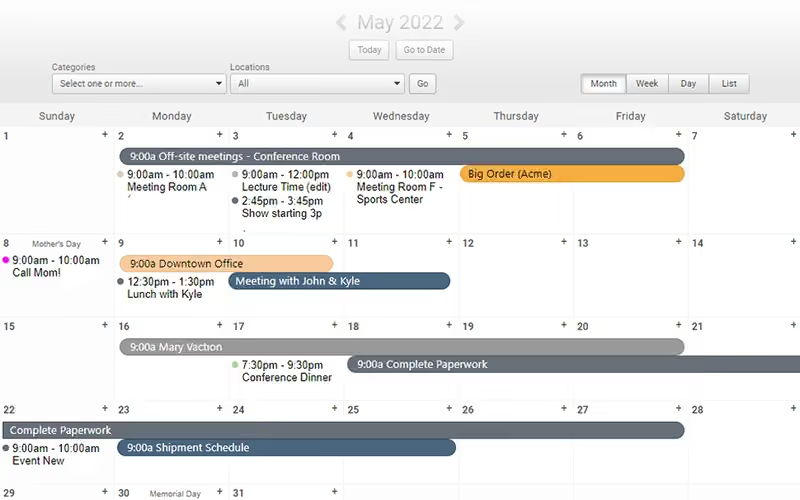
CalendarWiz software is a cloud-based calendar management system that serves as a single source of truth for events and resource allocation within multi-user environments. The platform is engineered to be highly intuitive, favoring simple setup and customization. This design focus is demonstrated by its integration process: users can embed the full calendar, event boards, or upcoming events lists into any website using simple cut-and-paste code, eliminating the necessity for HTML or web development expertise.
CalendarWiz Pricing
CalendarWiz offers the following pricing plans:
- Basic: $11/month
- Standard: $17/month
- Professional: $27/month
- Enterprise: $47/month
Disclaimer: The pricing is subject to change.
CalendarWiz Integrations
Who Is CalendarWiz For?
CalendarWiz is ideal for a wide range of industries and sectors, including:
- Educational institutions
- Healthcare organizations
- Nonprofit organizations
- Corporations
- Retail businesses
- Government and municipalities
- Sports and recreation
Is CalendarWiz Right For You?
CalendarWiz is the ideal solution for communities, churches, and businesses needing centralized scheduling and resource management. Its standout CalendarWiz features include robust room and facility booking, preventing costly double-bookings. The platform offers reliable infrastructure, utilizing real-time data backup and excellent uptime, and is scalable for growing teams, supported by responsive customer service.
Still doubtful if CalendarWiz is the right fit for you? Connect with our customer support staff at (661) 384-7070 for further guidance.
CalendarWiz Features
Event Board
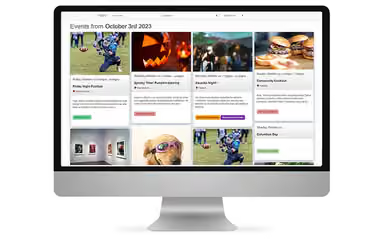
The CalendarWiz Event Board displays events using an attractive, mobile-friendly poster board style layout. This engaging feature showcases event images in a modern format, enhancing public communication. Organizations can easily customize the board’s colors and embed it seamlessly into any existing website.
Multi-User Editing
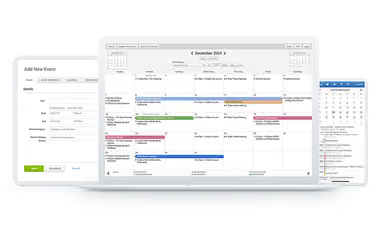
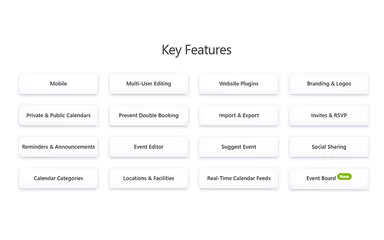
Teams can collaborate effectively using CalendarWiz Multi-User Editing. Administrators control user permissions, determining who can view or edit specific events to ensure data security. The feature also includes event change tracking, providing full visibility and monitoring of all calendar modifications.
Mobile
The CalendarWiz mobile interface ensures schedules are accessible and editable from any device, including smartphones and tablets. This provides essential flexibility for remote teams. There is no requirement to download an application; users simply log in through any standard web browser to view updates.
Custom Colors And Branding
Organizations can maintain brand consistency across all public-facing platforms using CalendarWiz custom colors and branding. Users may easily customize the calendar's colors and logos to match their website and corporate identity. Preset themes are available, or specific custom colors can be selected.
Invite With RSVP
Utilize the Invite with RSVP and attendance tool to streamline communication for meetings and events. Invitations can be sent with or without the optional RSVP feature to track expected attendance accurately. The system diligently maintains a record of all email recipients and confirmed attendees.
Pros And Cons of CalendarWiz
Pros
Easy to set up and integrate with clear documentation and examples
Simplifies scheduling for multiple organizations with shared calendars
Combines event creation, management, and customization in one platform
Easy to use for all users, even those with no technical experience
Cons
Activity Board doesn’t allow featuring events
Some features like image uploading or accent options could be easier
CalendarWiz Reviews
Total 46 reviews
4.9
All reviews are from verified customers
Rating Distribution
5
Stars89%
4
Stars11%
3
Stars0%
2
Stars0%
1
Stars0%
Share your experience
Individual & Family Services, 11-50 employees
Less than a year
“Reliable booking with strong security”
Pros
I haven't run into any bugs or glitches while booking rooms or handling scheduling. Security feels top, notch and the whole platform offers solid value for your money. Event management also doesn't come with any learning curve so everything runs smoothly from the start.
Cons
The only real downside is that I wish I'd discovered it sooner. I had tried a couple of other options before and they were nowhere near as good.
Rating Distribution
Ease of use
10
Value for money
9
Customer Support
9
Functionality
10
Construction, 51-100 employees
More than a year
“Highly customizable”
Pros
This platform is pretty easy to design to your needs. You can set things up in whatever way works best for your workflow. It's also responsive-viewing it from a computer, tablet or phone is all supported so it's convenient no matter what device you're on.
Cons
Dragging and dropping isn't available. They've mentioned they're working on adding that feature but it still hasn't shown up.
Rating Distribution
Ease of use
8
Value for money
9
Customer Support
8
Functionality
9
Political Organization, 11-50 employees
Less than 6 months
“fast integration with docs”
Pros
Calendarwiz was extremely easy to integrate and the documentation actually helps, lots of examples plus ready-to-click code snippets. We had everything working in just a few minutes and were able to roll out a customized calendar across the entire organization. It's also priced in a way that makes sense for a small nonprofit.
Cons
It would be nice if the Activity Board supported featuring but that's a pretty minor request compared to how capable the app is overall and how smoothly it gets set up.
Rating Distribution
Ease of use
10
Value for money
9
Customer Support
8
Functionality
10
Frequently Asked Questions
Does CalendarWiz have a mobile app?
There is no information available about a CalendarWiz mobile application.
Does CalendarWiz offer an API?
There is no information available about a CalendarWiz API.
What other apps does CalendarWiz integrate with?
The vendor has not shared specific information regarding third-party integrations for this software.
What types of pricing plans does CalendarWiz offer?
CalendarWiz price plan suit different needs: Basic at $11/month, Standard at $17/month, Professional at $27/month, and Enterprise at $47/month. You can request a custom CalendarWiz cost quote to match your specific requirements.
What level of support does CalendarWiz offer?
CalendarWiz offers support via an online contact form.
What language does CalendarWiz support?
CalendarWiz is primarily available in English.
Who are the typical users of CalendarWiz?
CalendarWiz is a versatile scheduling solution suited for many industries and sectors. It serves educational institutions, healthcare organizations, and nonprofit organizations, while also supporting corporations, retail businesses, government entities, and sports and recreation programs, making it a flexible tool for a variety of scheduling needs.