


Chatwoot
Last Updated
Overview
Chatwoot is an open-source customer engagement platform under collaboration and productivity software for unified communication. While the self-hosted version requires technical maintenance, its cloud-based solution and robust automation capabilities streamline support effortlessly. Overall, Chatwoot’s flexibility makes it a powerful choice.

Chatwoot Specifications
- Real-Time Communication
- Automation & Workflow
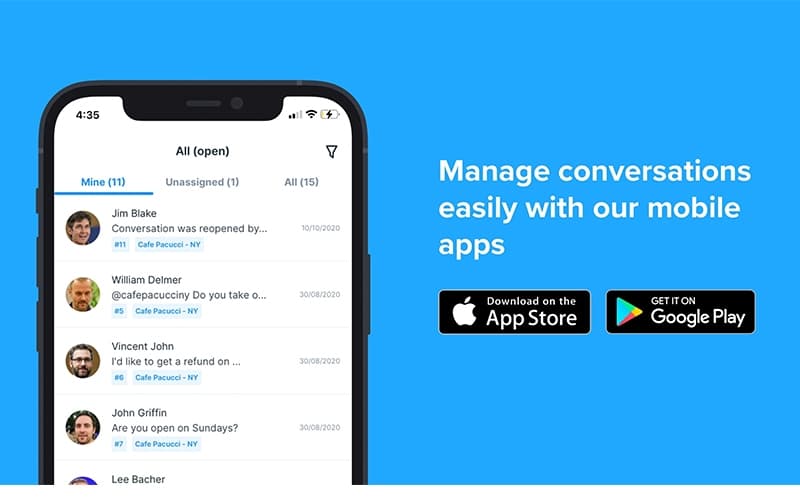
- Mobile Accessibility
- Analytics & Reporting
Chatwoot Features
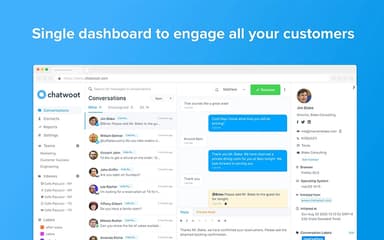
Shared Inbox
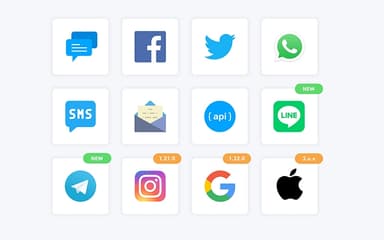
This feature unifies conversations from channels like Email, WhatsApp, and Twitter into a single view. Agents can collaborate by assigning tasks to specific team members and using private notes to discuss queries internally before responding. This eliminates collision and ensures a cohesive voice across all customer touchpoints.
Live Chat Widgets
Customize the chat interface to align perfectly with your brand's visual identity using this tool. The widget supports multi-lingual capabilities and rich media attachments, providing a modern experience for website visitors. It effectively reduces friction for users seeking immediate assistance directly from your web pages.
Chatbot Automations
Automate initial interactions by integrating with NLU platforms like Dialogflow or Rasa to handle repetitive FAQs. This system qualifies leads 24/7 and seamlessly hands off complex issues to human agents only when necessary. It significantly lowers response times while keeping the support team focused on high-value problems.
Canned Responses
Accelerate reply times by creating short codes for frequently asked questions and common greeting messages. Agents can insert these pre-written text blocks into active conversations with a few keystrokes, maintaining consistency in tone and accuracy. This feature is essential for maintaining high service standards during high-volume periods.
Conversation Labels
Organize incoming tickets by tagging them based on urgency, topic, or customer segment for easier retrieval. These custom identifiers allow managers to filter workflows and generate granular reports on specific issue types. Proper segmentation helps in identifying trends and improving product strategies based on user feedback.
Pros And Cons of Chatwoot
Pros
Intuitive and clean user interface
Centralizes multiple communication channels efficiently
Seamless integrations make the entire process efficient
Cons
Software interface may seem dated and requires updates
Users have requested for more customization options in the reporting feature
Chatwoot Reviews
Total 10 reviews
4.6
All reviews are from verified customers
Rating Distribution
5
Stars60%
4
Stars40%
3
Stars0%
2
Stars0%
1
Stars0%
Share your experience
Small Business, 11-50 employees
“all messages in one place”
Pros
My sister recently began selling crochet items through social media and I ended up handling the leads, customers, sales and everything else for her small startup. For this kind of online business, it has been a really solid fit. The biggest advantage is not having to download every app and keep each one open all the time. I can set aside a couple of hours at night and from one platform, manage, check and reply to customer messages coming in from different channels from people interested in buying the crochet products.
Cons
During a flash sale, once requests started coming in quickly across multiple platforms like Facebook and Instagram, the mobile notifications in it were delayed. Also, connecting WhatsApp in the beginning felt a bit confusing and harder than it should have been.
Rating Distribution
Ease of use
10
Value for money
10
Customer Support
10
Functionality
9
Small Business, 11-50 employees
“Perfect fit for startup support”
Pros
Running this tool has been exactly what our small startup team needed from an on-site chat support tool. Getting it set up was quick and connecting it with our workflow was even simpler. We use it with both Slack and email and it handles our daily support needs really well. Compared with other bloated tools that hide their pricing, this one feels like an obvious choice. We rely on it every day with a single support agent and have been very happy with it.
Cons
After nearly a year of using it every day, we still haven't run into any issues.
Rating Distribution
Ease of use
10
Value for money
9
Customer Support
10
Functionality
10
Small Business, 11-50 employees
“Impressive customer engagement”
Pros
It's an excellent tool for handling customer engagement. The platform is very user-friendly, highly responsive and gives us a solid place to manage customer support issues all in one spot. I used it regularly in my work and it does a good job of storing customer data while also providing useful insights. Implementation was simple which adds even more value to the product. Their support team has also been impressive, responding to questions quickly whenever needed. Overall, the way it fits into daily operations has really helped the organization grow faster.
Cons
Even though it's a very good tool overall, one area that could use some improvement is the UI especially to help new people get comfortable and adapt to the platform more quickly.
Rating Distribution
Ease of use
10
Value for money
9
Customer Support
8
Functionality
9
Frequently Asked Questions
What level of support does Chatwoot offer?
They offer ticket-based support, live chat, and extensive online documentation.
What language does Chatwoot support?
Chatwoot natively supports 30+ different languages.
Who are the typical users of Chatwoot?
Typical users include digital marketing agencies, sales operations, and data analytics teams.
What types of pricing plans does Chatwoot offer?
Chatwoot offers the free Hacker plan along with Startups at $19, Business at $39, and Enterprise at $99 per agent per month. Get a detailed Chatwoot cost breakdown tailored to your specific requirements.
Does Chatwoot have a mobile app?
Yes, Chatwoot does offer a dedicated mobile app for iOS and Android users.
Does Chatwoot offer an API?
Yes, Chatwoot does offer an API.
What other apps does Chatwoot integrate with?
Chatwoot integrates with various systems including WooCommerce, Shopify, Slack, Dialogflow, Google Translate, and Zoho CRM.