


Chatwork
Last Updated
Overview
Chatwork delivers unified communication with chat, tasks, file sharing, and video calls for smoother teamwork. Its simplicity supports fast adoption across teams. While support documentation may not cover all scenarios, the platform’s organized workspace and strong security standards make it a dependable choice for streamlined collaboration.
Chatwork Specifications
- Real-Time Communication
- File Sharing & Management
- Document Management
- Task & Project Management
Chatwork Features
Real-Time Chat
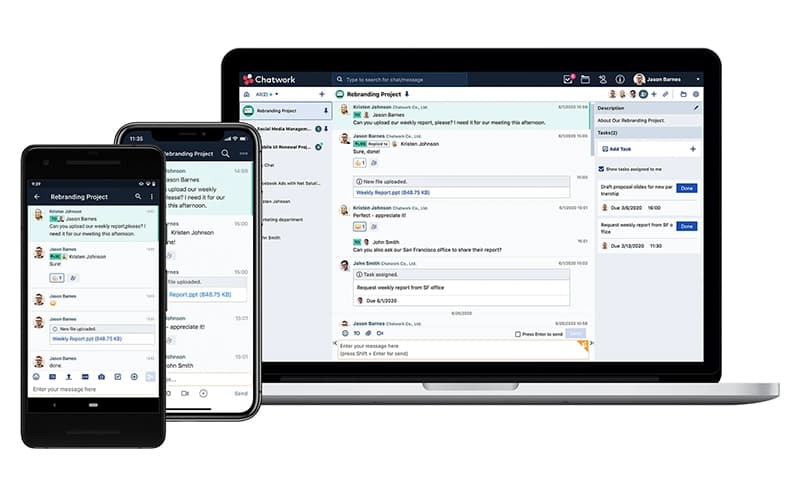
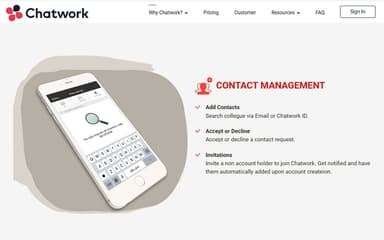
Chatwork’s chat function enables individuals and teams to communicate instantly through direct messages, group discussions, and project-based rooms. Users can organize conversations, mark important threads, and locate information quickly using keyword search. This improves clarity in daily workflows and reduces reliance on long email exchanges.
Task Management
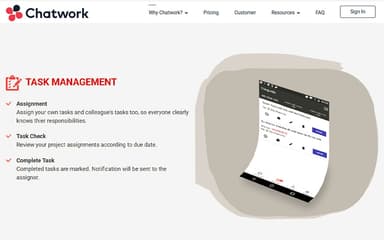
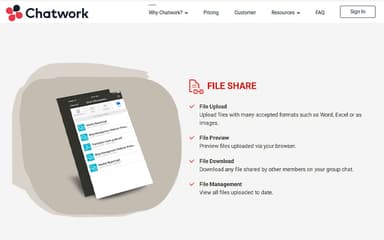
The task management module lets users assign responsibilities, track progress, and verify completed actions without leaving the chat environment. It supports task creation for oneself or team members, ensures visibility into upcoming deadlines, and delivers notifications when items are completed. This helps teams maintain accountability and stay aligned on project goals.#fn File Sharing#fd#Chatwork features a central space to upload, preview, download, and manage documents directly in chat rooms. Supported formats include Word, Excel, images, and more. By storing all shared files within conversations, teams streamline document access, prevent version confusion, and maintain organized project-specific repositories for ongoing collaboration.
Video Calling
Video call capabilities allow teams to switch from chat to face-to-face discussions for more detailed meetings. Users can host group video sessions, share screens, and participate via smartphones when away from desktops. This feature enhances remote communication, supports faster decision-making, and helps distributed teams stay visually connected.
Pros And Cons of Chatwork
Pros
Enhances accountability with structured task visibility
Reduces project delays through timely task notifications
Simplifies document access with centralized file storage
Cons
Documentation gaps may hinder user workflows
Customer support time may vary at times
Chatwork Reviews
Total 9 reviews
4.7
All reviews are from verified customers
Rating Distribution
5
Stars67%
4
Stars33%
3
Stars0%
2
Stars0%
1
Stars0%
Share your experience
Banking, 500+ employees
“A solid team chat for our business”
Pros
ChatWork works well as a business-focused platform that corporate teams can use for team messaging, video meetings and file sharing.
Cons
One common downside is the free plan which feels quite restricted with tight usage limits, only a small number of external app integrations and limited automation options.
Rating Distribution
Ease of use
9
Value for money
10
Customer Support
10
Functionality
8
Small Business, 11-50 employees
“An organized team collaboration hub!”
Pros
Biggest strength I noticed in it is how simple and organized communication feels. It makes working with a team much easier by keeping group chats, task management and file sharing all in one place. I also really appreciate how user-friendly it is especially when it comes to handling work discussions and staying connected with teammates.
Cons
A downside is that certain features can feel a bit limited compared to other collaboration tools especially for managing larger projects. The interface also comes across as somewhat outdated at times and notifications can get overwhelming when group chats are very active.
Rating Distribution
Ease of use
8
Value for money
9
Customer Support
9
Functionality
8
Education Management, 51-100 employees
“task tracking really helps”
Pros
One thing that works really well with it is how simple it is to use which keeps communication structured and organized. The built-in task management feature is especially useful for keeping track of pending work and follow-ups. Being able to turn conversations directly into tasks helps make sure action items don't get overlooked. It also works very well for collaboration since internal teams can coordinate without depending so much on email which helps boost productivity. Having file sharing and task tracking together in one platform makes day-to-day coordination much easier. The file sharing and notification features have also been quite helpful in daily work. Mobile access is another big plus because it keeps everyone connected while working remotely or even outside office hours. Setup was simple from the beginning and onboarding did not require much training since the interface is user friendly and the main features like chat, file sharing and task management are easy to understand.
Cons
Integrations with other platforms could definitely be better because they still feel a bit limited compared to some other collaboration tools. The interface could also use a more modern design along with stronger customization options to improve the overall experience. Also, searching through older conversations can be a little difficult when discussion threads get long especially if multiple topics are being discussed in the same chat.
Rating Distribution
Ease of use
10
Value for money
8
Customer Support
8
Functionality
7
Frequently Asked Questions
Does Chatwork offer an API?
Yes, Chatwork provides API access.
What level of support does Chatwork offer?
Chatwork provides support via FAQs.
What types of pricing plans does Chatwork offer?
Chatwork offers Free and Business plans starting at $8.4 per month. Request a custom Chatwork price quotation.
What language does Chatwork support?
Chatwork supports the English language.
Who are the typical users of Chatwork?
Chatwork is used across business services, IT, marketing, education, financial services, and consulting firms.
What other apps does Chatwork integrate with?
No third-party integrations are listed.
Does Chatwork have a mobile app?
Yes, Chatwork offers a mobile app.