

Conference Calling
Last Updated
Be the first one to leave a review!
No review found

Starting Price
$16.49
per user per month

Conference Calling Specifications
- Real-Time Communication
- File Sharing & Management
- Calendar & Scheduling
- Integration with Other Tools
What Is Conference Calling?
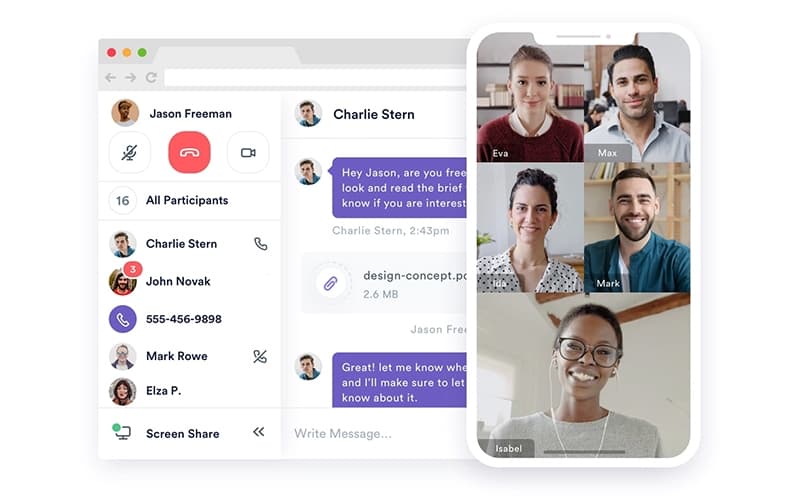
Conference Calling, officially known as Vast Conference, is a cloud-based conference calling and online meeting platform for companies to manage training sessions or large virtual events. The software offers organizations the capacity to conduct large conference calls, with up to 1000 callers. Its video conferencing feature offers up to 49 HD video feeds with the capacity to accommodate up to 250 viewers. Additionally, the platform offers operator-led calls for formal or complex events with trained staff to manage sessions efficiently.
What Is Conference Calling Best For?
The platform is well known for its operator-assisted conference calls with integrated presentation capabilities. It allows users to add visual content through slide presentations, application sharing, webcasting, or recorded video. The software lets lead operators manage callers while organizers conduct a structured, presentation-focused session. It combines operator control with presentation delivery to allow users to manage sessions and provide better visual communication.
How Much Does Conference Calling Cost?
The platform’s starting price is $16.49/user/month for its Essentials plan. It includes several capabilities, including unlimited conference calls and interactive online meetings. Additional Conference Calling pricing tiers are as follows:
- Standard: $21.99/user/month
- Professional: $43.99/user/month
- Pay As You Go: 2¢/min/caller
Additionally, the software offers a 14-day free trial. Besides the fixed subscription charges, users should also consider paying additional costs, including, but not limited to, the following:
- Operator-Assisted Conference Calls: 16¢/minute/line for the Standard package and 19¢/minute/line for the Premium package
- Implementation And Setup: Estimated at $500–$2,500 for account configuration and deployment assistance
- Training And Onboarding: Costs approximately $300–$1,500, based on the training complexity and length
- Third-Party Integrations: Might add up to $1,000–$5,000/integration, depending on complexity
- Custom Configuration: Typically falls within $500–$2,000 for specialized workflows or account requirements
Disclaimer: The pricing is subject to change.
Conference Calling Integrations
Vast Conference integrates with the following platforms:
- Okta
- Microsoft Office 365
- Google Calendar
- Outlook Plugin
- Google SSO
How Does Conference Calling Work?
Here's how you can get started with the software upon signing in:
- Open the administrator portal to manage company users, service plans, conferencing settings, and account access
- Add users and assign the appropriate conferencing access based on each employee’s responsibilities
- Review the dashboard to monitor account usage and billing reports from the administrator portal
- Set conferencing features according to how your organization plans to conduct audio calls or online meetings
- Create conference details and provide participants with the relevant meeting links or dial-in numbers
- Schedule meetings through supported calendar tools when organizing recurring or planned conference calls
- Monitor active calls to view participants and manage meeting controls while a conference is underway
- Review recordings and reports after meetings to access stored calls and examine account activity
Who Is Conference Calling For?
Vast Conference is used in the following industries:
- Marketing
- Design
- Accounting
- Information technology
Conference Calling Use Cases
Based on our review of Conference Calling’s features and capabilities, we have identified several scenarios where this tool works well for client discussions and formal events:
Distributed Teams Holding Recurring Team Meetings
Conference Calling allows distributed teams to conduct recurring meetings even when their employees are working from various locations or remotely. It lets teams invite remote participants into video and audio discussions without requiring them to attend the meetings in-person. Additionally, the platform’s browser-based access capability allows teams to join meetings through different devices as well.
Client Discussions Requiring Multiple Stakeholders
Several client conversations require the presence of multiple stakeholders simultaneously, such as account representatives, subject-matter specialists, managers, and external stakeholders. Coordinating with all stakeholders through a single call gets challenging. Conference Calling allows organizations and departments to carry out larger group discussions while coordinating group conversations on a regular basis.
Large Enterprises Coordinating Company-Wide Meetings
There are several instances, such as departmental briefings and company-wide announcements, where corporate firms need to conduct meetings that involve the entire firm. The platform is capable of holding audio conferences with a capacity to accommodate up to 1000 callers in a single call. It allows organizations to bring together geographically dispersed employees within the same session.
Investor And Other Formal Corporate Events
The system provides operator-assisted services to help organizations conduct formal events where organizers need dedicated support during the call. The software supports events of up to 6,000 callers, with registration, recording, and transcription available for organizations that need a formal record of the session. It allows a lead moderator to coordinate speakers, manage participants, and oversee the session while the organizers focus on the event itself.
Corporate Training Teams Delivering Remote Training And Educational Sessions
In several instances, remote training sessions involve presenting information to a group while allowing participants to ask questions during the presentation. Conference Calling software offers webinar sessions that support presentations, audience questions and answers sessions, and post-event access to recordings. Organizations can therefore use the same conferencing environment for scheduled training as well as sessions that need to remain available after the live event.
Is Conference Calling Right For You?
If you are looking for a conferencing platform that can manage international dial-ins and can coordinate large group meetings with complex setup, then Conference Calling might be the right software for you. The platform offers various capabilities, including operator-assisted service and 1000-caller capacity, making it a suitable option for large formal events.
Additionally, the software is GDPR-compliant, providing security for sensitive user information. Trusted by several companies, including The Street and Planet Marketing, the platform is capable of meeting the needs of growing organizations.
Still have doubts about the Conference Calling software? Contact us at (661) 384-7070 to make the right call.
Conference Calling Features
Webinar Events
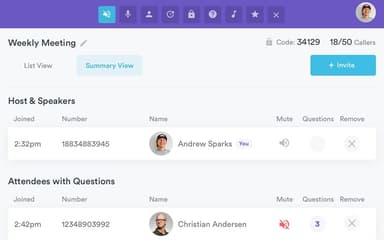
Conference Calling software provides users with browser-based webinar hosting for training sessions, product demonstrations, panel discussions, and live audience question-and-answer (Q&A) sessions. It lets hosts schedule invitations and collect registration details before an event. The platform also includes attendance reports that show details about the engagement data, such as the attendance joining and leaving times. It lets users record sessions to help attendees view them later without missing anything.
Conference Call Services
This functionality provides users with specific numbers for repetitive audio meetings without requiring a new number for every session. Participants can join calls from various devices, including mobile devices and web browsers. The platform lets hosts view active callers and manage entry controls during the call.
Webcasting
Conference Calling features live webcasts that allow organizations to present HD audio, video, or slide content to a large remote audience. The software provides a branded event registration page to organizations, from which potential participants can sign up for the upcoming event. Additionally, it provides several capabilities to attendees, such as chats, polls, and question-and-answer tools that allow them to participate during the session.
Video Conferencing
The system provides users with browser-based video meetings to conduct discussions remotely through Outlook, Google Calendar, or Microsoft 365. With HD audio and video settings, the software allows participants to share their screens during presentations, exchange files with team members, and record sessions to review later. It also provides hosts with the ability to customize meeting settings that allow them to choose the visibility of participants during the video conference.
Pros And Cons of Conference Calling
Pros
Keeps audiences engaged through interactive presentations
Saves time by simplifying meeting setup and participation
Keeps conversations focused with clear audio and call controls
Makes communication efficient with convenient in-call tools
Improves collaboration across different departments
Cons
Large calls can be harder to manage clearly
Screen sharing may lag with high-resolution visuals
Lacks tools for annotating shared visuals
Conference Calling Pricing
Essentials | Standard | Professional | Pay As You Go |
|---|---|---|---|
$16.49 per month per user | $21.99 per month per user | $43.99 per month per user | 2¢ per minute per caller |
|
|
|
|
Disclaimer: The pricing details were last updated on Sep 25, 2026 from the vendor's website. Please contact us for a tailored pricing list.
Conference Calling Reviews

No reviews yet!
Be the first to review this product
Frequently Asked Questions
What language does Conference Calling support?
Conference Calling supports the English language.
Does Conference Calling offer an API?
No, Conference Calling does not offer an API.
What other apps does Conference Calling integrate with?
Conference Calling integrates with Google SSO, Outlook Plugin, Okta, Google Calendar, and Microsoft Office 365.
Does Conference Calling have a mobile app?
Yes, Conference Calling has a mobile app available on iOS, Windows, and Android devices.
What types of pricing plans does Conference Calling offer?
The software offers four pricing plans: Essentials ($16.49/user/month), Standard ($21.99/user/month), Professional ($43.99/user/month), and Pay As You Go (2¢/min/caller). Get a personalized Conference Calling price quote today.
What level of support does Conference Calling offer?
Conference Calling provides form submission, phone, and online chat support.
Who are the typical users of Conference Calling?
Conference Calling is used in marketing, information technology, accounting, and design industries.