


Kumospace
Last Updated
Overview
Kumospace transforms remote work with immersive virtual spaces, enabling spontaneous conversations and organized meetings. Though the initial setup requires some adjustments, its design makes collaboration natural and engaging. If your business values culture, teamwork, and real‑time communication, Kumospace fits the bill perfectly.


Kumospace Specifications
- Real-time Communication
- File Sharing & Management
- Document Management
- Task Project & Management
What Is Kumospace?
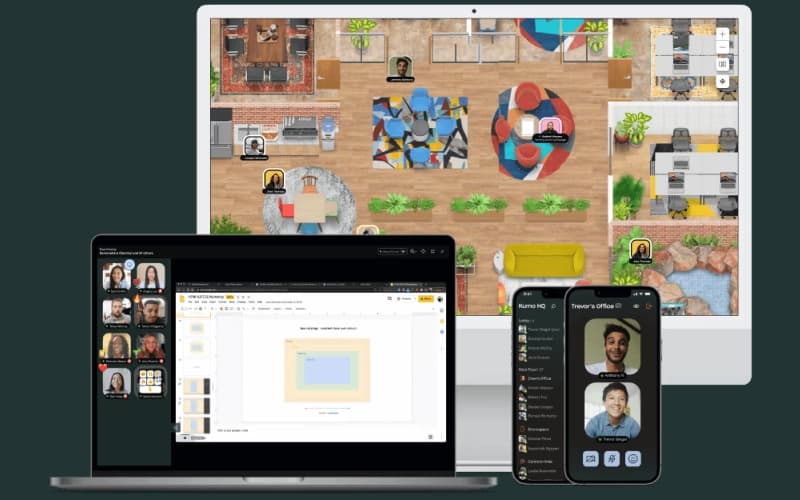
Kumospace is an immersive virtual office platform designed to bridge the gap between remote and in-person work environments. Utilizing spontaneous 'watercooler' moments and organized meetings within a customizable digital layout. This spatial approach helps businesses solve the problem of 'Zoom fatigue' and remote isolation, fostering a stronger company culture and improving real-time communication for distributed teams of all sizes.
Kumospace Pricing
Businesses can choose from the following Kumospace price plans:
- Free - $0/user/month
- Business - $20/user/month
- Enterprise - Custom pricing
Disclaimer: The pricing is subject to change.
Kumospace Integrations
The software integrates with various third-party tools and systems. These include:
- Microsoft Outlook
- Microsoft Teams
- Google Calendar
Who Is Kumospace For?
Kumospace is ideal for a wide range of industries and sectors, including:
- Finance
- Healthcare
- Education
- Technology
- Government
Is Kumospace Right For You?
Kumospace is a strong fit for organizations that want to restore human connection in remote work environments. Its spatial audio and customizable spaces stand out for teams that value culture, informal collaboration, and engagement. The platform has been widely adopted by remote-first companies and has earned strong visibility across software review platforms for innovation in virtual collaboration. If your team struggles with isolation or meeting overload, Kumospace offers a refreshing alternative.
Still doubtful if Kumospace software is the right fit for you? Connect with our customer support staff at (661) 384-7070 for further guidance.
Kumospace Features
Online Meetings
Kumospace allows users to run productive virtual meetings that go beyond simple video calls. By providing a structured yet flexible digital environment, teams can transition from formal presentations to quick huddles effortlessly.
Video Conferencing
The platform is specifically designed to support the nuances of hybrid and remote work. High-quality video streams combined with administrative controls ensure that face-to-face interactions remain professional and secure.
Virtual Office
The software provides a "home base" for distributed organizations. It replicates the physical presence of an office, allowing managers to see team availability and employees to feel a sense of belonging in a shared digital environment.
Webinar Platform
This feature allows organizations to broadcast at scale using a platform designed for large formats and high-impact messaging. It provides the tools necessary to deliver professional keynotes and product launches while maintaining a high level of audience engagement and technical stability.
Screensharing
Kumospace offers multiple screensharing capabilities and remote screen control. This allows participants to troubleshoot technical issues in real-time or co-edit documents during a session, turning passive viewing into an active, collaborative experience for everyone involved in the meeting.
Pros And Cons of Kumospace
Pros
Strong team collaboration fosters engagement
Intuitive interface enhances productivity
An engaging remote work environment supports interaction
Cons
Users desire more customization options
Mobile app notifications disrupt user experience
Kumospace Reviews
Total 86 reviews
4.6
All reviews are from verified customers
Rating Distribution
5
Stars66%
4
Stars31%
3
Stars2%
2
Stars0%
1
Stars0%
Share your experience
Mid Market, 51-100 employees
“Offers a secure virtual workspace”
Pros
Using Kumospace has been a really positive experience because the platform is simple to use, packed with strong security features and has an excellent interface. Its virtual workspace tools make remote work feel effortless and allow teams to stay productive from anywhere. Video conferencing is also very convenient which improves communication across teams and makes virtual meetings much more effective for business. Also, the collaboration features are very useful. Overall, Kumospace has been dependable and makes work much easier.
Cons
Up to this point, it has met our expectations and I have not run into any issues worth mentioning.
Rating Distribution
Ease of use
10
Value for money
9
Customer Support
9
Functionality
10
Education Management, 11-50 employees
“a flexible team collaboration space”
Pros
Managing a large team feels much more practical with this flexible workspace. Setting up and organizing collaboration spaces is simple and the interface is user friendly enough to move around without much confusion. One feature that deserves more attention is the ability to add games and activities in it which has been genuinely useful for team bonding and social interaction.
Cons
There can still be a bit of a learning curve for people who are not very comfortable with digital tools. It also does not perform particularly well on low-bandwidth connections so some backend optimization similar to what Zoom offers would help. Another limitation is the 4-hour-per-week usage cap which would be better if it were extended.
Rating Distribution
Ease of use
7
Value for money
10
Customer Support
10
Functionality
7
Not Specified, N/A employees
“Perfect for distributed teams”
Pros
Working with decentralized teams is much more convenient with this and it really helps bring everyone together in one place.
Cons
Pricing is on the higher side although compared with the cost of maintaining a physical office, it's still reasonable.
Rating Distribution
Ease of use
10
Value for money
7
Customer Support
10
Functionality
10
Frequently Asked Questions
What type of pricing plan does Kumospace offer?
The vendor offers multiple price plans. These include Free ($0/user/month), Business ($20/user/month, with a 14‑day free trial), and Enterprise (custom pricing). Get in touch for a personalized Kumospace pricing plan based on your business's specific needs!
Does Kumospace offer an API?
The vendor hasn't provided details about API availability.
What other apps does Kumospace integrate with?
It integrates with various third-party tools, such as Microsoft Outlook, Microsoft Teams, and Google Calendar.
Does Kumospace offer a mobile app?
Yes, it supports both iOS and android mobile apps.
Who are the typical users of Kumospace?
Kumospace features are suitable for businesses operating in multiple industries and sectors, such as finance, healthcare, education, technology, and government.
What languages does Kumospace support?
The platform supports the English language.
What level of support does Kumospace offer?
Kumospace offers support via a ticket system.