


Paced Email
Last Updated
Overview
Paced Email delivers scheduled digests of messages, allowing users to check mail only when they choose, improving focus and saving time. While its documentation is limited, the platform offers spam-blocking and real-time chat services. These features help maintain productivity and efficient communication throughout the day.
Paced Email Specifications
- Real-Time Communication
- Task & Project Management
- Calendar & Scheduling
- Integration with Other Tools
What Is Paced Email?
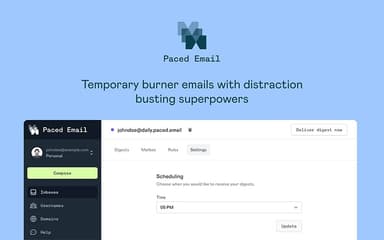
Paced Email is an email management utility that empowers users to regain control over their inboxes by intercepting emails and bundling them into summaries. By creating unlimited aliases, users can segment their communication channels and prevent interruptions from non-urgent newsletters. This minimizes context switching and significantly boosts concentration. This helps individuals and small teams reduce inbox overload, protect their real email identity, and organize inbound communication. With this approach, emails become less of a distraction and more manageable.
Paced Email Pricing
The Paced Email cost structure is subscription-based. Its monthly billing plans are priced as follows:
- Basic Plan: $6/user/month
- Standard Plan: $12/user/month
- Premium Plan: $24/user/month
- Enterprise: Custom pricing
Disclaimer: The pricing is subject to change.
Paced Email Integrations
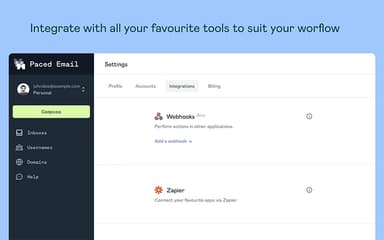
The software supports integration with multiple platforms, such as:
- Zapier software
- Integrately
- Pabbly Connect
- Make
Who Is Paced Email For?
Paced Email is ideal for a range of industries, including:
- Programming
- Marketing
- E-commerce
- Advertising
- Non-profits
Is Paced Email Right For You?
Struggling to maintain focus due to constant low-priority emails and notifications? Paced Email helps manage communication by delivering scheduled digests, reducing distractions and keeping your inbox organized. The platform includes two-factor authentication to secure your account and ensures you receive critical updates without cluttering your primary inbox, helping users maintain productivity throughout the workday.
Still not sure about Paced Email? Contact our support team at (661) 384-7070 for further guidance.
Paced Email Features
Mail Processing
Paced Email’s unlimited mail processing helps teams handle large volumes of forwarded messages without overwhelming their primary inbox. It organizes incoming communication intelligently, enabling users to stay focused on essential tasks while reducing clutter and maintaining a more streamlined work environment, improving daily efficiency.
Batched Digests
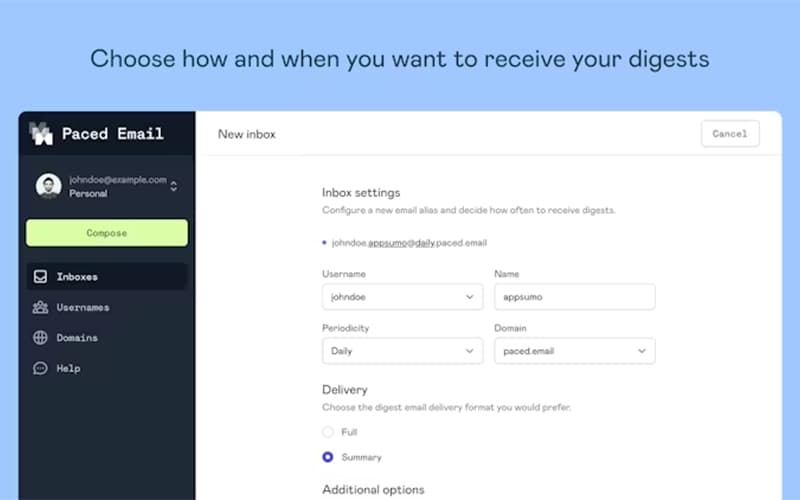
Batch Digests consolidate forwarded messages into scheduled summaries, allowing users to review updates at chosen intervals rather than being interrupted constantly. This structure supports better concentration, improves time allocation, and provides a controlled way to stay informed without frequent inbox disruptions.
Mailboxes
Paced Email features a mailbox service that lets users manage multiple aliases from a single dashboard. It keeps communication organized across different projects and teams. This centralized hub ensures users can interact with their buffered messages without cluttering their primary personal or work email accounts.
Spam Busting
This feature automatically blocks unwanted senders and unsubscribes from irrelevant newsletters. It reduces inbox noise, strengthens personal privacy, and allows users to focus on legitimate conversations. This improves message quality, cuts down on distractions, and keeps communication channels consistently cleaner
Default Templates
Default Templates help configure how incoming messages are displayed, giving users more predictable formatting across forwarded emails. By setting preferences early, teams maintain consistent readability, reduce manual adjustments, and improve their ability to scan messages for essential information.
Pros And Cons of Paced Email
Pros
Helps maintain focus by batching emails into digests
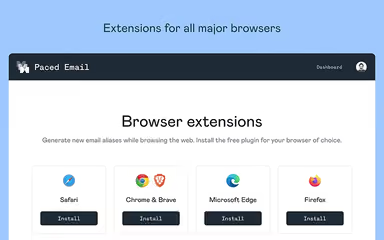
Supports seamless browser extension for quick access
Enables clients to use their sub-domain and set up as many email addresses as they want
Cons
Should include the ability to add signatures to sent emails
Limited advanced email-management tools, like automatic spam filtering
Paced Email Reviews
Total 69 reviews
4.9
All reviews are from verified customers
Rating Distribution
5
Stars94%
4
Stars6%
3
Stars0%
2
Stars0%
1
Stars0%
Share your experience
Information Technology and Services, N/A employees
Less than 6 months
“Flexible email tools we love”
Pros
Using this platform has been a really positive experience. It's user friendly, simple to navigate and it keeps improving over time. The developer is receptive to feedback, maintains a public roadmap (which is a big deal when it comes to trusting vendors and understanding where the product is headed) is clearly enthusiastic about making both the platform and the user experience better. Being able to use our own subdomain is incredibly valuable and having no limit on the number of unique email addresses we can create is a major advantage. Sending from those addresses is extremely useful too and you can even configure them for multiple recipients, similar to a mailing list. We also appreciate being able to create custom email addresses, choose how often messages are delivered and remove them if they start attracting spam. Also, the rules feature adds a lot of flexibility and customization. I could honestly keep listing reasons we're happy with it but it's one of those platforms that really speaks for itself once you start using it and just to be clear, I have no affiliation with the company.
Cons
There really isn't much to criticize over the long term. A few things we'd still like to have (such as a sent folder and the option to add a signature to outgoing emails) are already on their shortlist for upcoming improvements. We also mentioned that some fields should appear on the main settings page and they've already started moving those based on our feedback. If there's any downside for us, it's simply that we didn't start using it earlier.
Rating Distribution
Ease of use
10
Value for money
8
Customer Support
9
Functionality
10
Retail, N/A employees
Less than a year
“burner emails done right”
Pros
Being able to create aliases or burner emails is really useful for signing up for newsletters without worrying about endless follow-ups or hunting down unsubscribe links later. I can just turn them off or delete them whenever I want. The custom domain support is another big plus though I'm not sure what the domain limit is and honestly I'd rather not ask in case that makes them add one. The Chrome extension also makes the whole process convenient since creating a burner email is pretty simple. The only extra step is choosing how often I want to get the digest.
Cons
A dedicated mobile app would make this even better. That said, I'm currently using it as a PWA so it's not causing much trouble for me right now.
Rating Distribution
Ease of use
10
Value for money
10
Customer Support
10
Functionality
9
Marketing and Advertising, N/A employees
Less than a year
“Smart alias digest setup!!”
Pros
Multiple aliases and email addresses can be bundled into digests and delivered weekly, monthly or even paused whenever needed. It also lets me keep emails stored in the mailbox without cluttering up my primary account.
Cons
My only regret is not signing up for more accounts when the price was lower since I underestimated how useful it would end up being. I also waited about six months after signing up before I actually started using it.
Rating Distribution
Ease of use
10
Value for money
8
Customer Support
9
Functionality
9
Frequently Asked Questions
What language does Paced Email support?
Paced Email is primarily available in English
Does Paced Email have a mobile app?
Yes, Paced Email software offers an iOS app.
What types of pricing plans does Paced Email offer?
It offers Basic, Standard, Premium, and Enterprise plans. Request a personalized Paced Email price quote for your business.
Who are the typical users of Paced Email?
It is ideal for professionals in marketing, advertising, programming, and non-profit industries, as well as students.
Does Paced Email offer an API?
Yes. Paced Email provides API access and webhooks for deeper integrations.
What other apps does Paced Email integrate with?
Paced Email integrates with Zapier, Integrately, Pabbly Connect, and Make.
What level of support does Paced Email offer?
It offers email support.