

Last Updated
Overview
SimpleMind is a versatile mind-mapping tool that helps organize thoughts and generate new ideas. While the mobile version lacks some advanced features available on desktop, its seamless support for free-form layouts, multiple auto-layouts, and extensive customization options help balance the experience. This makes SimpleMind software a solid asset for brainstorming and planning.

SimpleMind Specifications
- File Sharing & Management
- Task & Project Management
- Mobile Accessibility
- User Management
What Is SimpleMind?
SimpleMind is a mind-mapping software designed to help users organize and remember information to create solid ideas. It caters to professionals, students, and creatives across various industries who seek to structure their ideas visually. By providing intuitive tools for brainstorming, planning, and problem-solving, the software addresses common challenges in organizing complex information. Its cross-platform availability ensures users can access their mind maps on multiple devices.
SimpleMind Pricing
The software offers three packages:
- SimpleMind Free
- SimpleMind Pro
- SimpleMind Trial
While free and Trial plans come with no costs attached, SimpleMind Pro offers a range of pricing options based on platform and license type:
Single User Licenses:
- Mac or Windows: $29.99/user
- Mac and Windows Bundle: $54.99/user/both platforms
Family/Team Licenses (up to 4 users):
- Mac or Windows: $49.99
- Mac and Windows Bundle: $99.98
10-User Licenses:
- Mac or Windows: $114.99
- Mac and Windows Bundle: $229.98
Site Licenses:
- Each Site License for Mac or Windows: $598.99
Mobile Versions:
- iPad & iPhone: Starting from $10.99
- Android: From €8.99
SimpleMind Integrations
Who Is SimpleMind For?
The software is suitable for businesses of all sizes and caters to different industries, such as:
- Education
- Business and corporate strategy
- Project management
- Research and analysis
- Creative industries
- Healthcare
Is SimpleMind Right For You?
SimpleMind helps businesses streamline brainstorming, improve workflow organization, and enhance team collaboration. It boosts productivity by structuring ideas visually, simplifies decision-making, and supports strategic planning. With cross-platform access, it ensures seamless information sharing, making it a reliable tool for managing projects, meetings, and complex processes efficiently. Overall, SimpleMind software empowers businesses to think clearly, plan effectively, and execute ideas with greater efficiency.
Still not sure if SimpleMind is right for you? Get in touch with our customer support team at (661)384-7070, and it will guide you towards the best decision.
SimpleMind Features
Cross-Platform Synchronization
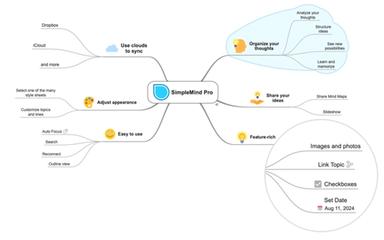
With availability on Mac, Windows, iPad, iPhone, and Android, the software ensures users can access and edit their mind maps across devices. Utilizing cloud services like Dropbox, it provides seamless synchronization, enabling continuous workflow without interruption.
Intuitive Mind Mapping
SimpleMind offers both free-form and auto-layout options, enabling users to add, reorganize, and restructure topics effortlessly. This flexibility caters to individual preferences, making the mind-mapping process seamless and tailored to unique thinking styles.
Customizable Appearance
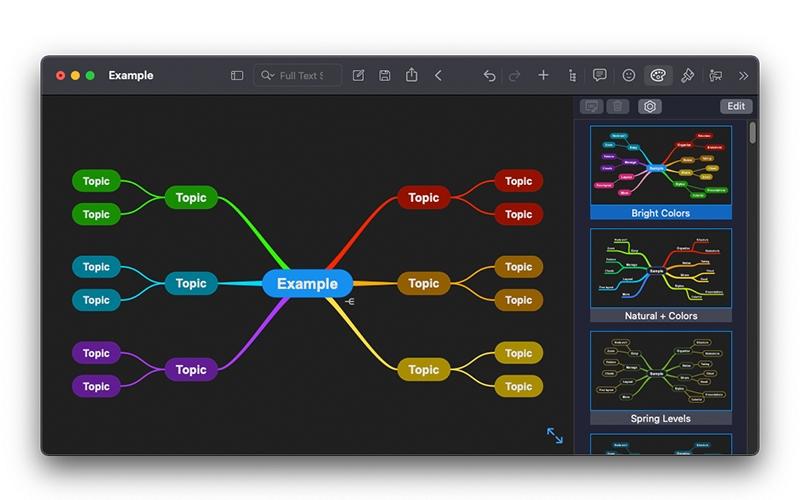
Users can personalize their mind maps using over 15 style sheets or create custom ones. Adjustments to borders, lines, colors, and backgrounds allow for a tailored visual representation, aligning with personal or corporate aesthetics.
Integrated Slideshow Presentation
The built-in slideshow feature enables users to present their mind maps directly within SimpleMind. This functionality facilitates clear communication of ideas, keeping audiences engaged without the need for external presentation tools.
Advanced Task Management
SimpleMind features advanced tools that enhances task tracking by enabling the addition of checkboxes, progress bars, and roll-up progress bars to topics. This feature aids in monitoring task completion and managing project workflows effectively.
Pros And Cons of SimpleMind
Pros
User-friendly interface
Attractive visual representations
Facilitates brainstorming sessions
Regular updates and improvements
No advertisements
Cons
Limited features in the free version
No real-time collaboration features
Occasional performance issues
No bundled documentation (Web only)
SimpleMind Reviews
Total 10 reviews
4.5
All reviews are from verified customers
Rating Distribution
5
Stars50%
4
Stars50%
3
Stars0%
2
Stars0%
1
Stars0%
Share your experience
Bindiya S.
Business Development Manager, 500+ employees
“Keeps the creative process simple”
Pros
What I really like about It is how easy it is to use. The interface feels very user-friendly and I love being able to customize stuff. There are a bunch of layout options and it's nice that I can share everything easily too.
Cons
The mobile version doesn't have as many features as the desktop one which can be frustrating when I'm trying to do more advanced stuff on my phone.
Rating Distribution
Ease of use
8
Value for money
10
Customer Support
10
Functionality
10
Vijaay Kumar S.
Finance head, 11-50 employees
“Fun & easy to use”
Pros
It helps me organize all the ideas floating around in my head, remember important stuff and come up with new thoughts. I use it to build mind maps and I often share them with my students and colleagues. Honestly I use it every single day.
Cons
I think the documentation could be way better. There were plenty of times it could've helped but it just wasn't detailed enough. That said the product itself is pretty easy to use.
Rating Distribution
Ease of use
8
Value for money
6
Customer Support
8
Functionality
8
Verified User
Small-Business, 11-50 employees
“Handy little tool that does what I need”
Pros
I remember using this app on my Android phone a few years back to make mind maps. It's free and worked pretty well overall. It was very easy to use and you could use it on both tablets and phones without any lag. I liked that I could customize the maps a little bit too. Overall it was a solid experience, no real problems and it helped me wrap up my mind maps quickly.
Cons
The app works great and I've never had issues with performance but honestly the design feels outdated like it's stuck in the early 2000s. It doesn't really let you modernize the look which is something I really care about. It doesn't affect how it works but I wish I could make it look a bit more stylish.
Rating Distribution
Ease of use
6
Value for money
8
Customer Support
8
Functionality
8
Frequently Asked Questions
What language does SimpleMind support?
The platform primarily supports English language.
What other apps does SimpleMind integrate with?
Schedule a free SimpleMind demo to learn about its integrations.
Does SimpleMind have a mobile app?
Yes, SimpleMind has a mobile app.
What types of pricing plans does SimpleMind offer?
SimpleMind software offers three packages: SimpleMind Free, SimpleMind Pro, and SimpleMind Trial. While the Free and Trial plans are cost-free, SimpleMind Pro provides multiple pricing options based on platform and license type. Single-user licenses cost $29.99 for Mac or Windows and $54.99 for both. Family/Team licenses (up to 4 users) are $49.99 for Mac or Windows and $99.98 for both. 10-user licenses are priced at $114.99 for a single platform and $229.98 for both. Site licenses cost $598.99 per platform. Mobile versions start at $10.99 for iOS and €8.99 for Android. Users can get a personalized SimpleMind cost quote accordingly.
Does SimpleMind offer an API?
No, SimpleMind does not offer an API.
What level of support does SimpleMind offer?
SimpleMind offers comprehensive support via email, FAQS, and a Knowledge Base.
Who are the typical users of SimpleMind?
SimpleMind is used by creative industries, healthcare, legal services, education and project management businesses.