


Last Updated
Key Takeaways
Generated from the text of customer reviews
Our Verdict
Overall Rating
Based on 81 users reviews
4.6
Rating Distribution
Positive
94%
Neutral
5%
Negative
1%
Starting Price
$16.99
per user per month

Zoom Meetings Specifications
- Real-Time Communication
- File Sharing & Management
- Calendar & Scheduling
- Integration with Other Tools
Zoom Meetings Features
Screen Sharing
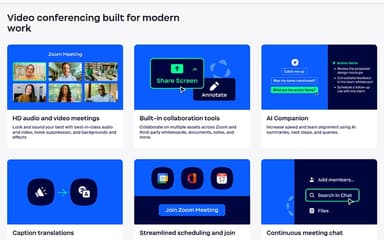
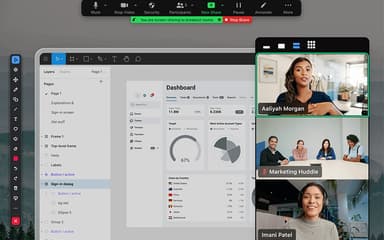
This feature lets users share their desktop, a specific application, part of their screen, videos, audio, or a second camera during meetings. Participants can annotate shared material or take control of presentation slides. Presenters can use these options to guide discussions without switching between separate content-sharing tools.
Virtual Backgrounds
With this feature, companies can replace participants’ physical surroundings with images or videos. Zoom provides ready-made backgrounds, supports custom uploads, and lets eligible users generate new ones through AI prompts. This gives teams more control over the visual setting seen during business calls.
Video Filters And Avatars
This functionality can be used to change a person’s on-screen appearance through filters, stickers, branded overlays, and avatars. Businesses can even add logos or name tags, while individuals can apply appearance effects or choose animated avatars. These options add visual customization directly to the video feed.
Breakout Rooms
Users can access this capability to divide a larger meeting into as many as 50 smaller sessions. Hosts can assign people automatically or manually, move between rooms, answer help requests, and send announcements. Groups can then return to the main session once their separate discussions are finished.
Expanded Audio Conferencing
The platform gives businesses a way to support meeting audio through VoIP, toll dial-in, dedicated conferencing numbers, and phone call-outs. Larger organizations can connect SIP-based audio or link an existing third-party teleconferencing provider. This gives callers different ways to join based on their available phone or network setup.
Pros And Cons of Zoom Meetings
Pros
Breakout rooms and whiteboards support focused team brainstorming
AI summaries help users recall key meeting discussions faster
Co-host controls let users share meeting responsibilities
Cons
High bandwidth use can affect meetings on limited connections
Search can make past files and conversation threads harder to find
Zoom Meetings Pricing
Workplace Basic | Workplace Pro | Workplace Business | Workplace Enterprise |
|---|---|---|---|
Free | $16.99 per user per month | $21.99 per user per month | Custom Pricing |
|
|
|
|
Disclaimer: The pricing details were last updated on Sep 07, 2026 from the vendor's website. Please contact us for a tailored pricing list.
Zoom Meetings Reviews
Total 81 reviews
4.6
All reviews are from verified customers
Rating Distribution
5
Stars70%
4
Stars23%
3
Stars5%
2
Stars0%
1
Stars1%
Share your experience
Tisha W.
Hospital & Health Care, 500+ employees
Less than a year
“like the Built in screen recording”
Pros
The thing I like most about this tool is the built-in screen sharing and recording which I can use right away whenever I am giving a presentation.
Cons
only thing to keep in mind is that calls on the free version are capped at 40 minutes. Aside from that, I haven't really run into any issues.
Rating Distribution
Ease of use
10
Value for money
10
Customer Support
10
Functionality
8
Stephanie
E-Learning, 1-10 employees
More than a year
“allow join calls without account”
Pros
One thing that really works well with it is how people can join a call without needing a Zoom account or even installing the app on their device. Screen sharing, including sharing audio, is very easy too and on the Mac app I can move the call window over whatever I am presenting which helps me arrange my screen in a way that suits how I work. The whiteboard feature is also very useful. I also like that when I record meetings, I can just send a link to the replay page instead of having to upload the video to YouTube or somewhere else first.
Cons
Storage for recorded calls fills up very quickly at the start. And since the cheapest annual business plan is already quite expensive, I usually have to download the recordings I want to keep and free up space for only the meetings I want to leave available through a replay link. On top of that the settings pages feel too complicated and seem to get rearranged often. That makes it frustrating to find what you need especially when setting up workshop sessions ahead of time.
Rating Distribution
Ease of use
10
Value for money
8
Customer Support
10
Functionality
10
Manish S.
Information Technology and Services, 11-50 employees
Less than a year
“All tools in one place”
Pros
Having meetings, chats, emails, calendars and whiteboards all in one place with Zoom makes day to day work much easier to keep on top of. The video call quality is also better than a lot of competing platforms and it offers more useful options during calls.
Cons
One downside is that�it�still feels very focused on meetings. On top of that adding things like phone service, webinars or newer advanced tools such as AI can make the overall cost climb pretty quickly.
Rating Distribution
Ease of use
10
Value for money
8
Customer Support
10
Functionality
10
Frequently Asked Questions
Does Zoom Meetings have a mobile app?
Yes, it offers a mobile app for both iOS and Android.
Does Zoom Meetings offer an API?
Yes, it offers API access.
What level of support does Zoom Meetings offer?
It provides support through, phone, live chat, support center, and ticketing system.
What language does Zoom Meetings support?
It supports Chinese (Simplified), Chinese (Traditional), English, French, German, Indonesian, Italian, Japanese and many others.
Who are the typical users of Zoom Meetings?
Zoom Meetings features are used across various industries and sectors that rely on real-time video and audio communication, including government, manufacturing, retail, and healthcare, etc.
What other apps does Zoom Meetings integrate with?
Zoom Meetings software integrates with many third-party applications, including Workday, Microsoft Teams, Google Drive, Figma, ServiceNow, and Salesforce.
What types of pricing plans does Zoom Meetings offer?
Zoom Meetings price plans start at $16.99/user/month for the Workplace Pro plan. It also offers a free Workplace Basic plan and a Workplace Business plan starting at $21.99/user/month. Contact us to get a tailored Zoom Meetings cost estimate.