


Revver
Last Updated
Overview
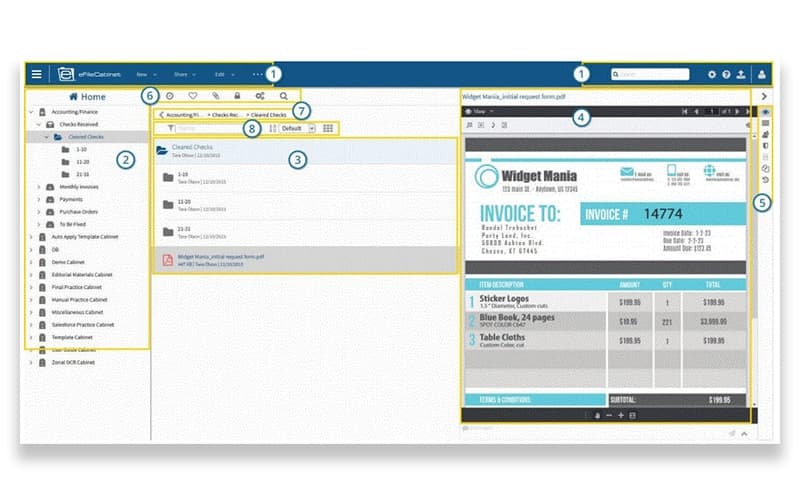
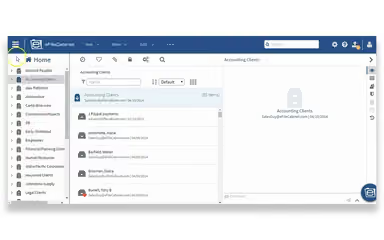
Revver simplifies document management to help businesses in securing files and automating complex workflows for efficient customer interactions. While customer support response time can be improved, its efficient automation and compliance features make it a comprehensive choice for service businesses.
Revver Specifications
- Role-Based Permission
- Content Versioning
- Analytics and Reporting
- Template Management
Revver Features
Document Workflow Automation
The software allows users to design custom workflows that automatically route documents for review and approval. This feature eliminates manual hand-offs and bottlenecks to ensure that critical business processes move forward efficiently without constant human intervention or oversight. It simplifies the path from document creation to final sign-off.
Smart Extract AI
Using advanced optical character recognition, Revver automatically identifies and extracts key data from uploaded documents. This feature significantly reduces manual data entry errors by populating metadata fields instantly to make files easier to organize, search for, and retrieve later. It turns unstructured files into structured business data.
Secure Client Portals
Revver software provides encrypted portals for sharing sensitive files externally with clients or partners. This feature ensures data security during transfers and allows for bi-directional sharing, which enables guests to upload documents directly into the system without needing a full license. It replaces insecure email attachments with a compliant alternative.
Revver Reports
The platform provides detailed analytics and reporting on document volumes, user activity, and client engagement. This feature allows administrators to track document lifecycles and measure the efficiency of automated workflows to identify areas for improvement.
eSignature Capabilities
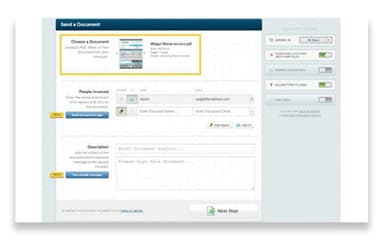
Revver simplifies the document lifecycle by including built-in electronic signature tools directly within the platform. This feature allows users to request and collect legally binding signatures on contracts and forms without using separate software. It accelerates the finalization of documents by keeping the entire signing process inside your secure document management system.
Pros And Cons of Revver
Pros
Automates complex document approvals and review workflows
Provides document management through OCR and metadata tagging
Efficient document management upon implementation
Cons
Mobile application requires optimization for greater efficiency
Interface can feel complex initially
Revver Reviews
Total 21 reviews
4.1
All reviews are from verified customers
Rating Distribution
5
Stars38%
4
Stars43%
3
Stars14%
2
Stars0%
1
Stars5%
Share your experience
Human Resources, 51-100 employees
Less than a year
“allows professional document management”
Pros
At KVC, we rely on Revver for managing documents as it keeps our files arranged professionally and easy to find.
Cons
The learning curve was a bit steep at first, yet once I got the hang of the system it worked well.
Rating Distribution
Ease of use
8
Value for money
9
Customer Support
10
Functionality
10
Hospital & Health Care, 51-100 employees
Less than a year
“offer quick support and simple workflows”
Pros
Whenever we run into a problem and are not sure how to proceed, the support team replies quickly. One time I deleted something very important by mistake and fortunately it was completely recoverable. Overall it's played a big role in helping our team simplify workflows and drastically reduce the amount of paper we store in the office. Plus the system very simple and easy to use.
Cons
I tried to turn an item into a main drawer but it actually belongs inside a different filing cabinet. So the app won't let me move it because it's locked as a drawer.
Rating Distribution
Ease of use
8
Value for money
10
Customer Support
10
Functionality
10
Mechanical or Industrial Engineering, 500+ employees
More than a year
“account restrictions without explanation”
Pros
I could not access Revver at all even though my account had been renewed and I paid for it. As the renewal wasn't reflected in it itself.
Cons
What frustrates me is that we are not told when there's a problem with our account instead we just see the message like All roles are currently restricted due to Security Policies or a lack of available licenses.
Rating Distribution
Ease of use
4
Value for money
3
Customer Support
2
Functionality
5
Frequently Asked Questions
Does Revver have a mobile app?
No, Revver currently does not offer a dedicated mobile app.
What language does Revver support?
The platform currently supports the English language.
What other apps does Revver integrate with?
The platform integrates with various software including Salesforce, Microsoft 365, Microsoft Word, Docusign, Google Drive.
What types of pricing plans does Revver offer?
The vendor offers customized pricing plans, depending on the unique requirements of businesses. Request a customized Revver price plan for your business today!
What level of support does Revver offer?
The platform provides support through email, phone, and a contact form.
Who are the typical users of Revver?
Revver features are designed for businesses in industries and sectors like logistics, manufacturing, healthcare, insurance, and accounting.
Does Revver offer an API?
Yes, Revver provides an API.