



Last Updated
Overview
AweSun offers remote desktop software that allows secure control of devices from anywhere, supporting work and troubleshooting. It cuts down travel for support and improves response times. Although log filters could be expanded further, their low latency and file-transfer tools make them a strong choice for remote handling.

AweSun Specifications
- Live Chat
- Omnichannel Support
- Analytics and Reporting
- Escalation Management
What Is AweSun?
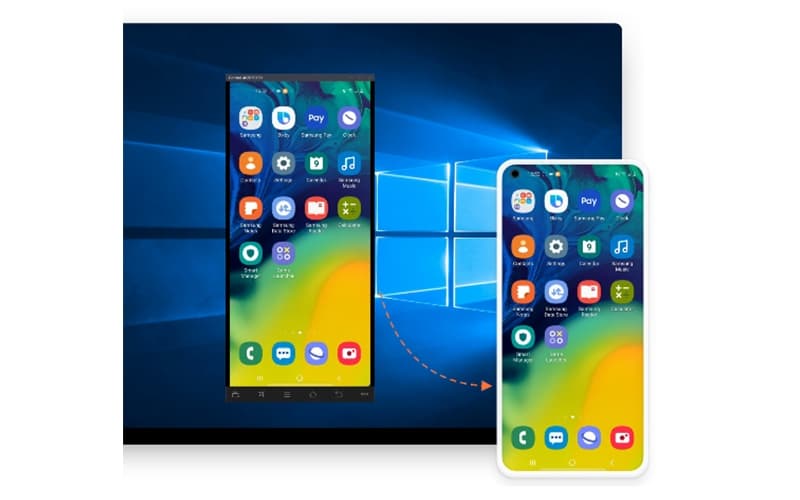
AweSun is a cloud-based remote access solution that lets users control desktops and mobile devices across platforms such as Windows, Mac, and Android. It handles multi-screen management to boost productivity in distributed teams. The tool addresses delays in IT help by enabling instant connections, reducing downtime for critical tasks. Plus, its command-execution feature enables quick fixes, helping businesses maintain operations without on-site visits.
AweSun Pricing
The AweSun cost varies based on the number of devices and features needed, offering flexible plans for businesses of all sizes, along with a free trial. These are as follows:
- Pro: $3/month
- Game: $5/month
- Global: $13/month
- Universe: $20/month
Disclaimer: The pricing is subject to change.
AweSun Integrations
The vendor has not provided details about third-party integrations for this software.
Who Is AweSun For?
AweSun software is ideal for a wide range of industries and sectors, including:
- Retail
- Pharmaceutical
- Manufacturing
Is AweSun Right For You?
Looking for a remote access tool? AweSun provides fast connections to resolve issues such as delayed support and device inaccessibility. It tackles these with low-latency control, ensuring quick resolutions for teams. The platform complies with global privacy standards for data handling. It provides secure access via multi-layer encryption and scales to manage thousands of devices through batch deployment.
Still not sure if AweSun is right for you? Contact our customer support team at (661) 384-7070, who will help you make the best decision.
AweSun Features
Multi-Screen Control
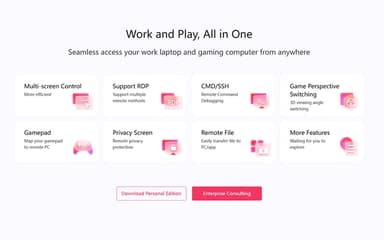
AweSun software lets users switch between multiple displays during sessions by selecting screens in the interface. This setup handles complex scenarios where tasks span multiple monitors and supports real-time adjustments without disconnection. It supports detailed reviews in support roles, reducing resolution time and enhancing accuracy across group efforts.
Remote File Transfer
The platform transfers files directly between connected devices using drag-and-drop in the session window. It handles large volumes without compression loss for quick sharing, and users can set permissions to control access during transfers. This reduces email chains, accelerates data exchange, and supports faster decisions in collaborative projects.
Low-Latency Streaming
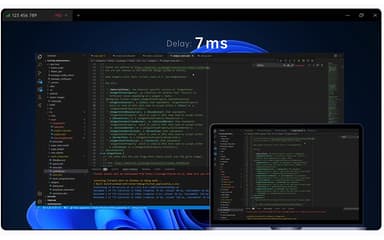
AweSun features provide high-definition video through optimized connection encoding. It adjusts quality based on bandwidth to keep controls responsive, and technology manages high resolution for clear views. This maintains smooth interactions, reduces errors in precise tasks, and improves efficiency for daily remote work.
Batch Deployment
Administrators deploy the client across devices through centralized commands from the dashboard. It applies policies consistently to new users without manual installations and processes, and logs each step for audits. This simplifies onboarding in large groups, ensuring uniform setups that promote smoother team coordination and management.
Pros And Cons of AweSun
Pros
Handles multiple screens well
Alerts on device risks
Uses multiple factors to authenticate
Cons
Log filters may need refinements
Recording format needs variety
AweSun Reviews
Total 25 reviews
4.8
All reviews are from verified customers
Rating Distribution
5
Stars76%
4
Stars24%
3
Stars0%
2
Stars0%
1
Stars0%
Share your experience
Telecommunications, N/A employees
More than a year
“Convenient remote work access”
Pros
During the COVID pandemic, I relied on this to handle my work remotely and it was very simple to use.
Cons
I haven't run into any drawbacks in day-to-day use.
Rating Distribution
Ease of use
10
Value for money
10
Customer Support
10
Functionality
10
Higher Education, N/A employees
Free Trial
“Secure choice”
Pros
Simple to use, secure and reliable and definitely worth the money.
Cons
Free version is quite limited, it would be better if personal use stayed free and only commercial use was charged.
Rating Distribution
Ease of use
9
Value for money
10
Customer Support
10
Functionality
10
Computer Software, N/A employees
Less than 6 months
“Promising remote desktop solution”
Pros
Our company recently started using this newer remote desktop tool and we're always on the lookout for the next best option. It definitely helps that, at least for now, most of the features we actually need are available for free.
Cons
The multi-monitor support is handled really well and the installation process is feasible too.
Rating Distribution
Ease of use
10
Value for money
10
Customer Support
8
Functionality
10
Frequently Asked Questions
Does AweSun have a mobile app?
Yes, AweSun offers a mobile app.
What other apps does AweSun integrate with?
The vendor has not shared information about its third-party integration.
What types of pricing plans does AweSun offer?
AweSun price includes free and paid plans from $3/month. Get a personalized AweSun cost estimate.
Who are the typical users of AweSun?
AweSun is commonly used in retail, pharmaceutical, and manufacturing sectors.
Does AweSun offer an API?
Yes, AweSun provides API access.
What language does AweSun support?
AweSun supports multiple languages, including English, Chinese, and Spanish.
What level of support does AweSun offer?
AweSun provides support via email and a ticketing system.