


Zendo
Last Updated
Overview
Zendo is a customer service software designed to streamline agency workflows. Although some users have requested more design customizations, its efficient service catalog, unified inbox, and instant payment features bridge this gap effectively. Overall, Zendo’s specialized tools make it a compelling choice for managing client services.
Zendo Specifications
- Live Chat
- CRM Integration
- Customer Feedback Surveys
- Self-Service Portal
What Is Zendo?
Zendo serves as a comprehensive client portal that combines selling services with customer support. It replaces chaotic email threads with a structured environment where agencies can list services, manage requests, and handle payments in one place. By centralizing these interactions, it drastically reduces administrative work and professionalizes the client experience. This software primarily serves creative agencies, consultants, and service-based businesses looking to scale their operations efficiently.
Zendo Pricing
Zendo offers multiple plans to its users according to their needs:
- Essential Plan: Free
- Pro Plan: $49/user/month
- Max Plan: $199/month
Disclaimer: The pricing is subject to change.
Zendo Integrations
The software supports integration with multiple systems and platforms, such as:
- Stripe
- Zapier
- Rewardful
- Tapfiliate
Who Is Zendo For?
Zendo software is ideal for a wide range of industries and sectors, including:
- Marketing agencies
- Web development firms
- Graphic design studios
- Consulting businesses
- Freelancers
- Software houses
Is Zendo Right For You?
Zendo is the perfect fit if your business struggles with scattered client communications and disjointed payment processes. Its standout ability to "productize" services into a catalog sets it apart, allowing clients to buy services as easily as e-commerce products. Awards for its user-friendly interface further validate its effectiveness. By unifying payments and requests, it solves the core problem of operational inefficiency for growing service businesses.
Still doubtful if Zendo is the right fit for you? Contact our customer support staff at (661) 384-7070 for further guidance.
Zendo Features
Service Catalog Setup
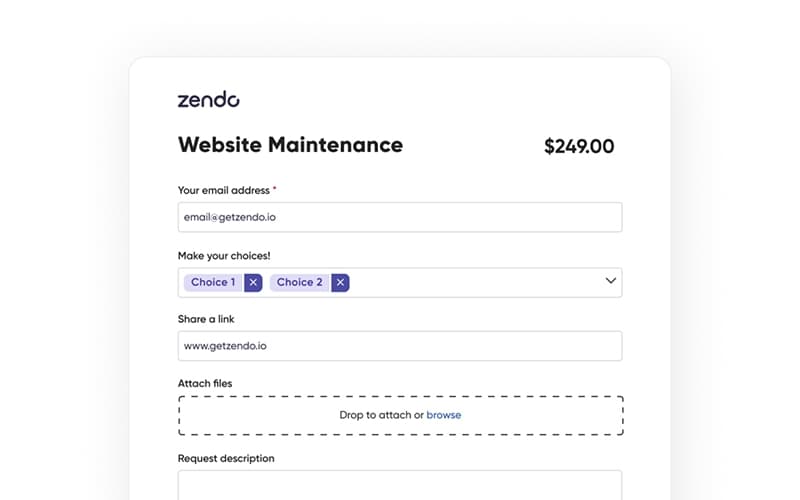
Users can create a custom service catalog that functions like an e-commerce store for services. You can define specific items, set prices, and create intake forms to gather necessary project details upfront. This feature transforms complex service agreements into simple, buyable products that clients can purchase instantly without back-and-forth negotiation.
Unified Client Portal
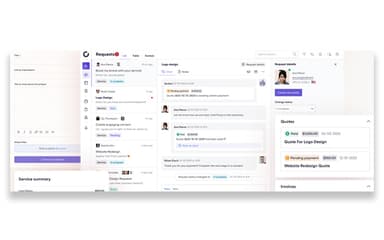
The platform provides a centralized hub where clients can log in to view their orders, invoices, and project status. It eliminates the need for external file-sharing tools by keeping all documents and correspondence in one secure location. This transparency builds trust and significantly reduces the volume of "status update" emails.
Real-Time Team Chat
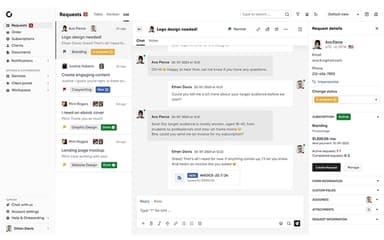
Zendo replaces traditional ticketing systems with a modern, real-time chat interface. Agents and clients can converse naturally within specific request threads, ensuring that context is never lost. The system also supports private internal notes, allowing team members to collaborate behind the scenes before responding to the client, ensuring professional communication.
Quotes And Invoicing
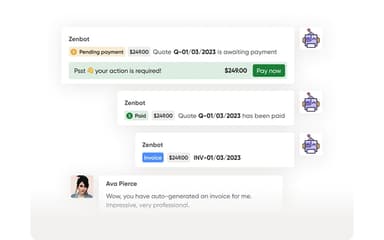
This feature allows businesses to generate professional quotes and convert them into invoices with a single click. Integrated directly with payment processors, it enables clients to approve estimates and pay immediately within the chat stream. This seamless financial workflow accelerates cash flow and removes friction from the billing process.
White Label Customization
Agencies can fully brand the portal to match their corporate identity, ensuring a consistent client experience. You can connect to a custom domain, add your logo, and adjust color schemes to make the platform feel like proprietary software. This capability is essential for maintaining brand authority and providing a polished, professional interface
Pros And Cons of Zendo
Pros
Significantly saves time on daily operations
Automates invoice generation and client delivery
Simple, complete, and highly customizable
Cons
Design options can be improved
Constant updates may reduce feature adaption
Zendo Reviews
Total 10 reviews
4.8
All reviews are from verified customers
Rating Distribution
5
Stars80%
4
Stars20%
3
Stars0%
2
Stars0%
1
Stars0%
Share your experience
Real Estate, 11-50 employees
“spot-on value for money”
Pros
It's really fast and convenient and it genuinely helps with my workflow. The customer service is top-tier, honestly a 10/10. Also, the value for the money feels spot on, I'm getting the same value (or more) than what I pay.
Cons
The invoicing still isn't working perfectly at the moment. That said, they're actively improving it so it's already getting better.
Rating Distribution
Ease of use
10
Value for money
10
Customer Support
10
Functionality
9
Not Specified, 11-50 employees
“strong free tier”
Pros
Finally, there's a moderately powerful client portal that covers what I actually need. Navigation feels simple and customization is easy. The free tier is packed with features, far more than enough for a freelancer who wants to centralize communication, keep track of statuses and manage shared assets while starting out with a few clients (beginner to intermediate level works nicely). The web app also responds well on different screen sizes and oddly enough the Kanban board performs even better on mobile than I expected. I'm definitely recommending Zendo to colleagues.
Cons
There's a pretty big gap between the free tier and the first paid plan particularly if you want to pay monthly instead of annually. I get why the jump is steep, unlimited clients and avoiding the awkwardness of charging per client but I'd likely upgrade much sooner if the first paid pricing were lower. Since it stands, I'll probably keep using the perfectly functional Zendo-branded tier until I either onboard more clients or one of them commits to a bigger project.
Rating Distribution
Ease of use
8
Value for money
8
Customer Support
10
Functionality
7
Not Specified, 11-50 employees
“visibility for clients”
Pros
Zendo helped me set up a client portal for my marketing agency. My clients can log in to see all their requests and files in one place and they can also access other tools, like Looker Studio, directly inside the portal.
Cons
Everything is working for me right now but I'd be happy if they added a few more features in the future.
Rating Distribution
Ease of use
10
Value for money
10
Customer Support
9
Functionality
9
Frequently Asked Questions
Does Zendo offer an API?
Yes, Zendo does offer an API.
Does Zendo have a mobile app?
No, Zendo does not offer a dedicated mobile app.
What other apps does Zendo integrate with?
Zendo integrates with Stripe, Zapier, Rewardful, and Tapfiliate.
What types of pricing plans does Zendo offer?
Zendo offers Essential for Free, Pro at $24.50/user/month, and Max at $99.50/user/month plans. Get a detailed Zendo cost breakdown tailored to your specific requirements.
Who are the typical users of Zendo?
Typical users include marketing agencies, web development firms, and graphic design studios.
What language does Zendo support?
The platform interface primarily supports English language.
What level of support does Zendo offer?
Zendo offers expert support via email and live chat.