Last Updated

Key Takeaways

Generated from the text of customer reviews

ManageEngine Patch Manager Plus is an enterprise patch management platform used by IT administrators, system engineers, and compliance teams across IT, healthcare, banking, and education sectors. Users report strong automation and centralized patch control as key advantages. Setup complexity and third-party update inconsistencies are common drawbacks. Recent updates include expanded third-party application patch support and security enhancements from ManageEngine.

Our Verdict

ManageEngine Patch Manager Plus is best suited for mid-sized to large IT teams managing distributed enterprise endpoints. It is generally viewed as a cost-effective option for organizations needing structured patch governance at scale. Pricing is more suitable for enterprises than small businesses. Recommended for compliance-focused IT environments requiring centralized patch management.

Overall Rating

Based on 16 users reviews

4.4

Rating Distribution

Positive

94%

Neutral

6%

Negative

0%

Starting Price
Less than $1

per endpoint per month
ManageEngine Patch Manager Plus Specifications

  • Vulnerability Management
  • Security Audits And Reporting
  • Patch Management
  • Threat Intelligence
View All Specifications

What Is ManageEngine Patch Manager Plus?

ManageEngine Patch Manager Plus, as the name reflects, is a cloud-based patch management system that simplifies the process of identifying, acquiring, and installing patches. Its centralized and all-encompassing console helps automate patching, which may otherwise be a tedious process. Advanced analytical tools and customizable deployments further streamline operations. The platform can also be deployed on-premises and is ideal for servers, laptops, and workstations.

What is ManageEngine Patch Manager Plus Best For?

ManageEngine Patch Manager Plus is best for automating patch detection, testing, and deployment across Windows, macOS, Linux, and third-party applications from a single console. It removes manual patch tracking and delays by applying updates consistently across all endpoints, ensuring systems stay up to date through a centralized patching workflow.

How Much Does ManageEngine Patch Manager Plus Cost?

ManageEngine Patch Manager Plus pricing starts at less than $1/endpoint/month (Professional Edition). Other editions include:

  • Enterprise Edition: $1/endpoint/month
  • Endpoint Central: Custom price

All packages come with a free 30-day trial.

Based on industry deployment benchmarks for endpoint and patch management tools, organizations should also consider the following additional costs:

  • Implementation And Onboarding: $1,000 – $15,000+ (one-time, depending on environment complexity)
  • Deployment And Configuration: $1,000 – $20,000+ (one-time, large-scale endpoint rollout)
  • Integrations (ITSM/Security Tools): $2,000 – $25,000+/year (service desk, SIEM, enterprise security tools)
  • Training And User Enablement: $500 – $7,500 (administrator onboarding and workflow training)
  • Infrastructure And Hosting (Self-Hosted): $500 – $10,000+/year (server, storage, scaling requirements)
  • Premium Support: Custom pricing (based on SLA and enterprise requirements)
Get a personalized ManageEngine Patch Manager Plus price quote that fits the scale of your patch management requirements.

Disclaimer: The pricing is subject to change.

ManageEngine Patch Manager Plus Integrations

The platform integrates with useful third-party applications which significantly improve the workflows, such as:

  • Tenable Vulnerability Management
  • Tenable Security Center
  • Rapid
  • Crowd Strike
  • ManageEngine Analytics Plus

How Does ManageEngine Patch Manager Plus Work?

Patch Manager Plus is available as a cloud-based deployment or on-premises installation. Here is how IT teams typically use the platform:

  • Sign up for cloud or install on-premises to begin managing endpoints across Windows, macOS, and Linux 
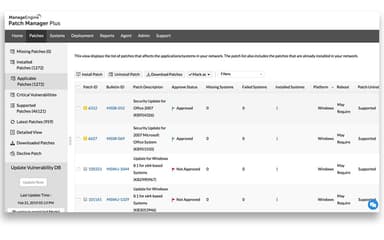
  • Scan systems to detect missing OS and third-party application patches, then deploy updates using agent-based automation 
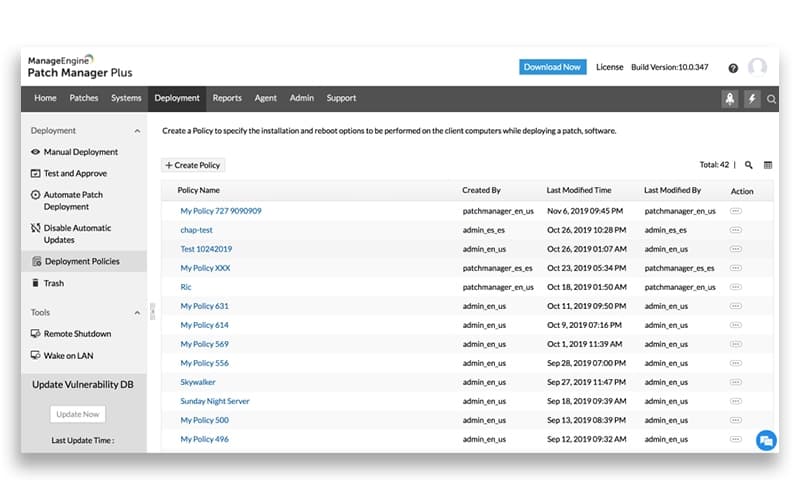
  • Configure deployment policies such as schedules, reboot settings, and restart deferrals via self-service options 
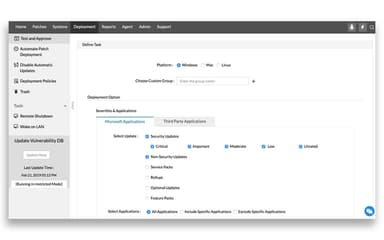
  • Create pilot groups to test patches before rolling them out across the wider environment 
  • Deploy OS, application, driver, and firmware updates across distributed endpoints with controlled scheduling 
  • Roll back supported patches and manage exclusions for specific applications when required 
  • Patch remote and off-network systems using internet-based endpoint management
  • Generate compliance and vulnerability reports on patch status and missing updates 
  • Integrate with ITSM and security tools such as ServiceDesk Plus for workflow coordination
Watch a free ManageEngine Patch Manager Plus demo to get a visual walkthrough of its key workflows.

Who Is ManageEngine Patch Manager Plus For? 

The platform is leveraged by various industries and sectors including:

  • Banking and finance
  • Automobile
  • Education
  • Information technology
  • Healthcare

ManageEngine Patch Manager Plus Use Cases

Based on our analysis of user feedback and ManageEngine Patch Manager Plus capabilities, the following scenarios represent the strongest fit:

1. IT Teams Managing Remote and Distributed Endpoint Environments

IT administrators overseeing hybrid or remote work environments struggle with maintaining consistent patch levels across devices outside the corporate network. Patch Manager Plus is used in setups where endpoints are spread across locations and require centralized patch coordination without manual intervention on each machine. Remote systems can be updated through agent-based communication over the internet, helping teams maintain control over patch status across LAN, WAN, and off-network devices. This makes it suitable for organizations where device visibility and update consistency are difficult to maintain manually.

2. Enterprises Running Mixed Operating System Infrastructures

Organizations with a combination of Windows, macOS, and Linux systems use Patch Manager Plus to avoid managing separate patching tools for each environment. IT teams apply a single workflow to handle OS updates and third-party application patches across different device types. This reduces fragmentation in patch cycles and allows administrators to standardize update policies across the entire infrastructure. It is commonly used in environments where endpoint diversity creates operational overhead in maintaining consistent security updates.

3. IT Support Teams Reducing Manual Patch-Related Workload

In environments where helpdesk teams previously handled routine update requests manually, the software is adopted to automate repetitive patching tasks. One IT support specialist noted that manual system updates across multiple machines consumed significant time and increased support workload, which improved after automation was introduced. Instead of visiting endpoints individually, teams now rely on scheduled deployments and centralized control to manage updates. This shift allows support staff to focus on higher-priority incidents rather than routine maintenance tasks.

4. Compliance-Driven Organizations Needing Patch Visibility And Reporting

Security and compliance teams use the tool in environments where maintaining audit-ready documentation is a regular requirement. Organizations under regulatory frameworks such as ISO, PCI, or internal security policies rely on patch status reporting to track system compliance across endpoints. Centralized dashboards provide visibility into missing updates and patch history, which supports internal audits and external compliance checks. This use case is common in industries where security reporting and update accountability are closely monitored.

5. IT Teams Aligning Patch Management With Security And Service Workflows

Security-focused IT teams use Patch Manager Plus alongside existing ITSM and vulnerability management systems to connect detection and remediation processes. Instead of treating patching as a standalone activity, updates are aligned with ticketing workflows and vulnerability findings for structured resolution cycles. Integration with tools such as ServiceDesk Plus allows teams to link patch deployment with service requests and change management processes. This approach is useful for organizations aiming to formalize how security issues are tracked and resolved across teams.

Is ManageEngine Patch Manager Plus Right For You? 

Managing patches manually can take time and may increase the risk of errors. With Patch Manager Plus, you can automate much of the process, including scanning, assessment, deployment, and reporting. It helps keep systems updated more consistently and allows IT teams to focus more on important tasks rather than repetitive patching work.

ManageEngine Patch Manager Plus software ensures enterprise-grade data protection and compliance with ISO 27001, PCI DSS, GDPR, and HIPAA standards.

ManageEngine Patch Manager Plus has garnered good recognition by being a recipient of numerous awards and accolades over the years. It also has a strong global customer base, including giant names like Hyundai and the University of Oxford, leveraging the system for secure, automated patch management across diverse IT environments.

Still unsure whether ManageEngine Patch Manager Plus is the right choice for your business? Contact us at (661) 384-7070 to talk to our customer support agent, who will guide you in making an informed decision. 

ManageEngine Patch Manager Plus Features

Cross Platform Support

ManageEngine Patch Manager Plus features cross platform support that automates patching across Windows, macOS, and Linux environments from a single console. Whether you're managing Mac laptops, Linux servers, or legacy Windows machines, it keeps all endpoints secure and up to date. This unified approach saves time, reduces complexity, and ensures that patch management is accessible for everyone.

See How It Works
Flexible Patch Deployment

You can customize how and when patches are deployed through your own deployment policies. The system enables you to define reboot behavior, schedule installs during off-hours, and let users postpone restarts. This flexibility helps minimize disruption while ensuring timely patching across all business units or remote workforces.

See How It Works
Patch Testing

Users can avoid business and IT disruptions by testing patches before full deployment. With Patch Manager Plus, you can create test groups and simulate installations. Only after a successful test run are patches approved for your network. This helps prevent crashes, incompatibilities, and saves IT teams from unnecessary firefighting.

See How It Works
Reporting And Analytics

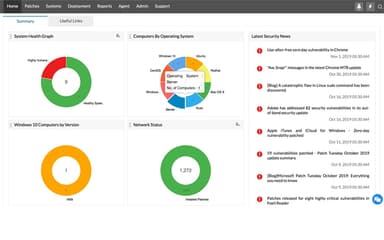
The platform comprises detailed reports on patch compliance, vulnerabilities, and deployment status. It also allows scheduling of automatic reports or customizing queries for deeper insights. You can track configurations by user or device, pinpoint missing updates, and monitor high-risk systems: making it easier to stay informed.

See How It Works
Third-Party Application Patching

ManageEngine Patch Manager Plus supports automated patching for a lot of third-party applications in addition to operating systems. IT teams can manage application updates from the same console used for OS patching, reducing tool sprawl and ensuring consistent security updates across both system and business software.

See How It Works
Automated Vulnerability Detection And Patch Scanning

The platform automatically scans endpoints to identify missing patches and known vulnerabilities across managed systems. This allows IT teams to detect security gaps early and prioritize patch deployment based on risk and system exposure, improving overall patch hygiene across the network.

See How It Works
Remote And Internet-Based Patch Management

Patch Manager Plus enables patch deployment to remote and off-network devices through agent-based communication over the internet. This ensures endpoints outside the corporate LAN, such as remote or hybrid work devices, remain updated without requiring direct network access or VPN connectivity.

See How It Works

Pros And Cons of ManageEngine Patch Manager Plus

Pros

  • Automation saves time and manual effort

  • Patch database is frequently updated

  • Intuitive dashboard gives an easy and quick overview

Cons

  • Initial set up and onboarding can be time-consuming

  • Has little options to create custom reports

ManageEngine Patch Manager Plus Pricing

Professional Edition

eye

View Price

What's Included

  • Multi-OS and endpoint patching

  • Third-party application updates

  • Patch scheduling outside deployment windows

  • Self-service portal for patches

  • Customizable compliance reporting

Enterprise Edition

eye

View Price

What's Included

  • Everything in Professional

  • Driver, BIOS, and antivirus updates

  • Automated patch testing and approval

  • Wake-on-LAN and remote shutdown scheduling

  • Bandwidth optimization during deployment

Endpoint Central

eye

View Price

What's Included

  • Everything in Patch Manager Plus

  • Vulnerability management

  • Malware protection

  • Enterprise data and browser security

  • Application and privilege management

  • Peripheral device control

  • Data leakage prevention

Disclaimer: The pricing details were last updated on May 22, 2026 from the vendor's website. Please contact us for a tailored pricing list.

ManageEngine Patch Manager Plus Reviews

Total 16 reviews

4.4

All reviews are from verified customers

Rating Distribution

5

Stars

50%

4

Stars

44%

3

Stars

6%

2

Stars

0%

1

Stars

0%

Share your experience

M

Michael

Information Technology and Services, 101-500 employees

More than a year

5.0
August 2025

Great for automation

Pros

I think it's been great for streamlining and automating updates in our complex production environment. ManageEngine helps us keep everything current without constant manual effort.

Cons

There's nothing I can think of to add here, I'm not come across any issues at the moment.

Rating Distribution

Ease of use

10

Value for money

10

Customer Support

10

Functionality

10

L

Lonnie

Non-Profit Organization Management, 101-500 employees

Free trial

4.0
August 2025

Easy domain setup

Pros

It's straightforward to set up and connects directly to your domain to deploy the agent automatically. You can fully customize how patches are rolled out and even automate the process using test groups and approval workflows.

Cons

Sometimes the only way to get a group of machines fully updated is to delete the deployment job and create a new one�it seems to push updates to a batch of them before stalling.

Rating Distribution

Ease of use

9

Value for money

8

Customer Support

8

Functionality

9

A

Alex

Computer Networking, 101-500 employees

Free trial

4.0
July 2025

Fast patch profiles

Pros

The automatic patch profiles are a standout feature, they make deployments faster than with other tools, while still giving you clear visibility into which patches are on each device.

Cons

Since we use Intune, it would be ideal if we could manage updates through it directly and avoid using an extra agent. Also, the Mac installer requires an additional file, and when I package everything together, Intune doesn't recognize it as properly signed, leading to installation failures.

Rating Distribution

Ease of use

8

Value for money

8

Customer Support

8

Functionality

7

Frequently Asked Questions

What language does ManageEngine Patch Manager Plus support?

Language support is available through Endpoint Central, offering localization in up to 20 global languages.

Does ManageEngine Patch Manager Plus offer an API?

Yes, ManageEngine Patch Manager Plus does offer an API.

Who are the typical users of ManageEngine Patch Manager Plus?

ManageEngine Patch Manager Plus supports different types of industries and sectors, including banking, automobile, IT, healthcare and education.

What other apps does ManageEngine Patch Manager Plus integrate with?

It integrates with platforms such as: Tenable Vulnerability Management, Tenable Security Center, Rapid7, Crowd Strike, and ManageEngine Analytics Plus.

What types of pricing plans does ManageEngine Patch Manager Plus offer?

Patch Manager Plus offers two packages—Professional (under $1/endpoint/month) and Enterprise ($1/endpoint/month)—with advanced endpoint protection available via the Endpoint Central. All plans include a 30-day free trial. Contact us to secure a tailor-made ManageEngine Patch Manager Plus cost quote for your specific needs.

What level of support does ManageEngine Patch Manager Plus offer?

ManageEngine Patch Manager Plus offers phone, email, live chat, ticketing, documentation, and community support, with optional premium support plans.

Does ManageEngine Patch Manager Plus have a mobile app?

Yes, ManageEngine Patch Manager Plus does offer mobile apps for both iOS and Android